Feb: April Fools Playtest, Zenkai, ISM & Assets++!

April Fools Playtest, Zenkai Announcement, New Assets format, Official VSCode Extension, Instanced Static Mesh Entity, Performance improvements, Sandbox Update and much more!

Welcome to our roundup of the latest updates from the last month!
April Fools Bonanza Playtest

April Fools Bonanza Playtest Banner
We are proud to announce our next event, the nanos world April Fools Bonanza Playtest!
With the theme: Non-serious, Comic & Playful!
From April 1st to April 5th, nanos world will be once again open for playtesting, as we bring the community together to try out comical game-modes, tools and entities made by the them!
If you are a developer, earn an exclusive April Fools badge for participating by creating your own game-modes or tools and entities for Sandbox for the event! Publish your packages with tools/entities to the Vault so they can be loaded in the Sandbox server!
On April 5th we will finish things off with a Grand Finale Playtest Section to play the created game-modes, and a big Sandbox playtest with all your tools/entities!
See you all there 🤡
Zenkai: New Ninja RP Server
It's with great honor we say nanos world is being the home of Zenkai, the new Ninja RP server that is being developed by an amazing team of super talented people!
Zenkai is the most ambitious ninja roleplay server inspired by the universe of the manga. The game is centered around roleplay: players embody a character, more precisely a ninja, and follow storylines guided by the staff while living the life of a shinobi. They progress through ranks, take part in academic roleplay, embark on various missions, and defend their villages during wars.
There is also an evolving political situation shaped by the agreements and decisions of the village leaders. The goal is to become the most powerful shinobi, but above all to have fun and create memorable roleplay moments
— Zenkai Team
See the announcement trailer on their X page:
Nouvelle Ère. https://t.co/SDXxOtGcSp pic.twitter.com/mhtAx6XToD
— Zenkai (@zenkaioff) March 1, 2026
I had the chance to participate in their internal testing and I can state how amazing the project is looking, with a lot of custom assets, custom systems and mechanics, and a very promising future ahead! You should definitely check it out and join their community on Discord!
New Feedback & Bugs Hub
We are migrating from GitHub Issues & Canny to this new Feedback & Bugs Hub tool!
It will be used to handle both bugs and feedback ideas! Since Canny changed their pricing plans and we were kicked out, we found this new tool suitable for our needs, and also we decided to centralize the Bug Reports on it too!
As always, if you have suggestions or found bugs, please report them to us there! 😅
Asset Packs Multiple Folders
One of the problems with our Asset Packs is that they only support a single Unreal Folder. So if you are creating Assets that have multiple Unreal folders, you have to create multiple Asset Packs, which is a bit annoying. Not to mentioning the pain to upload it to the Vault.
We are changing the format of our Asset Packs to support multiple Unreal folders in a single pack, this way you can create a single Asset Pack for your whole project, even if it has multiple Unreal folders.
This is a small technical change in the Assets.toml format and how Assets are mounted internally. Before it had a field unreal_folder that is the folder where nanos world mounted the assets, now it has a field unreal_folders that is an array of folders, which you can specify multiple folders to be mounted.
Now you must copy all folders as-is from the cooked Content/ folder of your Unreal project, and specify all those folders in the unreal_folders field of the Assets.toml file:
# unreal engine configurations
[unreal]
    unreal_folders = [
        "GoodSFX",
		"AwesomeProps",
		"MyCustomWeapons"
    ]
    # unreal engine version - unreal version this asset pack was compiled on
    unreal_version =        "5.7.3"
    # whether this asset pack was created as a plugin content
    is_plugin_content =     false
Practical Example:
If you have an asset that is located at YourUnrealProject/Content/PolygonHouses/Props/SM_MyMesh, you would have created an Asset Pack with unreal_folder = "PolygonHouses", with the asset reference configured as SM_MyMesh = "Props/SM_MyMesh" and your Asset Pack folder would be like:
my-asset-pack/
├── Props/
│   ├── SM_MyMesh.uasset
│   └── ...
└── Assets.toml
In this new format, this same Asset Pack will be configured with unreal_folders = [ "PolygonHouses" ], the asset reference will be SM_MyMesh = "PolygonHouses/Props/SM_MyMesh" and your Asset Pack folder will be like:
my-asset-pack/
├── PolygonHouses/
│   └── Props/
│       ├── SM_MyMesh.uasset
│       └── ...
└── Assets.toml
The existing Asset Packs will keep working but will receive a deprecated warning and should be updated to the new format as soon as possible.
This change solves the issues by making it feasible uploading complex Asset Packs to vault, and also do not messing our Assets folder or the Vault UI.
VSCode Official Extension
Visual Studio Code Official Extension
We are officially releasing the nanos world Lua VSCode Extension!
This project is a continuation of the Derpius work, which did an awesome job developing it, and since he couldn't have more time maintaining it, he agreed on transferring it to our Official Github Repo!
This extension integrates with our public API Repository and automatically generates stubs for Lua Language Server using the latest API version. Facilitating and giving the snippets and completions for coding nanos world!
Feel free to check the repo and send pull requests!
Install nanos world Lua VSCode Extensionvscode:extension/go-horse-studios.nanos-worldScripting & API
New Class: InstancedStaticMesh
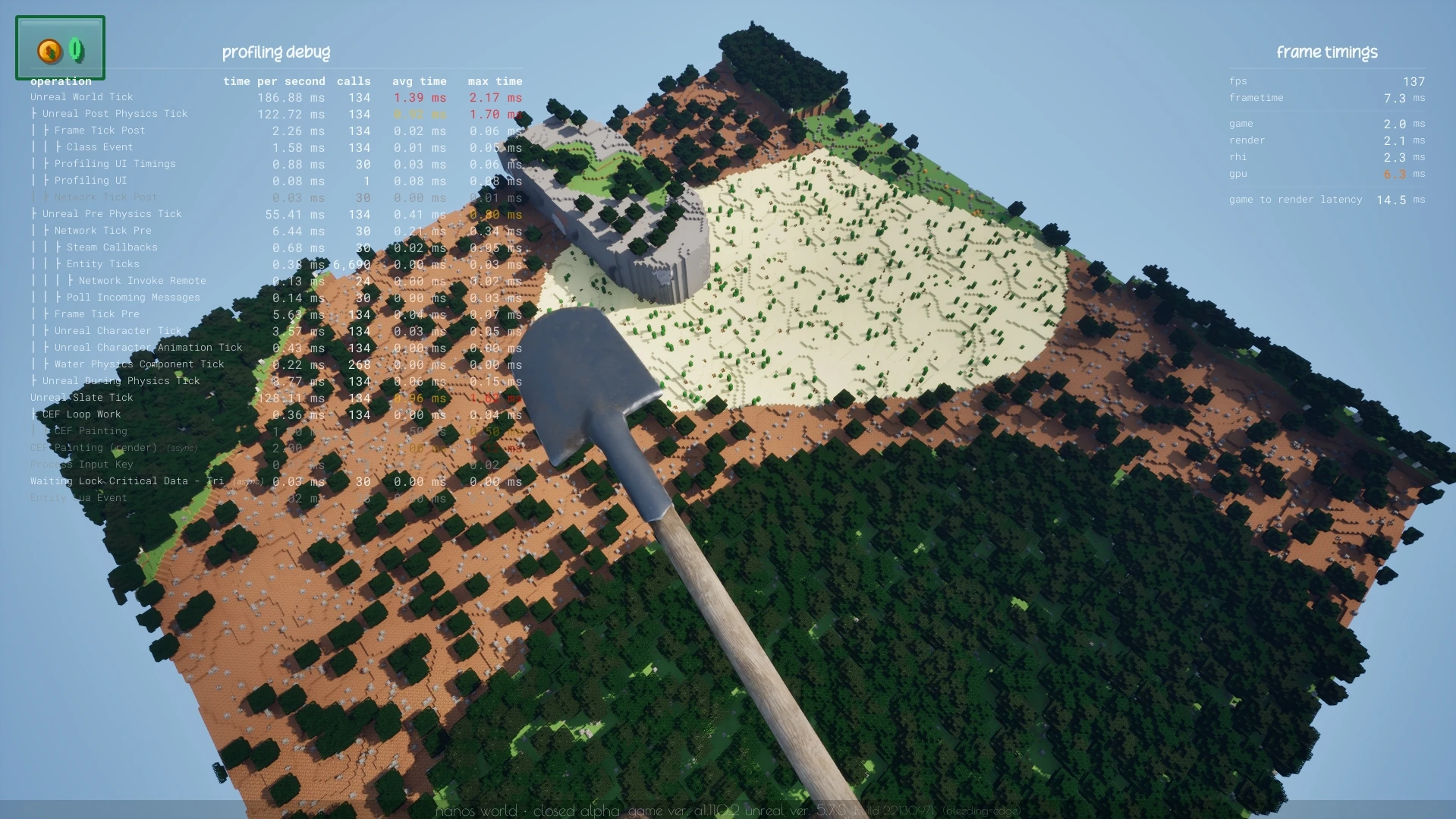
Minecraft world generated using Instanced Static Meshes by Olivato
Introducing... The new InstancedStaticMesh class!
This new class allows you to spawn and manage multiple instances of the same Static Mesh with a single entity, improving performance and reducing memory usage when you need to spawn many identical meshes!
Check the documentation for more information and examples on how to use it:
InstancedStaticMeshscripting-reference/classes/instancedstaticmeshNew & Improved Methods
We implemented a bunch of new scripting methods this month:
New Methods
- Added a new method
Viewport.SetBrandingBarSettings()for customizing the "nanos world" bar on screen, now it's possible to set it's position and show less information. -
Player:SetVOIPLocalMaxDistance() -
Package.IsUnloading()
Improved Methods
- Added a new parameter to
Pawn:StopMovement():stop_velocity, to also stop it's velocity. - Moved
:IsBeingDestroyed(),:HasAuthority()from Base Actor to Base Entity. - Moved
:GetDamageMultiplier()and:SetDamageMultiplier()from Character to Base Damageable.
Persistent Data keys separated by .
Now Package.SetPersistentData() supports passing keys separated by ..
It allows overriding just a child property of an existing table value, e.g.:
-- Defines my data
local MyPersistentData = {
	MyChild = 1,
	MyAnotherData = {
		Stuff = "Something",
		MoreStuff = "Something else"
	}
}

-- Sets the initial data
Package.SetPersistentData("MyPersistentData", MyPersistentData)

-- Then you can now modify MyPersistentData.MyAnotherData.Stuff directly
-- 	without submitting/editing the whole table every time
Package.SetPersistentData("MyPersistentData.MyAnotherData.Stuff", "New thing")
Math
- Added new methods to Quat:
:UnrotateVector(),:RotateVector(),:GetForwardVector(),:GetRightVector()and:GetUpVector(). - Added new methods to Vector:
:ToOrientationQuat()and:ToOrientationRotator()(renamed fromRotator()).
Rotator Rotate/UnrotateVector() Breaking Change
We had figured out an issue with our Rotator:RotateVector()/Rotator:UnrotateVector() methods, where they were inverted.
As we fixed it, it will require you to change your code if you are using those methods!
New Trace Type
Added a new Return to Trace: TraceMode: ReturnItem which returns a Item value, usually representing an Instanced primitive index (e.g. from Instanced Static Meshes). Useful for when you want to know which instance of an InstancedStaticMesh you are hitting with a trace.
New Scripting Guards
Now an error will be thrown if you try to spawn an entity while the Package is unloading, due everything being tearing down. Before it was causing internal issues and even crashes, as those entities cannot be cleaned up properly at that stage anymore.
Use Package.IsUnloading() inside Destroy events to prevent the errors.
Profiling & Debug
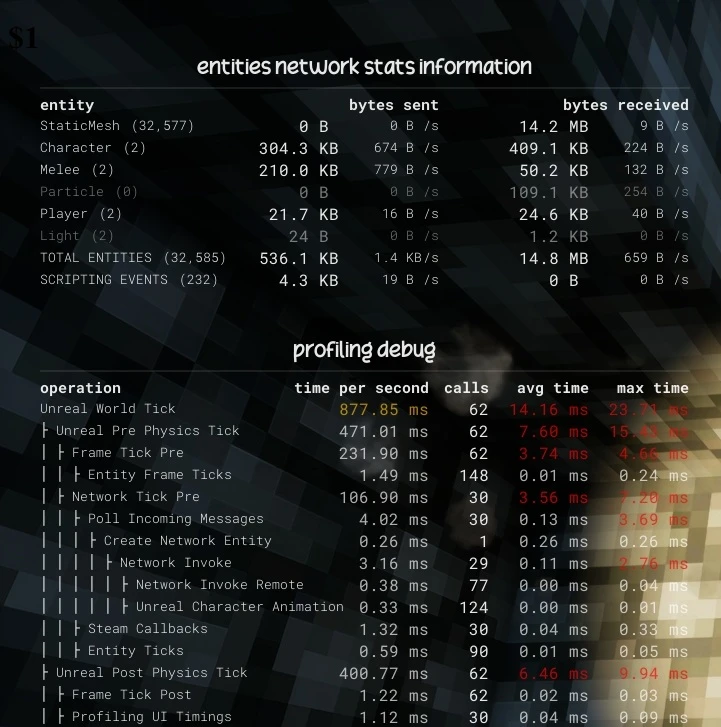
Network Stats also showing Scripting Events network usage & more detailed Profiling list
We have added more information to our Profiling list, and also the Entities Network Stats Information list. Now Entities spawning will be profiled (both for performance and network usage), Scripting Events have a special line, and more Unreal internal timings are displayed in the Profiling list.
Forge Plugin with the ADK

nanos world ADK on Steam
If you didn't know, we also upload the latest Assets Development Kit (ADK) version to Steam as a Tool (you still need to download Unreal Engine separately).
But now the Forge Plugin (created by NegativeName) is included by default in the Steam ADK, making it easier than ever to get your assets into the game! Every update made to the Forge Plugin is shipped automatically in the bleeding-edge version of the Steam's ADK, in every nanos world update.
Performance Improvements
Ticking
We drastically improved the server and client performance by skipping entities from ticking.
Ticks happen when an entity has some logic that needs to be updated every frame (e.g. forces, translate, kill z, lifespan, triggers), but many entities don't require, and they were being ticked unnecessarily, causing a lot of CPU usage when having many entities spawned.
This new system automatically detects if an entity requires ticking or not, and if it doesn't, it will be skipped from ticking, improving a lot when having thousands of entities spawned (that don't require ticking - i.e. StaticMesh).
Compression Library
We changed our Compression Library to zlib-ng, and it should be up to 4x faster to compress/decompress files and networking data.
The compression can be enabled/disabled on the server with the compression config setting, you can set it from 0-9, where 0 is no compression and 9 is maximum compression (but slower). The default value is 1 (which is a +- 10x faster than 9 and already provides a good amount of compression).
The compression is used for both scripting file compression and network data compression, and it should reduce a lot the network usage when enabled, especially if you have a lot of scripting files.
Constructor Cache System
We implemented a new internal Constructor Cache System. Now the entities construction data is cached until modified, this way we can reduce (a lot) the CPU usage by not serializing/compressing all the entities every time a player connects or changes dimensions.
Also, now the construction data will be compressed (if server is using compression), greatly reducing the network usage.
Memory Usage
We made a huge refactoring internally on several critical paths, improving a lot the memory usage of the game, from scripting method calls to networking serialization and invokes.
We reduced a lot of extra containers that were being used redundantly, and improved a lot of extra memory allocations that were being made unnecessarily.
Calling scripting methods, invoking Asynchronous methods, and setting values on entities should now use a lot less memory and CPU usage, improving the overall performance and stability of the server/game.
Stability
We have fixed dozens of bugs, crashes and potential vulnerabilities this month, improving the overall stability of the game.
More Sandbox Updates
This week we officially pushed our Sandbox update to the Vault, and to the Official Sandbox Server! Everyone is invited to play, test, find bugs and suggest improvements!
Wheel Gun
Finally we got dynamic and custom Wheels for Sandbox! They work thanks to our recent updates to Cables and Physics, and they work very well!
Wheels Fidget Spinner
Input System
We also implemented an initial version of an Input System, which allows binding keybindings to entities, to trigger actions on them by pressing keyboard keys!
Wheels Binding Inputs
Check the Docs page for more information:
Sandbox Entity Input Systemexplore/sandbox-game-mode/extra-featuresPersistent Config System
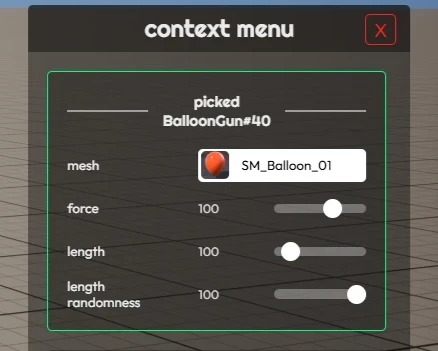
Custom Configuration in Balloon Gun Context Menu that are persisted automatically
We implemented a new Persistent Config System, that Tools can use to persist configs changed by the player when tweaking Tool Guns. This works by saving to disk the modified config, so the next time the player joins Sandbox, the last configs are used!
For example in the WheelGun, we load and store the start_activated setting using the system:
WheelGun.configs = {
	...
	start_activated = PersistentConfigSystem.GetConfig("WheelGun", "start_activated") or true,
	...
}

...

{
	label = "start activated",
	type = "checkbox",
	callback = function(value)
		WheelGun.configs.start_activated = value
		PersistentConfigSystem.SaveConfig("WheelGun", "start_activated", value)
	end,
	value = function()
		return WheelGun.configs.start_activated
	end,
}
Check the Docs page for more information:
Sandbox Persistent Config Systemexplore/sandbox-game-mode/extra-featuresNew Puke Gun
We also added a new Puke Gun (merged from Veggie and Bouncy Ball guns), now can spawn several items differently from a single Gun!
New Puke Gun
Steam Page Translation
We took the time to translate our Steam Page to some languages, including French, Spanish, Portuguese and German!
If you are a native speaker of any other language not listed here and you want to help us translating it to more languages, please let us know! It will be a pleasure to have it translated to more languages and make it more accessible for everyone!
Updated Dependencies
- Updated CEF to version 145.
- Updated Sentry to version 1.7.
Conclusion
February was one of our most productive months yet, it was only a 3-week month but we managed to get a lot of features, improvements and fixes done!
The most important event was the announcement of Zenkai, which is a project that we are very proud to be running on nanos world, and we can't wait to see it in action!
We are getting massive performance gains from our improved Ticking, Compression and Constructor Cache systems, and we are seeing a lot of improvements in the overall stability of the game, with way fewer crashes and bugs happening! The servers are managing to handle thousands of entities at the same time effortlessly, and the game is running smoother than ever!
The Asset Pack refactor will make it way easier to create and upload complex Asset Packs to the Vault, and the new VSCode Extension will make it easier to code for nanos world!
I'm also incredibly excited to see what you build with the new InstancedStaticMesh class and how you'll push the limits of the Sandbox with the new tools and systems.
Finally, the countdown to the April Fools Bonanza has officially begun! Get ready by creating funny-wacky tools and game-modes ready for April 1st. I can't wait to see what you gonna build!
See you next month, and thank you all for being part of this amazing community! We couldn't do it without you! ❤️