Base Pickable
Pickables are special Actors which can be grabbed, held and used by Characters.
Base ClassAPI Source
👪Base Class
This is a Base Class, an abstract definition that shares common methods and events with it's child classes. You cannot spawn it, and you cannot call anything on the Base Class name itself. Use any class that inherits it.
Classes that share methods and events from this Base Class: Grenade, Melee, Weapon.
Classes that share methods and events from this Base Class: Grenade, Melee, Weapon.
They have special methods and events and are highlighted when looked at by a Character.
🦠 Functions
| Returns | Name | Description | |
|---|---|---|---|
 | AddSkeletalMeshAttached | Attaches a Skeletal Mesh as master pose to this entity | |
| AddStaticMeshAttached | Attaches a Static Mesh to this entity | |
| table of string | GetAllSkeletalMeshAttached | Gets all Skeletal Meshes attached to this entity |
| table of string | GetAllStaticMeshAttached | Gets all Static Meshes attached to this entity |
| Character or nil | GetHandler | Gets the Character, if it exists, that's holding this Pickable |
| HandlingMode | GetHandlingMode | Gets the Handling Mode of this Pickable |
| SkeletalMesh Reference | GetMesh | Gets the name of the asset this Pickable uses |
 | PullUse | Pulls the usage of this Pickable (will start firing if this is a weapon) | |
| ReleaseUse | Releases the usage of this Pickable (will stop firing if this is a weapon) | |
| RemoveAllSkeletalMeshesAttached | Removes all SkeletalMeshes attached | |
| RemoveAllStaticMeshesAttached | Removes all StaticMeshes attached | |
| RemoveSkeletalMeshAttached | Removes, if it exists, a SkeletalMesh from this Pickable given its custom ID | |
| RemoveStaticMeshAttached | Removes, if it exists, a StaticMesh from this Pickable given its custom ID | |
| SetAttachmentSettings | Sets the Attachment Settings for this Pickable (how it attaches to the Character when Picking up) | |
 | SetBuoyancyPontoons | Sets the Buoyancy Pontoons used by the Water simulation | |
| SetBuoyancySettings | Sets how this entity behaves on Water | |
| SetCanUse | Sets if this Pickable can be used by the player when held | |
| SetCrosshairMaterial | Sets the crosshair material for this Pickable | |
| SetPickable | Sets if this Pickable can be picked up from ground by the player | |
| SetStaticMeshAttachedTransform | Sets a Static Mesh Attached location and rotation |
 Slow
SlowAddSkeletalMeshAttached
Spawns and attaches a SkeletalMesh to this entity, the SkeletalMesh must have the same skeleton used by this Actor's mesh, and will follow all animations from it. Uses a custom ID to be used for removing/customizing it afterwards
🆕Updated Function
This method was recently updated in ver. 1.144. See the Compatibility Versions page for more information.
my_pickable:AddSkeletalMeshAttached(id, skeletal_mesh_path, socket?, relative_location?, relative_rotation?, use_parent_bounds?, use_base_leader_pose_component?, animation_path?, attachable_id?)
Parameters
| Type | Parameter | Default | Description |
|---|---|---|---|
| string | id | Required parameter | Used further for removing or applying material settings on it |
| SkeletalMesh Reference | skeletal_mesh_path | Required parameter | Path to SkeletalMesh asset to attach |
| string | socket? | | Bone socket to attach to |
| Vector | relative_location? | Vector(0, 0, 0) | Relative location |
| Rotator | relative_rotation? | Rotator(0, 0, 0) | Relative rotation |
| boolean | use_parent_bounds? | true | If true, this component uses its parents bounds when attached. This can be a significant optimization with many components attached together |
| boolean | use_base_leader_pose_component? | true | If true, this component will use the base leader pose component for copying its animation |
| Animation Reference | animation_path? | | Path to Animation asset to play on the Skeletal Mesh attached |
| string | attachable_id? | | Optionally attaches this to another attached skeletal mesh (instead of attaching to the root component) |
See also RemoveSkeletalMeshAttached.
SlowAddStaticMeshAttached
Spawns and attaches a StaticMesh to this Pickable in a Socket with a relative location and rotation. Uses a custom ID to be used for removing/customizing it afterwards
my_pickable:AddStaticMeshAttached(id, static_mesh_path, socket?, relative_location?, relative_rotation?, use_parent_bounds?, attachable_id?)
Parameters
| Type | Parameter | Default | Description |
|---|---|---|---|
| string | id | Required parameter | Unique ID to assign to the StaticMesh |
| StaticMesh Reference | static_mesh_path | Required parameter | Path to StaticMesh asset to attach |
| string | socket? | | Bone socket to attach to |
| Vector | relative_location? | Vector(0, 0, 0) | Relative location |
| Rotator | relative_rotation? | Rotator(0, 0, 0) | Relative rotation |
| boolean | use_parent_bounds? | true | If true, this component uses its parents bounds when attached. This can be a significant optimization with many components attached together |
| string | attachable_id? | | Optionally attaches this to another attached static mesh (instead of attaching to the root component) |
See also SetStaticMeshAttachedTransform, RemoveStaticMeshAttached.
 Optimal
GetAllSkeletalMeshAttached
Gets all Skeletal Meshes attached to this entity
local ret = my_pickable:GetAllSkeletalMeshAttached()
GetAllStaticMeshAttached
Gets all Static Meshes attached to this entity
local ret = my_pickable:GetAllStaticMeshAttached()
GetHandler
Gets the Character, if it exists, that's holding this Pickable
local ret = my_pickable:GetHandler()
GetHandlingMode
Gets the Handling Mode of this Pickable
local ret = my_pickable:GetHandlingMode()
Returns
| Type | Description |
|---|---|
| HandlingMode | Handling Mode of this Pickable |
OptimalGetMesh
Gets the name of the asset this Pickable uses
local asset = my_pickable:GetMesh()
Returns
| Type | Description |
|---|---|
| SkeletalMesh Reference | Name of the asset this Pickable uses |
OptimalPullUse
Pulls the usage of this Pickable (will start firing if this is a weapon)
my_pickable:PullUse(release_use_after?)
Parameters
| Type | Parameter | Default | Description |
|---|---|---|---|
| float | release_use_after? | -1 | Time in seconds to automatically release the usage (-1 will not release, 0 will release one tick after) |
OptimalReleaseUse
Releases the usage of this Pickable (will stop firing if this is a weapon)
my_pickable:ReleaseUse()
RemoveAllSkeletalMeshesAttached
Removes all SkeletalMeshes attached
my_pickable:RemoveAllSkeletalMeshesAttached()
RemoveAllStaticMeshesAttached
Removes all StaticMeshes attached
my_pickable:RemoveAllStaticMeshesAttached()
RemoveSkeletalMeshAttached
Removes, if it exists, a SkeletalMesh from this Pickable given its custom ID
my_pickable:RemoveSkeletalMeshAttached(id)
Parameters
| Type | Parameter | Default | Description |
|---|---|---|---|
| string | id | Required parameter | Unique ID of the SkeletalMesh to remove |
See also AddSkeletalMeshAttached.
OptimalRemoveStaticMeshAttached
Removes, if it exists, a StaticMesh from this Pickable given its custom ID
my_pickable:RemoveStaticMeshAttached(id)
Parameters
| Type | Parameter | Default | Description |
|---|---|---|---|
| string | id | Required parameter | Unique ID of the StaticMesh to remove |
See also AddStaticMeshAttached.
OptimalSetAttachmentSettings
Sets the Attachment Settings for this Pickable (how it attaches to the Character when Picking up)
my_pickable:SetAttachmentSettings(relative_location, relative_rotation?, socket?)
Parameters
| Type | Parameter | Default | Description |
|---|---|---|---|
| Vector | relative_location | Required parameter | Location relative to the Socket |
| Rotator | relative_rotation? | Rotator(0, 0, 0) | Rotation relative to the Socket |
| string | socket? | hand_r_socket | Character Socket to attach to when picked up |
 Moderate
SetBuoyancyPontoons
Sets the spherical Pontoons used to float this entity on Water, overriding the ones automatically calculated from the Mesh bounds and mass.
Pass no value (or an empty table) to go back to the automatically calculated ones.
Pontoons only have an effect on Maps with Water Buoyancy enabled
my_pickable:SetBuoyancyPontoons(pontoons?)
Parameters
| Type | Parameter | Default | Description |
|---|---|---|---|
| table | pontoons? | nil | Array with the Pontoons, or nil to restore the automatically calculated ones with this format |
ModerateSetBuoyancySettings
Any value passed as nil restores that setting's default.
While the Pontoons are being automatically calculated, changing buoyancy_coefficient also recalculates them, as their radius derives from it.
my_pickable:SetBuoyancySettings(enabled?, buoyancy_coefficient?, buoyancy_damp?, max_buoyant_force?)
Parameters
| Type | Parameter | Default | Description |
|---|---|---|---|
| boolean | enabled? | true | Whether Buoyancy forces are applied at all |
| float | buoyancy_coefficient? | 0.1 | How much it floats, the higher the more |
| float | buoyancy_damp? | 1000 | First order damping on the vertical velocity, reduces bobbing |
| float | max_buoyant_force? | 5000000 | Clamp on the upwards force, stops light objects being launched out of the water |
OptimalSetCanUse
Sets if this Pickable can be used by the player when held
my_pickable:SetCanUse(can_use)
Parameters
| Type | Parameter | Default | Description |
|---|---|---|---|
| boolean | can_use | Required parameter | Whether this Pickable can be used by the player when held |
OptimalSetCrosshairMaterial
Sets the crosshair material for this Pickable
my_pickable:SetCrosshairMaterial(material_asset?)
Parameters
| Type | Parameter | Default | Description |
|---|---|---|---|
| Material Reference | material_asset? | nil | Asset path to the crosshair material, pass nil or an empty string for no crosshair |
OptimalSetPickable
Sets if this Pickable can be picked up from ground by the player
my_pickable:SetPickable(is_pickable)
Parameters
| Type | Parameter | Default | Description |
|---|---|---|---|
| boolean | is_pickable | Required parameter | Whether this Pickable can be picked up from ground by the player |
OptimalSetStaticMeshAttachedTransform
Sets a Static Mesh Attached location and rotation
my_pickable:SetStaticMeshAttachedTransform(id, relative_location, relative_rotation)
Parameters
| Type | Parameter | Default | Description |
|---|---|---|---|
| string | id | Required parameter | Unique ID of the StaticMesh set with AddStaticMeshAttached |
| Vector | relative_location | Required parameter | New relative location |
| Rotator | relative_rotation | Required parameter | New relative rotation |
See also AddStaticMeshAttached.
🚀 Events
| Name | Description | |
|---|---|---|
| Drop | When a Character drops this Pickable |
| Hit | When this Pickable hits something |
| Interact | Triggered when a Character interacts with this Pickable (i.e. tries to pick it up) |
| PickUp | Triggered When a Character picks this up |
| PullUse | Triggered when a Character presses the use button for this Pickable (i.e. clicks left mouse button with this equipped) |
| ReleaseUse | Triggered when a Character releases the use button for this Pickable (i.e. releases left mouse button with this equipped) |
Drop
When a Character drops this Pickable
<AnyPickableClass>.Subscribe("Drop", function(self, character, was_triggered_by_player)
	-- Drop was called
end)
Arguments
| Type | Argument | Description |
|---|---|---|
| Base Pickable | self | The Pickable which has been dropped |
| Character | character | The Character that dropped it |
| boolean | was_triggered_by_player | If the Player actively pressed the Drop binding to drop |
Hit
When this Pickable hits something
<AnyPickableClass>.Subscribe("Hit", function(self, impact_force, normal_impulse, impact_location, velocity, other_actor)
	-- Hit was called
end)
Arguments
| Type | Argument | Description |
|---|---|---|
| Base Pickable | self | The Actor that was hit |
| float | impact_force | The intensity of the hit normalized by the Pickable's weight |
| Vector | normal_impulse | The impulse direction of the hit |
| Vector | impact_location | The world space location of the impact |
| Vector | velocity | The Pickable's velocity at the moment it hit |
| Base Actor or nil | other_actor | The other actor that hit this Pickable |
Interact
Triggered when a Character interacts with this Pickable (i.e. tries to pick it up)
Returnfalseto prevent the interaction
<AnyPickableClass>.Subscribe("Interact", function(self, character)
	-- Interact was called
	return true
end)
Arguments
| Type | Argument | Description |
|---|---|---|
| Base Pickable | self | The Pickable that just got interacted with |
| Character | character | The Character that interacted with it |
PickUp
Triggered When a Character picks this up
<AnyPickableClass>.Subscribe("PickUp", function(self, character)
	-- PickUp was called
end)
Arguments
| Type | Argument | Description |
|---|---|---|
| Base Pickable | self | The Pickable that just got picked up |
| Character | character | The Character that picked it up |
PullUse
Triggered when a Character presses the use button for this Pickable (i.e. clicks left mouse button with this equipped)
<AnyPickableClass>.Subscribe("PullUse", function(self, character)
	-- PullUse was called
end)
Arguments
| Type | Argument | Description |
|---|---|---|
| Base Pickable | self | The Pickable which has just been used |
| Character | character | The Character that used it |
ReleaseUse
Triggered when a Character releases the use button for this Pickable (i.e. releases left mouse button with this equipped)
<AnyPickableClass>.Subscribe("ReleaseUse", function(self, character)
	-- ReleaseUse was called
end)
Arguments
| Type | Argument | Description |
|---|---|---|
| Base Pickable | self | The Pickable which has just stopped being used |
| Character | character | The Character that stopped using it |
➕ Available Crosshairs
nanos world provides a bunch of crosshair materials which can be used in Weapons/Pickables. You can of course create your own crosshair material and use those instead!
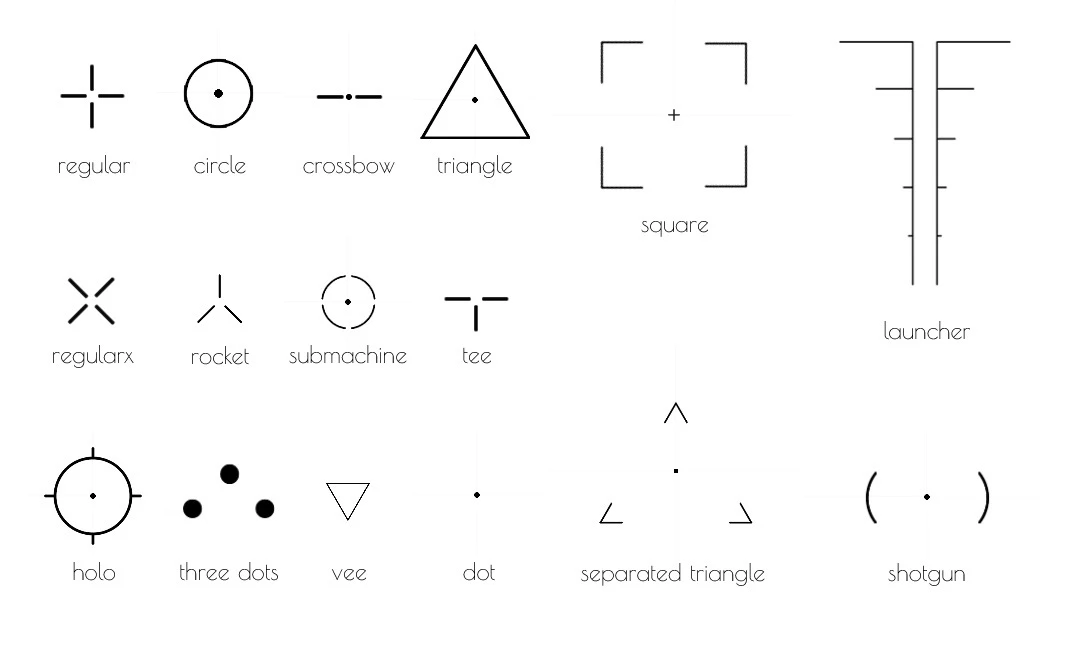
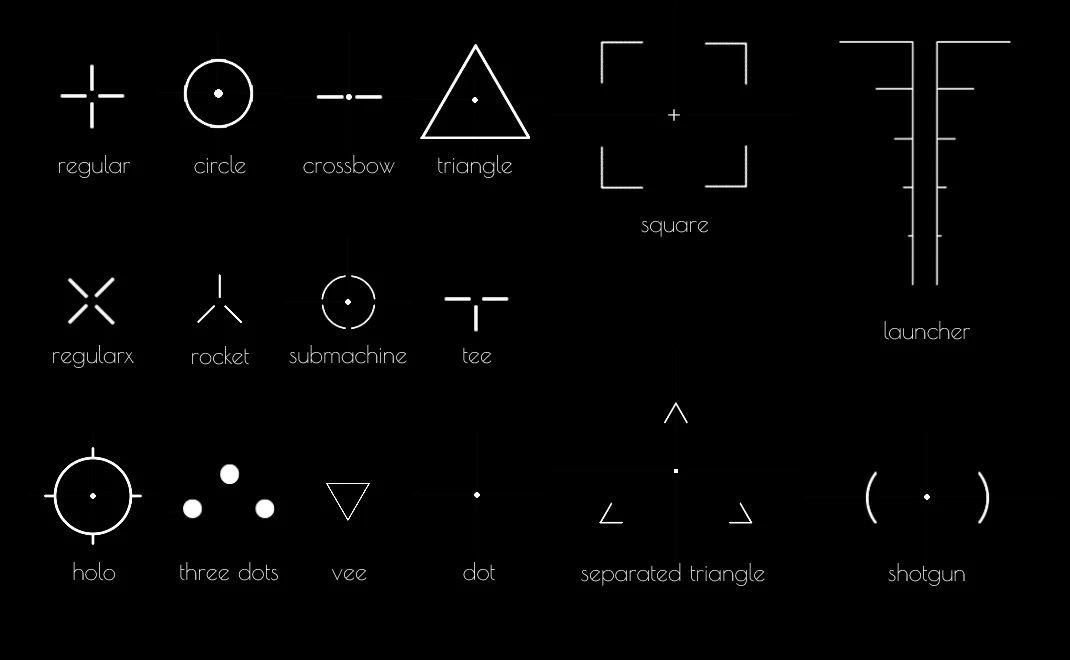
All available Crosshairs
List of crosshair materials included in the default asset pack
nanos-world::MI_Crosshair_Circlenanos-world::MI_Crosshair_Crossbownanos-world::MI_Crosshair_Dotnanos-world::MI_Crosshair_Holonanos-world::MI_Crosshair_Launchernanos-world::MI_Crosshair_Regularnanos-world::MI_Crosshair_Regular_Xnanos-world::MI_Crosshair_Rocketnanos-world::MI_Crosshair_Separated_Trianglenanos-world::MI_Crosshair_Shotgunnanos-world::MI_Crosshair_Squarenanos-world::MI_Crosshair_Submachinenanos-world::MI_Crosshair_Teenanos-world::MI_Crosshair_ThreeDotsnanos-world::MI_Crosshair_Trianglenanos-world::MI_Crosshair_Vee