基础可拾取物
可拾取物是特殊的 Actor,可以被角色抓取、手持和使用。
Base ClassAPI Source
👪Base Class
This is a Base Class, an abstract definition that shares common methods and events with it's child classes. You cannot spawn it, and you cannot call anything on the Base Class name itself. Use any class that inherits it.
Classes that share methods and events from this Base Class: Grenade, Melee, Weapon.
Classes that share methods and events from this Base Class: Grenade, Melee, Weapon.
它们拥有特殊的方法和事件,当被角色注视时会被高亮显示。
🦠 函数
| Returns | Name | Description | |
|---|---|---|---|
 | AddSkeletalMeshAttached | 附加一个骨骼网格体作为该实体的骨骼主姿态 | |
| AddStaticMeshAttached | 附加一个静态网格体到此实体 | |
| table of string | GetAllSkeletalMeshAttached | 获取附加到此实体的所有骨骼网格体 |
| table of string | GetAllStaticMeshAttached | 获取附加到此实体的所有静态网格体 |
| Character or nil | GetHandler | 获取当前正手持该可拾取物的角色(如果存在) |
| HandlingMode | GetHandlingMode | 获取该可拾取物的手持模式 |
| SkeletalMesh Reference | GetMesh | 获取该可拾取物使用的资产名称 |
 | PullUse | 拉取该可拾取物的使用状态(如果这是武器,将开始开火) | |
| ReleaseUse | 释放该可拾取物的使用状态(如果这是武器,将停止开火) | |
| RemoveAllSkeletalMeshesAttached | 移除所有已附加的骨骼网格体 | |
| RemoveAllStaticMeshesAttached | 移除所有已附加的静态网格体 | |
| RemoveSkeletalMeshAttached | 根据自定义 ID 移除此可拾取物上已存在的骨骼网格体(如果存在) | |
| RemoveStaticMeshAttached | 根据自定义 ID 移除此可拾取物上已存在的静态网格体(如果存在) | |
| SetAttachmentSettings | 设置此可拾取物的附加设置(即拾取时如何附加到角色上) | |
 | SetBuoyancyPontoons | 设置水体模拟所使用的浮筒 | |
| SetBuoyancySettings | 设置该实体在水中的行为 | |
| SetCanUse | 设置玩家在手持该可拾取物时是否可以使用它 | |
| SetCrosshairMaterial | 设置该可拾取物的准星材质 | |
| SetPickable | 设置玩家是否可以从地面上拾取该可拾取物 | |
| SetStaticMeshAttachedTransform | 设置已附加静态网格体的位置和旋转 |
 Slow
SlowAddSkeletalMeshAttached
生成并附加一个骨骼网格体到此实体,该骨骼网格体必须使用与此 Actor 的网格相同的骨骼,并且将同步其所有动画。使用自定义 ID 以便随后进行移除/自定义设置
🆕Updated Function
This method was recently updated in ver. 1.144. See the Compatibility Versions page for more information.
my_pickable:AddSkeletalMeshAttached(id, skeletal_mesh_path, socket?, relative_location?, relative_rotation?, use_parent_bounds?, use_base_leader_pose_component?, animation_path?, attachable_id?)
Parameters
| Type | Parameter | Default | Description |
|---|---|---|---|
| string | id | Required parameter | 后续用于移除或在其上应用材质设置 |
| SkeletalMesh Reference | skeletal_mesh_path | Required parameter | 要附加的骨骼网格体资产路径 |
| string | socket? | | 要附加到的骨骼插槽 |
| Vector | relative_location? | Vector(0, 0, 0) | 相对位置 |
| Rotator | relative_rotation? | Rotator(0, 0, 0) | 相对旋转 |
| boolean | use_parent_bounds? | true | 如果为 true,则该组件在附加时使用其父级的边界。当附加许多组件时,这可以带来显著的优化 |
| boolean | use_base_leader_pose_component? | true | 如果为 true,此组件将使用基础领头姿态组件来复制其动画 |
| Animation Reference | animation_path? | | 要在附加的骨骼网格体上播放的动画资产路径 |
| string | attachable_id? | | 可选,将此组件附加到另一个已附加的骨骼网格体上(而不是附加到根组件上) |
See also RemoveSkeletalMeshAttached.
SlowAddStaticMeshAttached
在插槽中以相对位置和旋转生成并附加一个静态网格体到此可拾取物。使用自定义 ID 以便随后进行移除/自定义设置
my_pickable:AddStaticMeshAttached(id, static_mesh_path, socket?, relative_location?, relative_rotation?, use_parent_bounds?, attachable_id?)
Parameters
| Type | Parameter | Default | Description |
|---|---|---|---|
| string | id | Required parameter | 分配给该静态网格体的唯一 ID |
| StaticMesh Reference | static_mesh_path | Required parameter | 要附加的静态网格体资产路径 |
| string | socket? | | 要附加到的骨骼插槽 |
| Vector | relative_location? | Vector(0, 0, 0) | 相对位置 |
| Rotator | relative_rotation? | Rotator(0, 0, 0) | 相对旋转 |
| boolean | use_parent_bounds? | true | 如果为 true,则该组件在附加时使用其父级的边界。当附加许多组件时,这可以带来显著的优化 |
| string | attachable_id? | | 可选,将此组件附加到另一个已附加的静态网格体上(而不是附加到根组件上) |
See also SetStaticMeshAttachedTransform, RemoveStaticMeshAttached.
 Optimal
GetAllSkeletalMeshAttached
获取附加到此实体的所有骨骼网格体
local ret = my_pickable:GetAllSkeletalMeshAttached()
GetAllStaticMeshAttached
获取附加到此实体的所有静态网格体
local ret = my_pickable:GetAllStaticMeshAttached()
GetHandler
获取当前正手持该可拾取物的角色(如果存在)
local ret = my_pickable:GetHandler()
GetHandlingMode
获取该可拾取物的手持模式
local ret = my_pickable:GetHandlingMode()
Returns
| Type | Description |
|---|---|
| HandlingMode | 此可拾取物的手持模式 |
OptimalGetMesh
获取该可拾取物使用的资产名称
local asset = my_pickable:GetMesh()
Returns
| Type | Description |
|---|---|
| SkeletalMesh Reference | 此可拾取物使用的资产名称 |
OptimalPullUse
拉取该可拾取物的使用状态(如果这是武器,将开始开火)
my_pickable:PullUse(release_use_after?)
Parameters
| Type | Parameter | Default | Description |
|---|---|---|---|
| float | release_use_after? | -1 | 自动释放使用状态的秒数(-1 表示不自动释放,0 表示在一刻后释放) |
OptimalReleaseUse
释放该可拾取物的使用状态(如果这是武器,将停止开火)
my_pickable:ReleaseUse()
RemoveAllSkeletalMeshesAttached
移除所有已附加的骨骼网格体
my_pickable:RemoveAllSkeletalMeshesAttached()
RemoveAllStaticMeshesAttached
移除所有已附加的静态网格体
my_pickable:RemoveAllStaticMeshesAttached()
RemoveSkeletalMeshAttached
根据自定义 ID 移除此可拾取物上已存在的骨骼网格体(如果存在)
my_pickable:RemoveSkeletalMeshAttached(id)
Parameters
| Type | Parameter | Default | Description |
|---|---|---|---|
| string | id | Required parameter | 要移除的骨骼网格体的唯一 ID |
See also AddSkeletalMeshAttached.
OptimalRemoveStaticMeshAttached
根据自定义 ID 移除此可拾取物上已存在的静态网格体(如果存在)
my_pickable:RemoveStaticMeshAttached(id)
Parameters
| Type | Parameter | Default | Description |
|---|---|---|---|
| string | id | Required parameter | 要移除的静态网格体的唯一 ID |
See also AddStaticMeshAttached.
OptimalSetAttachmentSettings
设置此可拾取物的附加设置(即拾取时如何附加到角色上)
my_pickable:SetAttachmentSettings(relative_location, relative_rotation?, socket?)
Parameters
| Type | Parameter | Default | Description |
|---|---|---|---|
| Vector | relative_location | Required parameter | 相对于插槽的位置 |
| Rotator | relative_rotation? | Rotator(0, 0, 0) | 相对于插槽的旋转 |
| string | socket? | hand_r_socket | 被拾取时要附加到的角色插槽 |
 Moderate
SetBuoyancyPontoons
设置用于让该实体浮于水面上的球形浮筒,这将覆盖根据网格体边界和质量自动计算出的浮筒。
不传值(或传入空表)可恢复为自动计算的浮筒。
浮筒仅在启用了水体浮力的地图中生效
my_pickable:SetBuoyancyPontoons(pontoons?)
Parameters
| Type | Parameter | Default | Description |
|---|---|---|---|
| table | pontoons? | nil | 包含浮筒数据的数组,传入 nil 可恢复自动计算的浮筒 with this format |
ModerateSetBuoyancySettings
传入 nil 值将恢复该设置的默认值。
在自动计算浮筒时,修改 buoyancy_coefficient 也会同步重新计算浮筒,因为浮筒半径是由该系数推算出来的。
my_pickable:SetBuoyancySettings(enabled?, buoyancy_coefficient?, buoyancy_damp?, max_buoyant_force?)
Parameters
| Type | Parameter | Default | Description |
|---|---|---|---|
| boolean | enabled? | true | 是否施加浮力 |
| float | buoyancy_coefficient? | 0.1 | 漂浮的程度,越高程度越大 |
| float | buoyancy_damp? | 1000 | 垂直速度的一阶阻尼,用于减少起伏 |
| float | max_buoyant_force? | 5000000 | 向上力的最大限制值,防止较轻的物体被直接弹飞出水面 |
OptimalSetCanUse
设置玩家在手持该可拾取物时是否可以使用它
my_pickable:SetCanUse(can_use)
Parameters
| Type | Parameter | Default | Description |
|---|---|---|---|
| boolean | can_use | Required parameter | 玩家在手持该可拾取物时是否可以使用它 |
OptimalSetCrosshairMaterial
设置该可拾取物的准星材质
my_pickable:SetCrosshairMaterial(material_asset)
Parameters
| Type | Parameter | Default | Description |
|---|---|---|---|
| Material Reference | material_asset | Required parameter | 准星材质的资产路径 |
OptimalSetPickable
设置玩家是否可以从地面上拾取该可拾取物
my_pickable:SetPickable(is_pickable)
Parameters
| Type | Parameter | Default | Description |
|---|---|---|---|
| boolean | is_pickable | Required parameter | 玩家是否可以从地面拾取此可拾取物 |
OptimalSetStaticMeshAttachedTransform
设置已附加静态网格体的位置和旋转
my_pickable:SetStaticMeshAttachedTransform(id, relative_location, relative_rotation)
Parameters
| Type | Parameter | Default | Description |
|---|---|---|---|
| string | id | Required parameter | 通过 AddStaticMeshAttached 设置的静态网格体的唯一 ID |
| Vector | relative_location | Required parameter | 新的相对位置 |
| Rotator | relative_rotation | Required parameter | 新的相对旋转 |
See also AddStaticMeshAttached.
🚀 事件
| Name | Description | |
|---|---|---|
| Drop | 当角色丢弃该可拾取物时 |
| Hit | 当该可拾取物撞击到某种物体时触发 |
| Interact | 当角色与该可拾取物交互时触发(即尝试将其拾取) |
| PickUp | 当 Character 拾取该物品时触发 |
| PullUse | 当角色按下该可拾取物的使用键时触发(即在装备此物品时单击鼠标左键) |
| ReleaseUse | 当角色松开该可拾取物的使用键时触发(即在装备此物品时松开鼠标左键) |
Drop
当角色丢弃该可拾取物时
<AnyPickableClass>.Subscribe("Drop", function(self, character, was_triggered_by_player)
	-- Drop was called
end)
Arguments
| Type | Argument | Description |
|---|---|---|
| Base Pickable | self | 被丢弃的可拾取物 |
| Character | character | 丢弃它的角色 |
| boolean | was_triggered_by_player | 玩家是否主动按下了丢弃按键来丢弃 |
Hit
当该可拾取物撞击到某种物体时触发
<AnyPickableClass>.Subscribe("Hit", function(self, impact_force, normal_impulse, impact_location, velocity, other_actor)
	-- Hit was called
end)
Arguments
| Type | Argument | Description |
|---|---|---|
| Base Pickable | self | 被撞击的 Actor |
| float | impact_force | 撞击力度,已根据可拾取物的重量进行归一化 |
| Vector | normal_impulse | 撞击的冲量方向 |
| Vector | impact_location | 撞击在世界空间中的位置 |
| Vector | velocity | 撞击瞬间该可拾取物的速度 |
| Base Actor or nil | other_actor | 与该可拾取物发生撞击的另一个 Actor |
Interact
当角色与该可拾取物交互时触发(即尝试将其拾取)
返回false以阻止交互
<AnyPickableClass>.Subscribe("Interact", function(self, character)
	-- Interact was called
	return true
end)
Arguments
| Type | Argument | Description |
|---|---|---|
| Base Pickable | self | 刚刚被交互的可拾取物 |
| Character | character | 与其进行交互的角色 |
PickUp
当 Character 拾取该物品时触发
<AnyPickableClass>.Subscribe("PickUp", function(self, character)
	-- PickUp was called
end)
Arguments
| Type | Argument | Description |
|---|---|---|
| Base Pickable | self | 刚刚被拾取的可拾取物 |
| Character | character | 拾取它的角色 |
PullUse
当角色按下该可拾取物的使用键时触发(即在装备此物品时单击鼠标左键)
<AnyPickableClass>.Subscribe("PullUse", function(self, character)
	-- PullUse was called
end)
Arguments
| Type | Argument | Description |
|---|---|---|
| Base Pickable | self | 刚刚被使用的可拾取物 |
| Character | character | 使用它的角色 |
ReleaseUse
当角色松开该可拾取物的使用键时触发(即在装备此物品时松开鼠标左键)
<AnyPickableClass>.Subscribe("ReleaseUse", function(self, character)
	-- ReleaseUse was called
end)
Arguments
| Type | Argument | Description |
|---|---|---|
| Base Pickable | self | 刚刚停止使用的可拾取物 |
| Character | character | 停止使用它的角色 |
➕ 可用的准星
nanos world 提供了许多可用于武器/可拾取物的准星材质。你当然也可以创建并使用自己的准星材质!
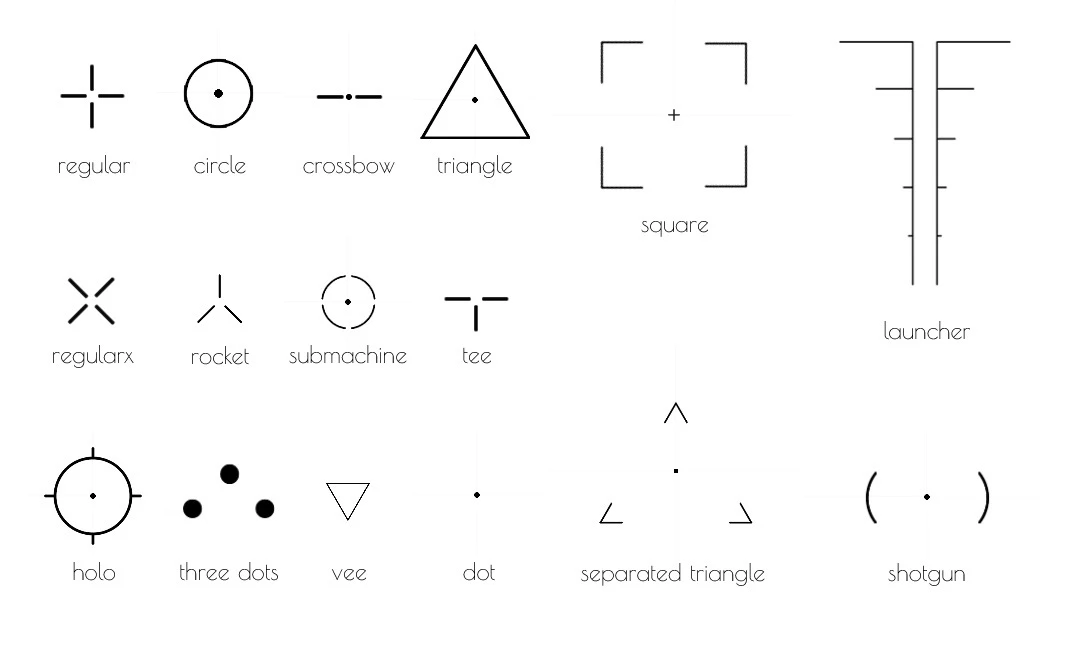
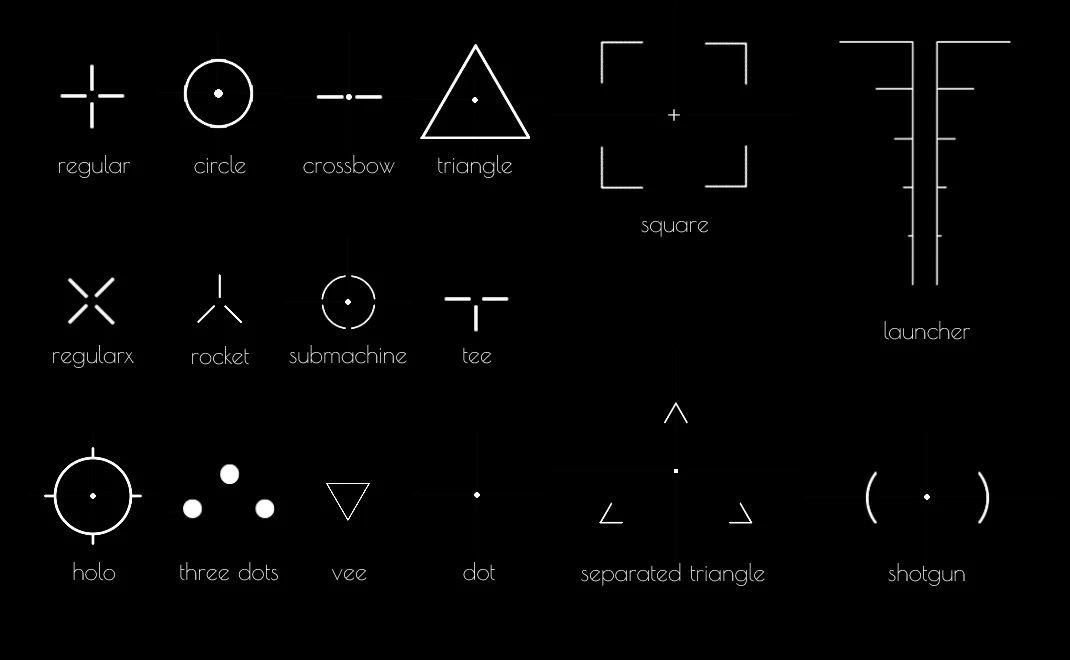
所有可用的准星
默认资产包中包含的准星材质列表
nanos-world::MI_Crosshair_Circlenanos-world::MI_Crosshair_Crossbownanos-world::MI_Crosshair_Dotnanos-world::MI_Crosshair_Holonanos-world::MI_Crosshair_Launchernanos-world::MI_Crosshair_Regularnanos-world::MI_Crosshair_Regular_Xnanos-world::MI_Crosshair_Rocketnanos-world::MI_Crosshair_Separated_Trianglenanos-world::MI_Crosshair_Shotgunnanos-world::MI_Crosshair_Squarenanos-world::MI_Crosshair_Submachinenanos-world::MI_Crosshair_Teenanos-world::MI_Crosshair_ThreeDotsnanos-world::MI_Crosshair_Trianglenanos-world::MI_Crosshair_Vee