Mai : FSR, nouveau format d’événements, nouveaux formulaires et UI++ !

Intégration du FSR, nouveau format d’événements, nouvelles méthodes natives de requêtes spatiales, nouveaux formulaires pour les projets et assistants, améliorations de l’UI et bien plus encore !
Welcome to our roundup of the latest updates from the last month!
Nouvelle vidéo Showcase !
Plus tôt ce mois-ci, nous avons sorti une nouvelle vidéo Showcase mettant en avant plusieurs serveurs et modes de jeu déjà créés sur nanos world ! Si vous ne l’avez pas encore vue, jetez-y un œil !
nanos world Gameplay Sizzle Reel #1 on YouTube
Regardez-le directement sur YouTube pour la meilleure qualité !
Aussi s'il vous plaît aidez-nous à partager, aimer et s'abonner à nos médias sociaux si vous le pouvez ! 💙
Nouveau formulaire d'inscription !
Afin de contribuer à l’essor de notre communauté et de soutenir tous les projets que vous construisez, nous venons de créer deux nouveaux formulaires ! Vos propositions seront soigneusement analysées par nos modérateurs ! 🙏
Inscrire un projet
Si vous travaillez sur un projet et que vous avez besoin d’accès pour votre équipe ou vos joueurs, utilisez ce nouveau formulaire pour enregistrer officiellement votre Projet auprès de nous et demander des Clés de Développement pour votre équipe de développement ou des Clés de Joueur pour effectuer des tests avec votre communauté.
Veuillez noter que ce formulaire ne vous dispense pas de vous inscrire via le formulaire des testeurs habituels si vous n'avez pas encore accès au jeu.
Assistant & Modérateur
Si vous aimez aider les autres, maintenir une ambiance amicale dans le chat et que vous souhaitez jouer un rôle plus actif sur le serveur, nous recherchons des Assistants dévoués pour aider les membres sur notre Discord, avec la possibilité de devenir Modérateurs !
Nous agrandissons progressivement notre équipe d’Assistants afin d’offrir un meilleur support et un environnement plus convivial pour tous. Alors, si vous pensez correspondre au profil, n’hésitez pas à postuler ! 🙏
🤝 Formulaire d'Assistant & Modérateurhttps://tally.so/r/44PBy5Associer un compte Discord

Nous venons d’intégrer Discord à notre système de compte !
Vous pouvez maintenant lier votre compte Discord directement dans votre page Profil. Si vous avez accès au jeu, vous pouvez récupérer vos rôles Discord @tester ou @playtester pour obtenir un accès exclusif à nos salons de test !
Intégration et Upscaling FSR

Ce mois-ci, nous avons intégré le tout dernier plugin AMD FidelityFX™ Technologies dans nanos world !
Cela permet aux utilisateurs n’utilisant pas de carte NVIDIA de profiter nativement dans le jeu de technologies telles que le Frame Generation de FSR, la Super Resolution et l’Anti-Lag. Que vous pouvez activer dans la section améliorée des Paramètres Vidéo :
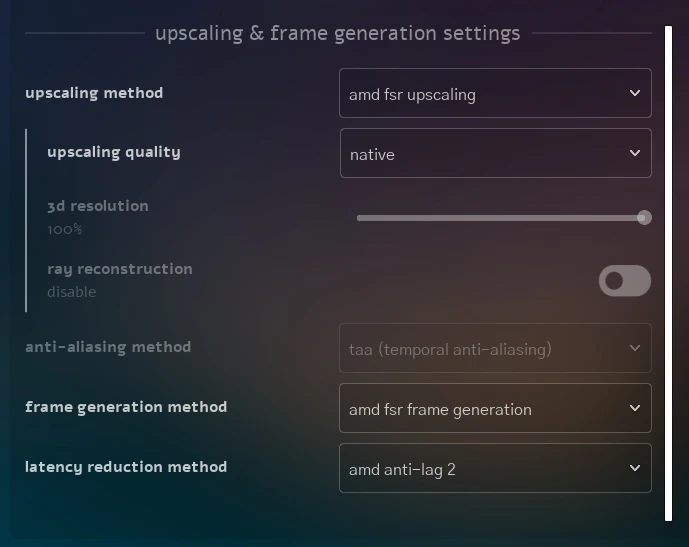
Nouvelle section : Paramètres de mise à l'échelle et de génération d'images
Notez que le FSR est disponible pour toutes les marques de GPU, pas seulement AMD !
Mise à jour DLSS
Du côté de NVIDIA, nous avons mis à jour le plugin DLSS vers sa toute dernière version (8.6), qui apporte le DLSS 4.5 prenant désormais en charge jusqu'à 6X Frame Generation pour les GPU NVIDIA compatibles.
New Events Format
As a result of our Discord discussion in the past month, and to give scripters more control over performance, we have implemented a new Call/BroadcastRemote format for Events and Base Entity!
Reliability Argument
Now all Call/BroadcastRemote methods will have a new argument reliability (Reliability).
You can now choose to send it as Reliability.Unreliable for non critical messages that can be lost, or Reliability.Reliable for important messages that must be received (current behavior we had so far).
Note that using Unreliable is much performant than Reliable, since the sender doesn't need to keep track of the message for re-transmission in case of loss, and the receiver doesn't need to send acknowledgments back to the sender. This can significantly reduce latency and improve performance in scenarios where message loss is acceptable.
This allows you to optimize performance in scenarios where you don't need guaranteed delivery, such as sounds, particles or just visual effects that is not required for the gameplay.
Note that those changes require you updating the Compatibility Version of your Packages to at least 1.139. See the docs page announcement for more information.
Send In Radius
Another addition is the new methods for broadcasting remote events to players in a specific radius around a location.
-
Events.BroadcastRemoteInRadius() -
Events.BroadcastRemoteInRadiusDimension() -
Entity:BroadcastRemoteInRadiusEvent()
This is much more efficient than iterate all players to build the players list in Lua, as we calculate it efficiently internally in C++ and only send the event to the players that are actually in the radius.
Amélioration des scripts
Query In Radius
Along the new BroadcastRemoteInRadius methods, we also added new methods to query players and actors in a specific radius around a location (also much more efficient than iterating all entities in Lua):
New Methods
Other new methods added this month:
Increased Dimensions Limit
We have refactored our Dimensions system internally to support more dimensions indexes.
Before it was limited to just 65.535 (16 bits) dimensions (which is already a very high number), but now we have increased it to 4.294.967.295 (32 bits) dimensions!
This allows more easy calculations per player when multiplying it's ID by a value for example.
UI Improvements
We've made several quality-of-life adjustments to the user interface.
Integrated Console
Now the Console is directly integrated into the Main Menu and Escape Menu! Making it easier to be accessed and used, without the need of a keybinding or a separate window.
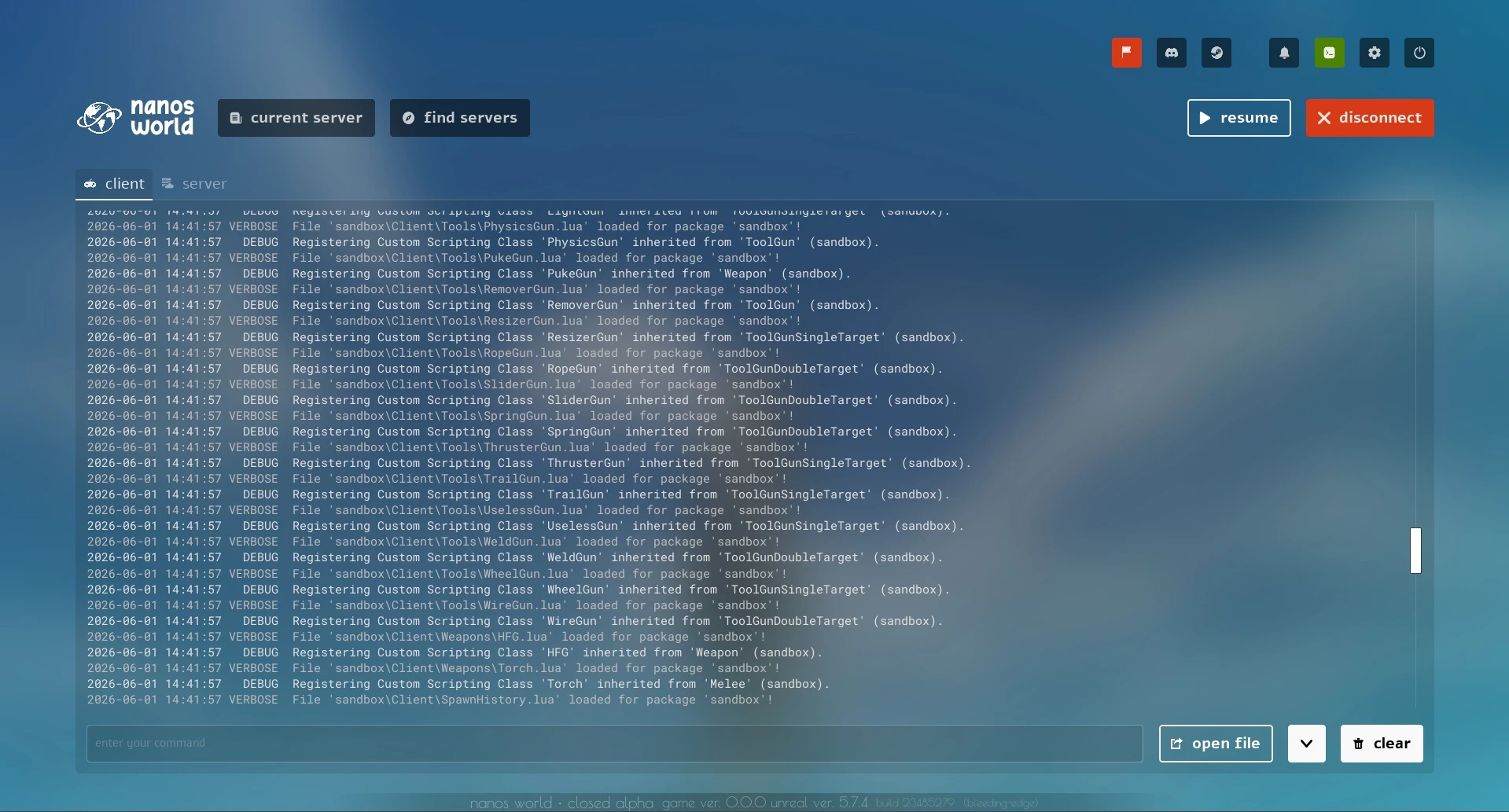
Integrated Console in Escape Menu
Now it can be easily accessed through the new Console button in the top bar:

Top bar with Console button
Please note that the Console Open/Close events won't exist anymore and are being removed.
New Hide All Keybinding
We added a new native keybinding (default to scroll lock) that allows you to hide all on-screen UIs.
That's useful for disabling UI elements (such as Debug widgets) for taking screenshots.
Profile Account Tab
We are constantly improving our in-game integrations with our Account and Store APIs.
For account management, we added a new tab to your Profile Popup so you can easily edit your username and e-mail in-game:
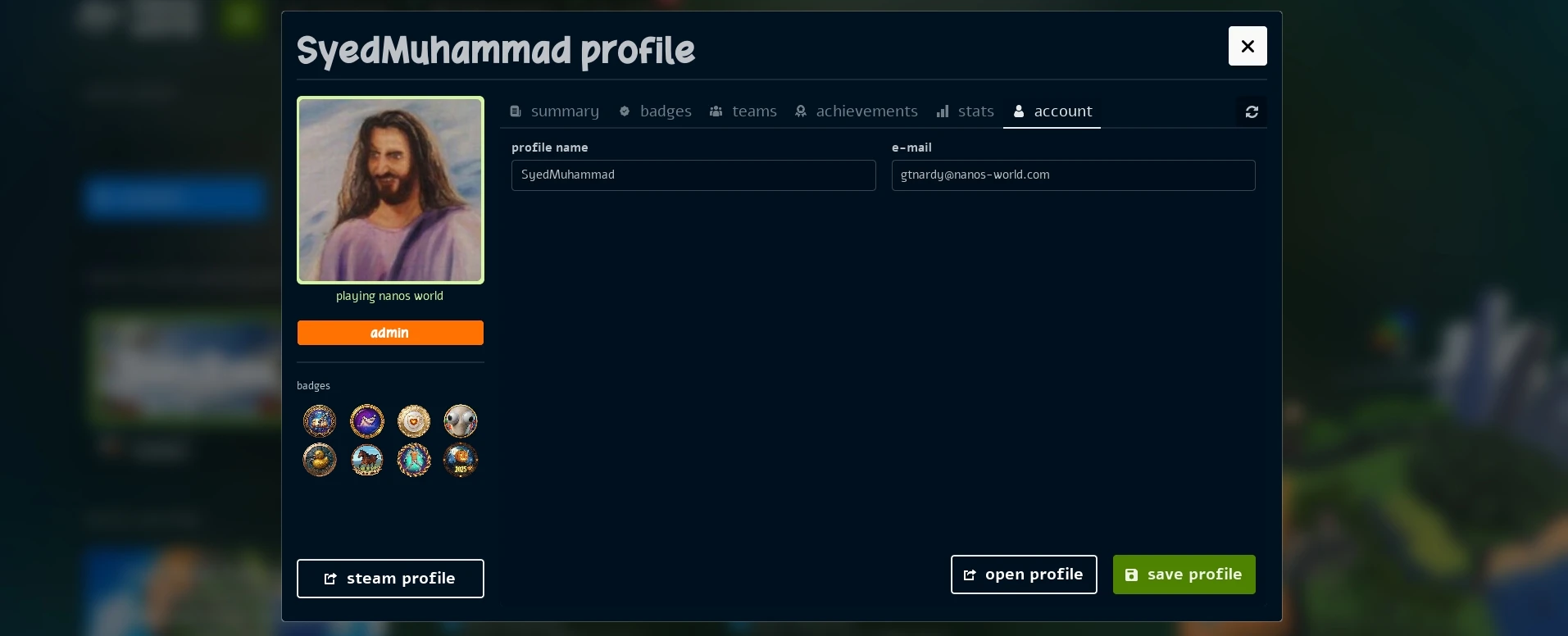
Account Management Tab
Settings
We've got a bunch of improvements in the Settings menu!
Restart Popup
Now when saving some settings (such as WebUI, RHI or Frame Generation), a Popup will appear to inform you that a game restart is required for the changes to take effect.

Restart Popup when changing Settings
Video Settings Layout
We also changed the Layout of the Video Settings menu to support separated configurations for Frame Generation and Super Resolution, making it easier to understand and configure those settings:
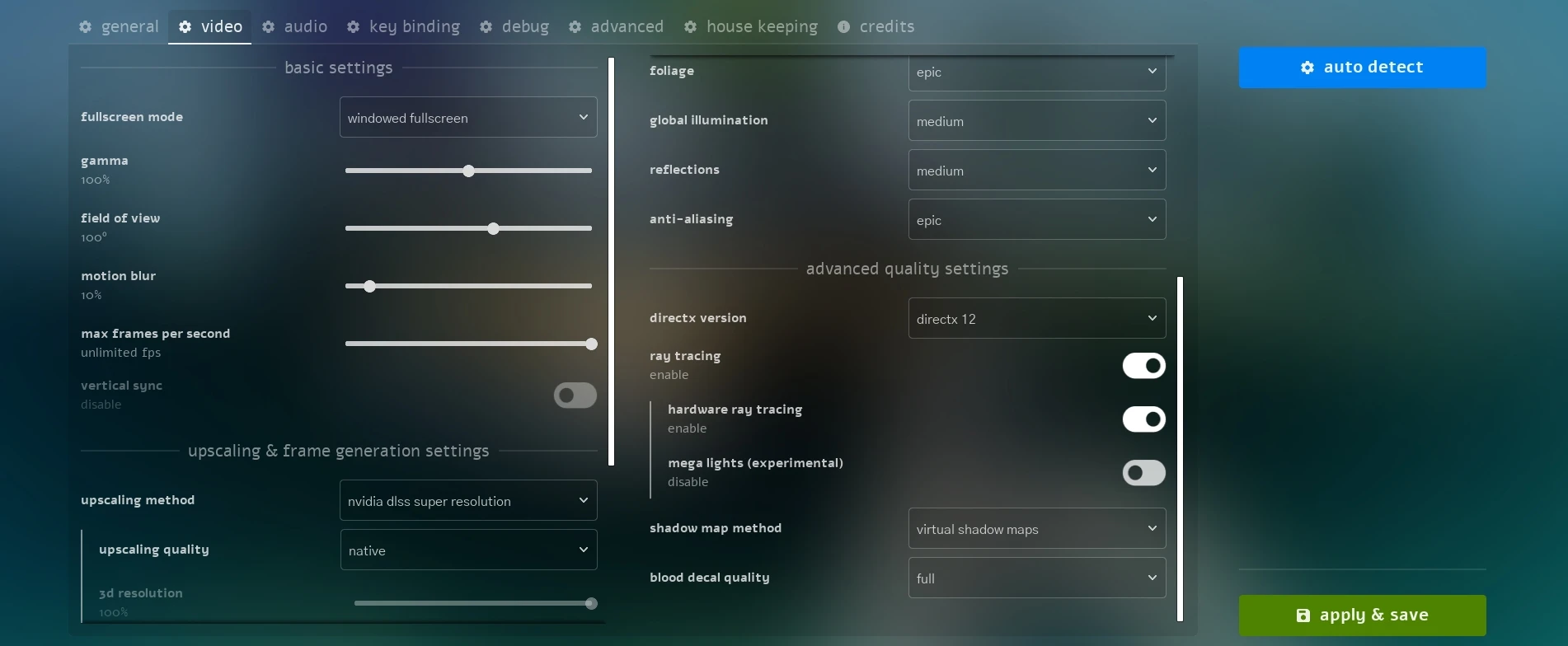
New Video Settings Layout
We also improved the resolutions list fixing wide aspect ratio not showing up in the list!
House Keeping Reworked
We internally completely reworked the House Keeping tab in the Settings, improving its performance and stability when cleaning up old cache data.
If you haven't used it, this Tab allows you cleaning cache data such as Logs, Downloaded Packages, Crashes files and more that keep accumulating over time and taking space on your disk.
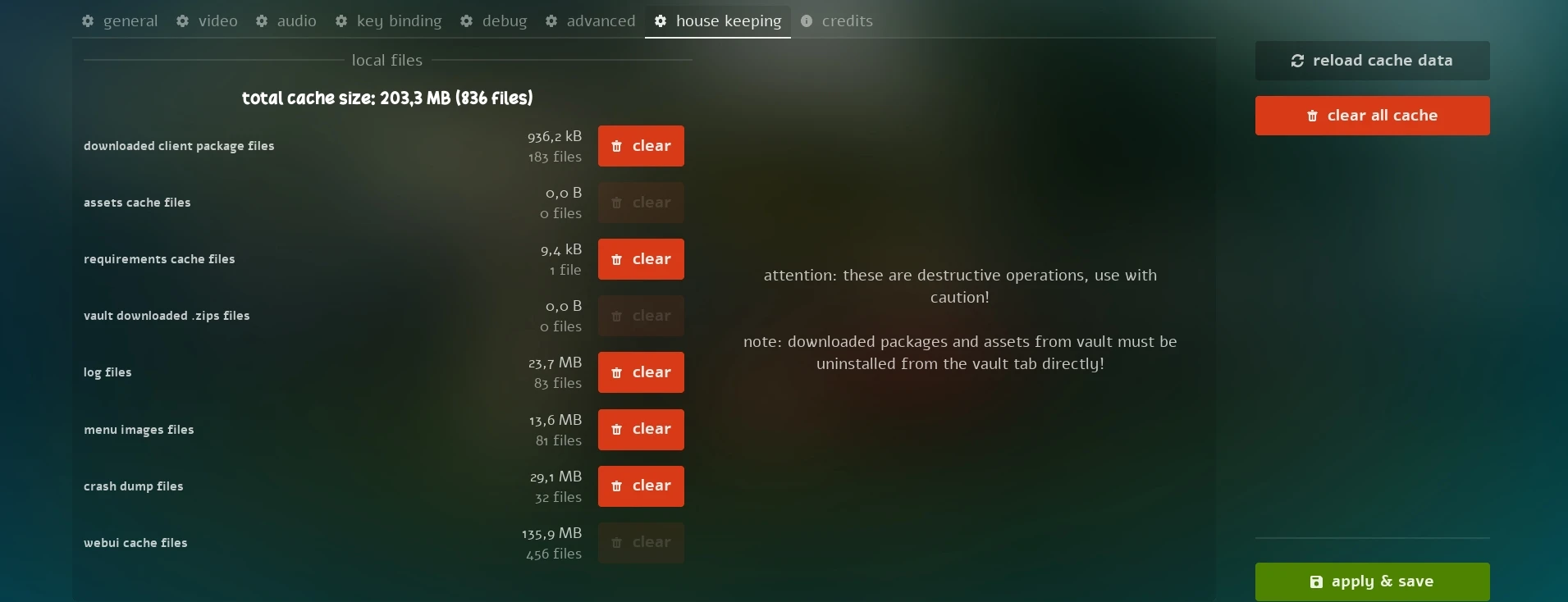
House Keeping Tab
In-game Microphone Test
We added a new Microphone Test button in the Audio Settings that allows you to test and hear your microphone input while in-game, as it would sound to other Players:

Microphone Test Button
Note that for now this feature is only available while in-game connected to a server.
Other Improvements
New clear Server Console Command
We added a new clear console command that allows you to clear the console output.
Automatically Clean CEF Cache
Now on every CEF update, the game automatically clear the old CEF cache data to prevent issues and crashes related to older CEF versions cache data.
Compatibility Version Warnings
To prevent log spam, Compatibility Version warnings will now only display once as a single warning in the first occurrence.
Conclusion
May has been a massive month for under-the-hood optimization and quality-of-life upgrades. Giving scripters more control over network reliability and pushing our internal systems to be as performant as possible is exactly the kind of technical foundation we aim!
I'm constantly working on improving our workflows and increasing our Discord Staff is one of the most important things to keep our community healthy and growing, so if you think you can help with that, please apply to be a Helper or Moderator! 🙏
A special thanks also goes to everyone contributing translations through Crowdin, helping make the game more accessible to players around the world, and to those supporting development through Ko-fi.
Your support is what allows me to continue working on nanos world full-time and keep pushing the project forward. 💙
See you in the next update! 🚀