💬 聊天
配置、发送和拦截聊天消息。
🎒 示例
(Chat.BroadcastMessage) Sends a message to everyone
Chat.BroadcastMessage("Welcome to the server!")
聊天中的颜色
你也可以在聊天中发送带颜色的消息!为此,只需在一段文本两端加上样式标签即可:\<TAG>我超棒的文本</>。
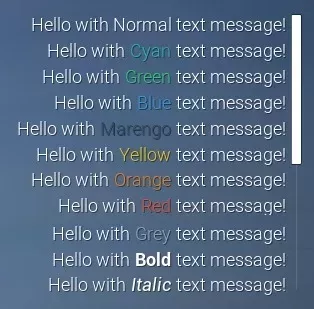
Server/Index.lua
Chat.BroadcastMessage("你好,我发了一条<cyan>青色</>文本消息!")
所有支持的文本样式/标签:
\<cyan> \<green> \<blue> \<purple> \<marengo> \<yellow> \<orange> \<red> \<grey> \<bold> \<italic>
备注
不可将两个或多个样式组合在一起使用(例如 \<bold> + \<red>)。
🗿 静态函数
| Returns | Name | Description | |
|---|---|---|---|
 | AddMessage | 添加一条仅在本地显示的聊天消息 | |
 | BroadcastMessage | 向所有玩家发送一条聊天消息 | |
| Clear | 清除所有消息 | |
| SendMessage | 仅向指定玩家发送一条聊天消息 | |
| SetConfiguration | 配置聊天的外观和位置 | |
| SetVisibility | 设置聊天是否可见 | |
 | function | Subscribe | 订阅事件 |
| Unsubscribe | 退订此特定类和此特定包中所有已订阅的事件,可选择传递函数以仅退订该回调 |
 Moderate
AddMessage
添加一条仅在本地显示的聊天消息
Chat.AddMessage(message)
Parameters
| Type | Parameter | Default | Description |
|---|---|---|---|
| string | message | Required parameter | 消息内容,支持与聊天框相同的富文本标签 |
ModerateBroadcastMessage
向所有玩家发送一条聊天消息
Chat.BroadcastMessage(message)
Parameters
| Type | Parameter | Default | Description |
|---|---|---|---|
| string | message | Required parameter | 要发送给所有玩家的消息 |
Chat.BroadcastMessage Examples
Sends a message to everyone
Chat.BroadcastMessage("Welcome to the server!")
Clear
清除所有消息
Chat.Clear()
 Optimal
SendMessage
仅向指定玩家发送一条聊天消息
Chat.SendMessage(player, message)
Parameters
| Type | Parameter | Default | Description |
|---|---|---|---|
| Player | player | Required parameter | 接收消息的玩家 |
| string | message | Required parameter | 消息 |
ModerateSetConfiguration
配置聊天的外观和位置
Chat.SetConfiguration(screen_location?, size?, anchors_min?, anchors_max?, alignment?, justify?, show_scrollbar?)
Parameters
| Type | Parameter | Default | Description |
|---|---|---|---|
| Vector2D | screen_location? | Vector2D(-25, 0) | 屏幕位置,或者当锚点拉伸时的左侧和顶部偏移量 |
| Vector2D | size? | Vector2D(600, 250) | 尺寸,或者当锚点拉伸时的右侧和底部偏移量 |
| Vector2D | anchors_min? | Vector2D(1, 0.5) | 最小锚点,从 (0, 0) 左上角到 (1, 1) 右下角 |
| Vector2D | anchors_max? | Vector2D(1, 0.5) | 最大锚点,从 (0, 0) 左上角到 (1, 1) 右下角 |
| Vector2D | alignment? | Vector2D(1, 0.5) | 聊天的轴心点,(0.5, 0.5) 为中心 |
| boolean | justify? | true | 文本是否两端对齐 |
| boolean | show_scrollbar? | true | 是否显示滚动条 |
OptimalSetVisibility
设置聊天是否可见
Chat.SetVisibility(is_visible)
Parameters
| Type | Parameter | Default | Description |
|---|---|---|---|
| boolean | is_visible | Required parameter | 聊天框是否可见 |
OptimalSubscribe
订阅事件
local ret = Chat.Subscribe(event_name, callback)
Parameters
| Type | Parameter | Default | Description |
|---|---|---|---|
| string | event_name | Required parameter | 要订阅的事件 |
| function | callback | Required parameter | 事件发生时运行的回调函数 |
Returns
| Type | Description |
|---|---|
| function | 函数回调 |
OptimalUnsubscribe
退订此特定类和此特定包中所有已订阅的事件,可选择传递函数以仅退订该回调
Chat.Unsubscribe(event_name, callback?)
Parameters
| Type | Parameter | Default | Description |
|---|---|---|---|
| string | event_name | Required parameter | 要退订的事件 |
| function | callback? | nil | 用于专门退订的可选回调 |
🚀 事件
| Name | Description | |
|---|---|---|
| ChatEntry | 当收到新的聊天消息时调用,通过代码编写发送的新消息也会触发此事件 |
| Close | 当玩家关闭聊天框时调用 |
| Open | 当玩家打开聊天框时调用 |
| PlayerSubmit | 当玩家在聊天框中提交消息时调用 |
ChatEntry
当收到新的聊天消息时调用,通过代码编写发送的新消息也会触发此事件
这对于创建自定义聊天界面同时仍旧使用内置系统非常有用
Chat.Subscribe("ChatEntry", function(message, player)
	-- ChatEntry was called
end)
Close
当玩家关闭聊天框时调用
Chat.Subscribe("Close", function()
	-- Close was called
end)
Open
当玩家打开聊天框时调用
Chat.Subscribe("Open", function()
	-- Open was called
end)
PlayerSubmit
当玩家在聊天框中提交消息时调用
返回 false 以阻止该消息被发送
Chat.Subscribe("PlayerSubmit", function(message, player)
	-- PlayerSubmit was called
	return true
end)