🪟 Widget
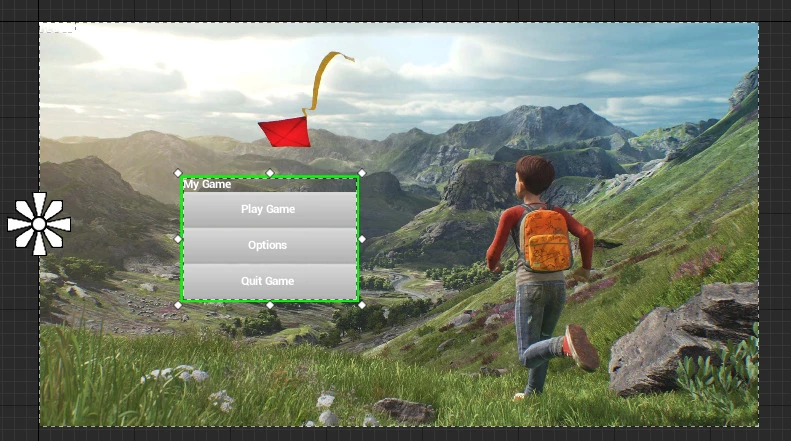
控件类支持通过脚本生成虚幻引擎的 Widget 类,并能像蓝图一样对它们进行操作!
 Client OnlyAPI Source
👪Inheritance
This class shares methods and events from Base Entity.
Widget 类提供了一种非常灵活的方式,可以在游戏内创建和使用虚幻控件作为 UI。
备注
Widget 类中未公开大部分参数,应使用 CallBlueprintEvent() 方法进行调用,该方法会调用底层特定的 Widget 方法。
🎒 示例
Creating a Simple Native Text and adding it to screen
Client/Index.lua
local my_text = Widget(NativeWidget.Text)
my_text:CallBlueprintEvent("SetText", "Hello World!")
my_text:AddToViewport()
提示
SetText 是来自 UTextBlock 的方法,它是与 NativeWidget.Text 关联的 Widget。
创建带有子项的控件
Client/Index.lua
local my_vertical_box = Widget(NativeWidget.VerticalBox)
my_vertical_box:AddToViewport()

local my_text = Widget(NativeWidget.Text)
my_text:CallBlueprintEvent("SetText", "Hello World!")

local my_button = Widget(NativeWidget.Button)

my_vertical_box:AddChild(my_text)
my_vertical_box:AddChild(my_button)
将 WebUI 用作图像笔刷
Client/Index.lua
local webui = WebUI("mywebui", "https://google.com", WidgetVisibility.Hidden)

local my_image = Widget(NativeWidget.Image)
my_image:CallBlueprintEvent("SetBrushFromMaterial", webui)
my_image:AddToViewport()
提示
SetBrushFromMaterial is a method from UImage, and expects a MaterialInstance as parameter. 传入 WebUI、SceneCapture 或 Canvas 作为参数时,会自动将其转换为其内部材质!
订阅调度器
Client/Index.lua
local my_button = Widget(NativeWidget.Button)

-- 在内部添加文本
local my_text = Widget(NativeWidget.Text)
my_text:CallBlueprintEvent("SetText", "Press Me!")
my_button:AddChild(my_text)

-- 绑定原生 OnClicked 调度器
my_button:BindBlueprintEventDispatcher("OnClicked", function()
	Console.Log("clicked!")
end)

-- 将按钮添加到视口(将填满整个屏幕)
my_button:AddToViewport()
📚 库和框架
以下是社区创建的使用 Widget 扩展其可能性的库和框架列表:
🛠 构造函数
Failed to load constructor '控件' (Class) data.🦠 函数
Failed to load class '控件' (Class) data.🚀 事件
Failed to load class '控件' (Class) data.✅ NativeWidgets 与虚幻控件的关系
List of the relation Unreal native Widgets ↔ NativeWidget Enums:
| 枚举 | 虚幻类 | 是否为面板 |
|---|---|---|
NativeWidget.Border | Border | ✅ |
NativeWidget.Button | Button | ✅ |
NativeWidget.CheckBox | CheckBox | ✅ |
NativeWidget.Image | Image | ❌ |
NativeWidget.ProgressBar | ProgressBar | ❌ |
NativeWidget.RichTextBlock | RichTextBlock | ❌ |
NativeWidget.Slider | Slider | ❌ |
NativeWidget.Text | TextBlock | ❌ |
NativeWidget.ComboBox | ComboBox | ❌ |
NativeWidget.EditableText | EditableText | ❌ |
NativeWidget.EditableTextMultiLine | MultiLineEditableText | ❌ |
NativeWidget.SpinBox | SpinBox | ❌ |
NativeWidget.TextBox | EditableTextBox | ❌ |
NativeWidget.TextBoxMultiLine | MultiLineEditableTextBox | ❌ |
NativeWidget.CanvasPanel | CanvasPanel | ✅ |
NativeWidget.GridPanel | GridPanel | ✅ |
NativeWidget.HorizontalBox | HorizontalBox | ✅ |
NativeWidget.Overlay | Overlay | ✅ |
NativeWidget.ScaleBox | ScaleBox | ✅ |
NativeWidget.ScrollBox | ScrollBox | ✅ |
NativeWidget.SizeBox | SizeBox | ✅ |
NativeWidget.UniformGridPanel | UniformGridPanel | ✅ |
NativeWidget.VerticalBox | VerticalBox | ✅ |
NativeWidget.WrapBox | WrapBox | ✅ |
NativeWidget.BackgroundBlur | BackgroundBlur | ✅ |
✅ 支持的参数类型列表
请在蓝图页面查看所有支持的参数类型。