🖥️ WebUI
用于生成动态网页浏览器的类。
 Client OnlyAPI Source
👪Inheritance
This class shares methods and events from Base Entity.
提示
我们的 WebUI 实现是基于最新版本的 Chromium Embedded Framework 构建的。
提示
如需访问浏览器内远程调试,请在连接到服务器后前往 http://localhost:9222
专有编解码器
公共 CEF 构建版不支持 MPEG-4 (.mp4)、H.264、H.265 和 AAC 等专有编解码器。我们建议将你的媒体文件转换为 WEBM 或 OGG。
🎒 示例
Client/Index.lua
-- 加载本地文件
local my_ui = WebUI(
    "Awesome UI",            -- 名称
    "file://UI/index.html",  -- 相对于此包的路径 (Client/)
    WidgetVisibility.Visible  -- 在屏幕上可见
)

-- 加载 Web URL
local my_browser = WebUI(
    "Awesome Site",          -- 名称
    "https://nanos-world.com",   -- 网页 URL
    WidgetVisibility.Visible  -- 在屏幕上可见
)

-- 从其他包加载本地文件
local my_ui = WebUI(
    "Awesome Other UI",      -- 名称
    "file://other-package/Client/UI/index.html",
    WidgetVisibility.Visible  -- 在屏幕上可见
)
将 WebUI 用作网格体材质
Client/Index.lua
-- 生成一个在屏幕上隐藏、不透明、不自动调整大小且尺寸为 500x500 的 WebUI
local my_ui = WebUI("Awesome Site", "https://nanos-world.com", WidgetVisibility.Hidden, false, false, 500, 500)

-- 生成一个 StaticMesh(可以是任何网格体)
local static_mesh = StaticMesh(Vector(0, 0, 100), Rotator(), "nanos-world::SM_Cube")

-- 将网格体材质设置为使用 WebUI
static_mesh:SetMaterialFromWebUI(my_ui)
在 Lua 和 JS (WebUI) 之间通信
Client/Index.lua
local my_ui = WebUI("Awesome UI", "file://UI/index.html")

local param1 = 123
local param2 = "hello"

-- 调用 JS 事件
my_ui:CallEvent("MyEvent", param1, param2)

-- 订阅以接收 JS 事件
my_ui:Subscribe("MyAnswer", function(param1)
    Console.Log("Received back! %s", param1)
    -- 将输出 'Received back! Hey there!'
end)
script.js
// 注册来自 Lua 的 "MyEvent"
Events.Subscribe("MyEvent", function(param1, param2) {
    console.log("Triggered! " + param1 + " " + param2);
    // 将输出 'Triggered! 123 hello'

    // 触发 Lua 上的 "MyAnswer"
    Events.Call("MyAnswer", "Hey there!");
});

// 也可以取消订阅事件以使其停止触发
Events.Unsubscribe("MyEvent");
美观滚动条
自从我们从 Webkit 迁移到 CEF 后,部分滚动条变得不太美观。这里有一段 CSS 小代码片段,可以使它们看起来接近 Webkit 样式:
::-webkit-scrollbar {
    width: 6px;
}

::-webkit-scrollbar-thumb {
    border-radius: 10px;
    background-color: #494949;
}

body {
    scrollbar-gutter: stable both-edges;
}
更多相关示例:
用户界面core-concepts/scripting/user-interface 基本 HUD(HTML)getting-started/tutorials-and-examples/basic-hud-html提示
你还可以通过 :SetMaterialFromCanvas() 方法将 Canvas 用作网格体材质!
📚 库和框架
以下是利用 WebUI 拓展其可能性的社区创建库和框架列表:
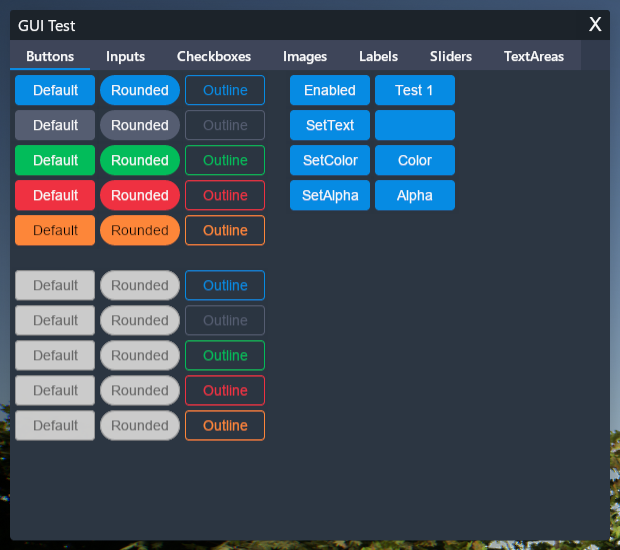
EGUI
由 MegaThorx 开发的创建用户界面的框架
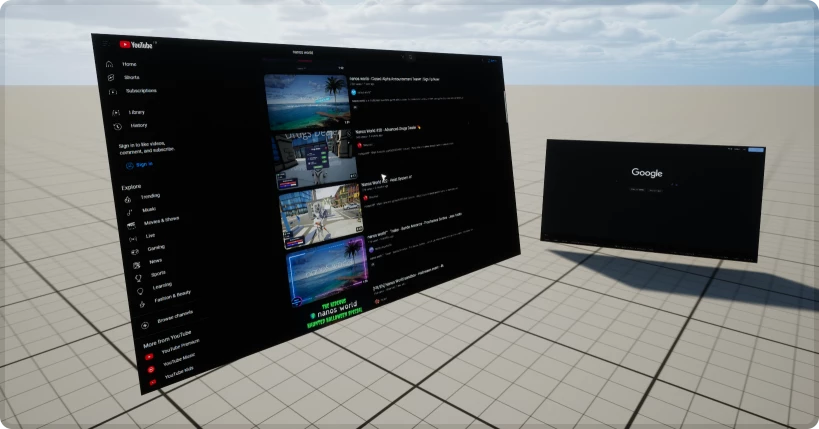
WebUI3d2d
由 Timmy 开发的在 3D 世界中生成可交互 WebUI 的工具

UI Framework
由 Voltaism 移植的强大 UI 框架
🛠 构造函数
Default Constructor
No description provided
local my_webui = WebUI(name, path, visibility?, is_transparent?, auto_resize?, width?, height?)
Parameters
| Type | Name | Default | Description |
|---|---|---|---|
| string | name | Required parameter | 用于调试日志 |
| HTML Path | path | Required parameter | 网页 URL 或 HTML 文件路径,例如 file://my_file.html |
| WidgetVisibility | visibility | WidgetVisibility.Visible | WebUI 在屏幕上是否可见 |
| boolean | is_transparent | true | WebUI 背景是否透明 |
| boolean | auto_resize | true | 当屏幕尺寸改变时是否自动调整大小(在使用 WebUI 绘制网格模型表面时,关闭此项很有用) |
| integer | width | 0 | 不使用 auto_resize 时 WebUI 的宽度大小 |
| integer | height | 0 | 不使用 auto_resize 时 WebUI 的高度大小 |
🔍 HTML 路径搜索器
加载 .html 文件支持以下搜索路径,并按以下顺序查找:
- 相对于
current-file-path/ - 相对于
current-package/Client/ - 相对于
current-package/ - 相对于
Packages/
🗿 静态函数
Inherited Entity Static Functions
WebUI inherits from Base Entity Class, sharing it's methods and functions:
Base Entityscripting-reference/classes/base-classes/entity
Base Entityscripting-reference/classes/base-classes/entity
| Returns | Name | Description | |
|---|---|---|---|
 | table of Base Entity | GetAll | 返回一个包含调用此方法的类中所有实体的表 |
| Base Entity | GetByIndex | 返回该类中指定索引处的特定实体 |
| integer | GetCount | 返回该类当前存在的实体数量 |
| table of table | GetInheritedClasses | 获取使用 继承系统 创建的、直接继承自该类的所有子类列表 |
| iterator | GetPairs | 返回一个包含该类所有实体的迭代器,供 pairs() 使用 |
| table or nil | GetParentClass | 如果该类是使用 继承系统 创建的,则获取其父类 |
| table | Inherit | 通过 继承系统 继承此类 |
| boolean | IsChildOf | 如果该类是使用 继承系统 创建的,检查此类是否为另一个类的子类 |
| function | Subscribe | 为此类的所有实体订阅一个 事件 |
| function | SubscribeRemote | 订阅从服务器调用的自定义事件 |
| Unsubscribe | 退订此包内该类中此 事件 的所有回调,或者仅取消传入的特定回调 |
This class doesn't have own static functions.
🦠 函数
Inherited Entity Functions
WebUI inherits from Base Entity Class, sharing it's methods and functions:
Base Entityscripting-reference/classes/base-classes/entity
Base Entityscripting-reference/classes/base-classes/entity
| Returns | Name | Description | |
|---|---|---|---|
 | BroadcastRemoteEvent | 直接在此实体上向所有玩家调用自定义远程事件 | |
| BroadcastRemoteInRadiusEvent | 直接针对此实体调用自定义远程事件,并将该事件传递给半径范围内的所有玩家 | |
| CallRemoteEvent | 直接在此实体上向特定玩家调用自定义远程事件 | |
| CallRemoteEvent | 直接在此实体上调用自定义远程事件 | |
| CallRemotePlayersEvent | 直接在此实体上调用自定义远程事件,并将事件传递给玩家列表 | |
 | Destroy | 销毁此实体 | |
| FinishSpawn | 如果此实体是以延迟 spawn_mode 生成的,则完成生成过程并将该实体发送至客户端 | |
| table of string | GetAllValuesKeys | 获取所有存储值的键名列表 |
| table | GetClass | 获取此实体的类 |
| integer | GetID | 获取此实体的通用网络 ID(客户端和服务器一致) |
| any | GetValue | 获取存储在此实体上指定键处的 值 |
| boolean | HasAuthority | 获取本地上下文是否对此实体拥有主控(如果由客户端生成则为 true,由服务器生成则为 false) |
| boolean | IsA | 递归检查此实体是否继承自某个类 |
| boolean | IsBeingDestroyed | 如果此实体正在被销毁,则返回 true |
| boolean | IsSpawned | 获取此实体是否已完成生成 |
| boolean | IsValid | 如果此实体有效(即未被销毁且指向有效的实体),则返回 true |
| SetSpawnMode | 从继承类的构造函数中覆盖此实体完成生成的时间点 | |
| SetValue | 在此实体中设置一个 值 | |
| function | Subscribe | 在这个特定实体上订阅一个事件 |
| function | SubscribeRemote | 在这个特定实体上订阅一个从服务器调用的自定义远程事件 |
| Unsubscribe | 退订此包内该实体中此 事件 的所有回调,或者仅取消传入的特定回调 |
| Returns | Name | Description | |
|---|---|---|---|
| BringToFront | 将此 WebUI 置于所有 WebUI 和控件的最前端 | |
| CallEvent | 在浏览器的 JavaScript 中调用一个事件 | |
| CloseDevTools | 关闭此 WebUI 的开发者工具,仅在未禁用 Client.SetDebugEnabled() 时有效 | |
| ExecuteJavaScript | 在浏览器中执行一段 JavaScript 代码 | |
| string | GetName | 获取此 WebUI 的名称 |
| Vector2D | GetSize | 获取此 WebUI 的当前尺寸 |
| WidgetVisibility | GetVisibility | 返回当前 WebUI 的可见性 |
| boolean | HasNodeFocus | 返回此 WebUI 是否有任何 DOM 节点处于聚焦状态 |
| boolean | IsFrozen | 返回此 WebUI 当前是否处于冻结状态 |
| boolean | IsReady | 返回此 WebUI 是否已准备就绪 |
| LoadHTML | 在此浏览器中加载纯 HTML 内容 | |
| LoadURL | 在此浏览器中加载一个新的文件或 URL | |
| OpenDevTools | 打开此 WebUI 的开发者工具,仅在未禁用 Client.SetDebugEnabled() 时有效 | |
| RemoveFocus | 移除此 WebUI 的焦点(并将焦点设回游戏视口) | |
| SendKeyEvent | 通过编程方式向 WebUI 发送按键事件 | |
| SendMouseClickEvent | 通过编程方式向 WebUI 发送鼠标点击事件 | |
| SendMouseMoveEvent | 通过编程方式向 WebUI 发送鼠标移动事件 | |
| SendMouseWheelEvent | 通过编程方式向 WebUI 发送鼠标滚轮事件 | |
| SetFocus | 启用此浏览器的焦点(即可以接收键盘输入并会触发输入事件) | |
| SetFreeze | 冻结 WebUI 渲染到表面(JavaScript 继续运行) | |
| SetLayout | 将布局设为屏幕上的画布 | |
| SetVisibility | 设置其在屏幕上的可见性 | |
| Sound | SpawnSound | 生成一个播放此 WebUI 音频的 Sound 实体 |
 Optimal
BringToFront
将此 WebUI 置于所有 WebUI 和控件的最前端
my_webui:BringToFront()
 Moderate
CallEvent
在浏览器的 JavaScript 中调用一个事件
my_webui:CallEvent(event_name, args...)
Parameters
| Type | Parameter | Default | Description |
|---|---|---|---|
| string | event_name | Required parameter | 用于触发事件的事件名称 |
| any | args... | Required parameter | 传递给事件的参数 |
OptimalCloseDevTools
关闭此 WebUI 的开发者工具,仅在未禁用 Client.SetDebugEnabled() 时有效
my_webui:CloseDevTools()
ExecuteJavaScript
在浏览器中执行一段 JavaScript 代码
注:此方法为实验性功能,应谨慎使用。在包与 WebUI 之间进行通信时,事件仍是首选方式。
my_webui:ExecuteJavaScript(javascript_code)
Parameters
| Type | Parameter | Default | Description |
|---|---|---|---|
| string | javascript_code | Required parameter | 要运行的 JavaScript 代码 |
OptimalGetName
获取此 WebUI 的名称
local name = my_webui:GetName()
Returns
| Type | Description |
|---|---|
| string | 此 WebUI 的名称 |
OptimalGetSize
获取此 WebUI 的当前尺寸
local ret = my_webui:GetSize()
Returns
| Type | Description |
|---|---|
| Vector2D | 此 WebUI 的当前尺寸 |
OptimalGetVisibility
返回当前 WebUI 的可见性
local visibility = my_webui:GetVisibility()
Returns
| Type | Description |
|---|---|
| WidgetVisibility | 当前 WebUI 的可见性 |
See also SetVisibility.
OptimalHasNodeFocus
返回此 WebUI 是否有任何 DOM 节点处于聚焦状态
local ret = my_webui:HasNodeFocus()
Returns
| Type | Description |
|---|---|
| boolean | 是否有任何 DOM 节点获得焦点 |
OptimalIsFrozen
返回此 WebUI 当前是否处于冻结状态
local freeze = my_webui:IsFrozen()
Returns
| Type | Description |
|---|---|
| boolean | 此 WebUI 当前是否处于冻结状态 |
OptimalIsReady
返回此 WebUI 是否已准备就绪
local ready = my_webui:IsReady()
Returns
| Type | Description |
|---|---|
| boolean | 此 WebUI 是否已就绪 |
OptimalLoadHTML
在此浏览器中加载纯 HTML 内容
my_webui:LoadHTML(html)
Parameters
| Type | Parameter | Default | Description |
|---|---|---|---|
| string | html | Required parameter | 要加载的 HTML 内容 |
OptimalLoadURL
在此浏览器中加载一个新的文件或 URL
my_webui:LoadURL(url)
Parameters
| Type | Parameter | Default | Description |
|---|---|---|---|
| HTML Path | url | Required parameter | 要加载的 URL 或包文件,例如 file://UI/index.html 或 https://... |
ModerateOpenDevTools
打开此 WebUI 的开发者工具,仅在未禁用 Client.SetDebugEnabled() 时有效
my_webui:OpenDevTools()
RemoveFocus
移除此 WebUI 的焦点(并将焦点设回游戏视口)
在你不再需要键盘输入后,必须调用此方法
my_webui:RemoveFocus()
SendKeyEvent
通过编程方式向 WebUI 发送按键事件
my_webui:SendKeyEvent(key_type, key_code, modifiers?)
Parameters
| Type | Parameter | Default | Description |
|---|---|---|---|
| WebUIKeyType | key_type | Required parameter | 是按键按下、按键抬起还是字符事件 |
| integer | key_code | Required parameter | JavaScript 键码 |
| WebUIModifier | modifiers? | WebUIModifier.None | 支持使用 | 分隔多个修饰键(使用按位运算) |
OptimalSendMouseClickEvent
你必须同时发送按下(Down)和释放(Up)才能使其正常工作
my_webui:SendMouseClickEvent(mouse_x, mouse_y, mouse_type, is_mouse_up, modifiers?, click_count?)
Parameters
| Type | Parameter | Default | Description |
|---|---|---|---|
| integer | mouse_x | Required parameter | 鼠标的 X 轴位置 |
| integer | mouse_y | Required parameter | 鼠标的 Y 轴位置 |
| WebUIMouseType | mouse_type | Required parameter | 哪一个鼠标按键 |
| boolean | is_mouse_up | Required parameter | 事件是 Up 还是 Down |
| WebUIModifier | modifiers? | WebUIModifier.None | 支持使用 | 分隔多个修饰键(使用按位运算) |
| integer | click_count? | 1 | 双击事件请传入 2 |
OptimalSendMouseMoveEvent
通过编程方式向 WebUI 发送鼠标移动事件
my_webui:SendMouseMoveEvent(mouse_x, mouse_y, modifiers?, mouse_leave?)
Parameters
| Type | Parameter | Default | Description |
|---|---|---|---|
| integer | mouse_x | Required parameter | 鼠标的 X 轴位置 |
| integer | mouse_y | Required parameter | 鼠标的 Y 轴位置 |
| WebUIModifier | modifiers? | WebUIModifier.None | 支持使用 | 分隔多个修饰键(使用按位运算) |
| boolean | mouse_leave? | false | 鼠标是否离开 WebUI |
OptimalSendMouseWheelEvent
通过编程方式向 WebUI 发送鼠标滚轮事件
my_webui:SendMouseWheelEvent(mouse_x, mouse_y, delta_x, delta_y)
Parameters
| Type | Parameter | Default | Description |
|---|---|---|---|
| integer | mouse_x | Required parameter | 鼠标的 X 轴位置 |
| integer | mouse_y | Required parameter | 鼠标的 Y 轴位置 |
| float | delta_x | Required parameter | 水平滚动量 |
| float | delta_y | Required parameter | 垂直滚动量 |
OptimalSetFocus
启用此浏览器的焦点(即可以接收键盘输入并会触发输入事件)
注:同一时间只能有一个浏览器获得焦点。
my_webui:SetFocus()
SetFreeze
冻结 WebUI 渲染到表面(JavaScript 继续运行)
my_webui:SetFreeze(freeze)
Parameters
| Type | Parameter | Default | Description |
|---|---|---|---|
| boolean | freeze | Required parameter | 是否冻结渲染 |
OptimalSetLayout
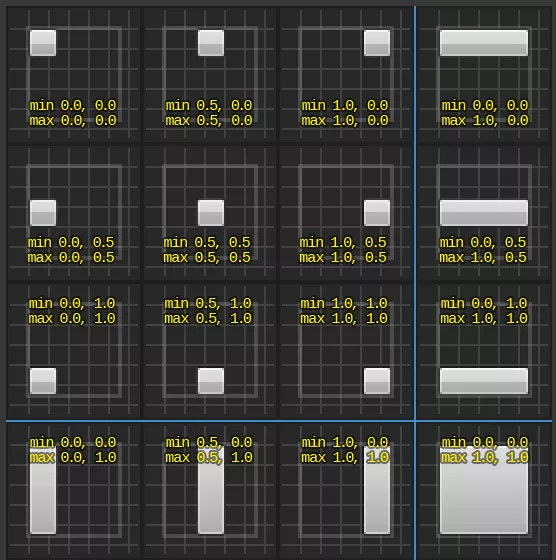
将布局设为屏幕上的画布。锚点:
my_webui:SetLayout(location?, size?, anchors_min?, anchors_max?, alignment?)
Parameters
| Type | Parameter | Default | Description |
|---|---|---|---|
| Vector2D | location? | Vector2D(0, 0) | 屏幕位置,或者当锚点拉伸时的左侧和顶部偏移量 |
| Vector2D | size? | Vector2D(0, 0) | 尺寸,或者当锚点拉伸时的右侧和底部偏移量 |
| Vector2D | anchors_min? | Vector2D(0, 0) | 最小锚点,从 (0, 0) 左上角到 (1, 1) 右下角 |
| Vector2D | anchors_max? | Vector2D(1, 1) | 最大锚点,从 (0, 0) 左上角到 (1, 1) 右下角 |
| Vector2D | alignment? | Vector2D(0.5, 0.5) | WebUI 的轴心点,(0.5, 0.5) 为中心 |
OptimalSetVisibility
设置其在屏幕上的可见性
my_webui:SetVisibility(visibility)
Parameters
| Type | Parameter | Default | Description |
|---|---|---|---|
| WidgetVisibility | visibility | Required parameter | 屏幕中的新可见性状态 |
See also GetVisibility.
OptimalSpawnSound
生成一个播放此 WebUI 音频的 Sound 实体
local ret = my_webui:SpawnSound(location?, is_2d?, volume?, inner_radius?, falloff_distance?, attenuation_function?)
Parameters
| Type | Parameter | Default | Description |
|---|---|---|---|
| Vector | location? | Vector(0, 0, 0) | 声音的世界坐标位置(如果是 3D) |
| boolean | is_2d? | true | 声音是否为 2D |
| float | volume? | 1.0 | 音量倍率 |
| integer | inner_radius? | 400 | 音量为 100% 的半径范围(如果是 3D) |
| integer | falloff_distance? | 3600 | 声音变为不可听见时的距离(如果是 3D) |
| AttenuationFunction | attenuation_function? | AttenuationFunction.Linear | 音量随距离衰减的方式(如果是 3D) |
Returns
| Type | Description |
|---|---|
| Sound | 生成的 Sound |
🚀 事件
Inherited Entity Events
WebUI inherits from Base Entity Class, sharing it's events:
Base Entityscripting-reference/classes/base-classes/entity
Base Entityscripting-reference/classes/base-classes/entity
| Name | Description | |
|---|---|---|
| ClassRegister | 当使用 继承系统 注册一个新类时触发 |
| Destroy | 当实体被销毁时触发 |
| Spawn | 当实体被生成/创建时触发 |
| ValueChange | 当实体通过 :SetValue() 改变了值时触发 |
Fail
当此页面加载失败时触发
WebUI.Subscribe("Fail", function(self, error_code, message)
	-- Fail was called
end)
Ready
当此页面完全加载完成时触发
WebUI.Subscribe("Ready", function(self)
	-- Ready was called
end)
Arguments
| Type | Argument | Description |
|---|---|---|
| WebUI | self | 触发该事件的 Web UI |