🆒 TextRender
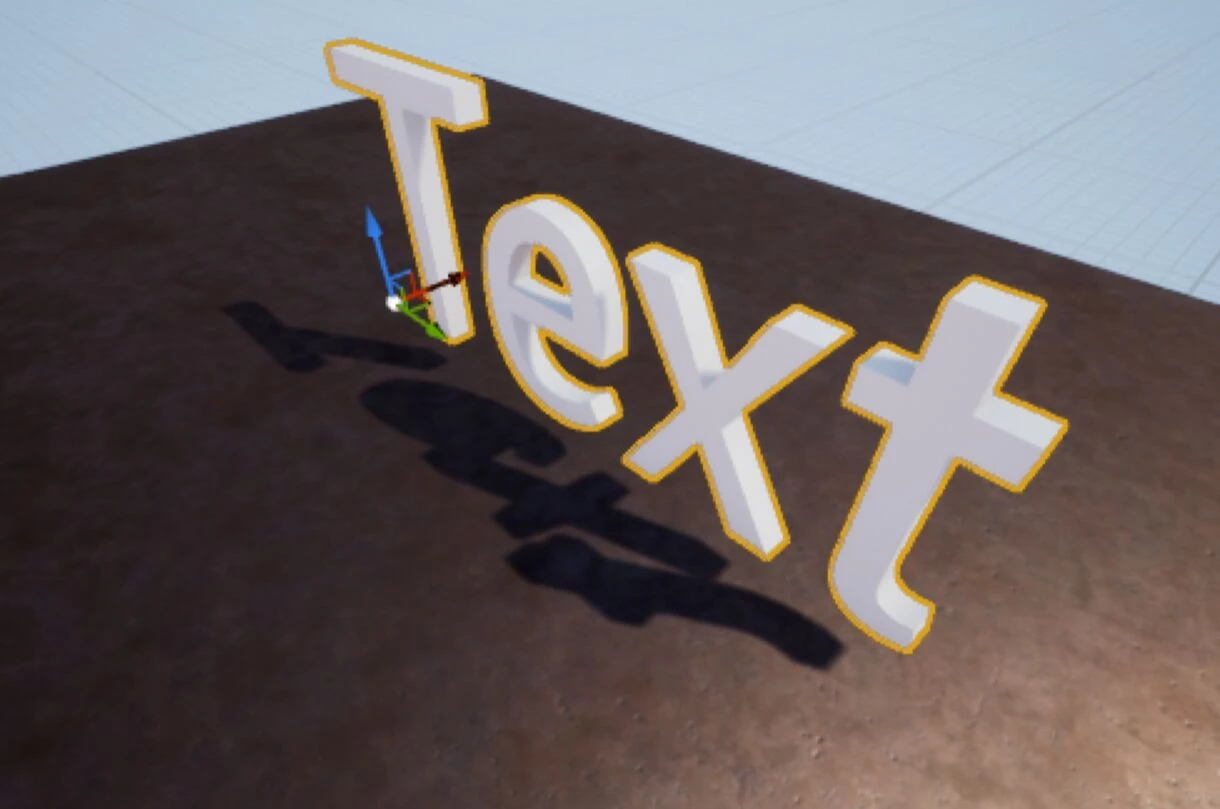
文本渲染类在 3D 世界中生成文本非常有用。
👪Inheritance
This class shares methods and events from Base Entity, Base Actor.
🎒 示例
local my_text_render = TextRender(
    Vector(-100, 200, 300),
    Rotator(),
    "My Awesome Text",
    40, -- 文本大小
    Color.RED
)
🛠 构造函数
Default Constructor
No description provided
local my_textrender = TextRender(location, rotation, text, word_size?, color?, rendering_type?, horizontal_alignment?, vertical_alignment?, font_asset?, cast_shadow?)
Parameters
| Type | Name | Default | Description |
|---|---|---|---|
| Vector | location | Required parameter | 生成的世界坐标位置 |
| Rotator | rotation | Required parameter | 生成的世界坐标旋转 |
| string | text | Required parameter | 要显示的文本 |
| float | word_size | 26 | 文本大小 |
| Color | color | Color.WHITE | 文本颜色 |
| TextRenderRenderingType | rendering_type | TextRenderRenderingType.Lit | 使其不受光照影响、总是面向相机或总是透过墙壁可见 |
| TextRenderHorizontalAlignment | horizontal_alignment | TextRenderHorizontalAlignment.Center | 文本的水平对齐方式 |
| TextRenderVerticalAlignment | vertical_alignment | TextRenderVerticalAlignment.Center | 文本的垂直对齐方式 |
| string | font_asset | | 用于文本的字体资产。注意字体必须是离线缓存的距离场字体 |
| boolean | cast_shadow | false | 控制是否应当投射阴影 |
🗿 静态函数
Inherited Entity Static Functions
TextRender inherits from Base Entity Class, sharing it's methods and functions:
Base Entityscripting-reference/classes/base-classes/entity
Base Entityscripting-reference/classes/base-classes/entity
| Returns | Name | Description | |
|---|---|---|---|
 | table of Base Entity | GetAll | 返回一个包含调用此方法的类中所有实体的表 |
| Base Entity | GetByIndex | 返回该类中指定索引处的特定实体 |
| integer | GetCount | 返回该类当前存在的实体数量 |
| table of table | GetInheritedClasses | 获取使用 继承系统 创建的、直接继承自该类的所有子类列表 |
| iterator | GetPairs | 返回一个包含该类所有实体的迭代器,供 pairs() 使用 |
| table or nil | GetParentClass | 如果该类是使用 继承系统 创建的,则获取其父类 |
| table | Inherit | 通过 继承系统 继承此类 |
| boolean | IsChildOf | 如果该类是使用 继承系统 创建的,检查此类是否为另一个类的子类 |
| function | Subscribe | 为此类的所有实体订阅一个 事件 |
| function | SubscribeRemote | 订阅从服务器调用的自定义事件 |
| Unsubscribe | 退订此包内该类中此 事件 的所有回调,或者仅取消传入的特定回调 |
This class doesn't have own static functions.
🦠 函数
Inherited Entity Functions
TextRender inherits from Base Entity Class, sharing it's methods and functions:
Base Entityscripting-reference/classes/base-classes/entity
Base Entityscripting-reference/classes/base-classes/entity
| Returns | Name | Description | |
|---|---|---|---|
 | BroadcastRemoteEvent | 直接在此实体上向所有玩家调用自定义远程事件 | |
| BroadcastRemoteInRadiusEvent | 直接针对此实体调用自定义远程事件,并将该事件传递给半径范围内的所有玩家 | |
| CallRemoteEvent | 直接在此实体上向特定玩家调用自定义远程事件 | |
 | CallRemoteEvent | 直接在此实体上调用自定义远程事件 | |
| CallRemotePlayersEvent | 直接在此实体上调用自定义远程事件,并将事件传递给玩家列表 | |
 | Destroy | 销毁此实体 | |
| FinishSpawn | 如果此实体是以延迟 spawn_mode 生成的,则完成生成过程并将该实体发送至客户端 | |
| table of string | GetAllValuesKeys | 获取所有存储值的键名列表 |
| table | GetClass | 获取此实体的类 |
| integer | GetID | 获取此实体的通用网络 ID(客户端和服务器一致) |
| any | GetValue | 获取存储在此实体上指定键处的 值 |
| boolean | HasAuthority | 获取本地上下文是否对此实体拥有主控(如果由客户端生成则为 true,由服务器生成则为 false) |
| boolean | IsA | 递归检查此实体是否继承自某个类 |
| boolean | IsBeingDestroyed | 如果此实体正在被销毁,则返回 true |
| boolean | IsSpawned | 获取此实体是否已完成生成 |
| boolean | IsValid | 如果此实体有效(即未被销毁且指向有效的实体),则返回 true |
| SetSpawnMode | 从继承类的构造函数中覆盖此实体完成生成的时间点 | |
| SetValue | 在此实体中设置一个 值 | |
| function | Subscribe | 在这个特定实体上订阅一个事件 |
| function | SubscribeRemote | 在这个特定实体上订阅一个从服务器调用的自定义远程事件 |
| Unsubscribe | 退订此包内该实体中此 事件 的所有回调,或者仅取消传入的特定回调 |
Inherited Actor Functions
TextRender inherits from Base Actor Class, sharing it's methods and functions:
Base Actorscripting-reference/classes/base-classes/actor
Base Actorscripting-reference/classes/base-classes/actor
| Returns | Name | Description | |
|---|---|---|---|
| AddActorTag | 向该 Actor 添加一个虚幻 Actor 标签 | |
 | AddAngularImpulse | 向该 Actor 添加角冲量。适用于单次瞬间爆发 | |
| AddImpulse | 向该 Actor 添加冲量。适用于单次瞬间爆发 | |
| boolean | AttachTo | 将该 Actor 附加到任何其他 Actor 上,可选择附加在特定骨骼处 |
| Detach | 将该 Actor 从其附加的 Actor 上分离 | |
| table of string | GetActorTags | 获取该 Actor 上的所有虚幻 Actor 标签 |
| Vector | GetAngularForce | 获取该 Actor 的角外力(由 SetAngularForce() 设置) |
| float | GetAngularVelocity | 返回此 Actor 的角速度 |
| table of Base Actor | GetAttachedEntities | 获取附加到该 Actor 的所有 Actor |
| Base Actor or nil | GetAttachedTo | 获取该 Actor 所附加到的父级 Actor |
| string | GetAttachedToSocket | 获取此 Actor 所附加到的骨骼或插槽名称 |
| table | GetBounds | 获取此 Actor 的包围盒,便于计算其在世界中的尺寸 |
| CollisionType | GetCollision | 获取该 Actor 的碰撞类型 |
| integer | GetDimension | 获取该 Actor 的维度 |
| float | GetDistanceFromCamera | 获取该 Actor 距离相机的距离 |
| Vector | GetForce | 获取该 Actor 的持续外力(由 SetForce() 设置) |
| float | GetLifeSpan | 获取此 Actor 被销毁前剩余的时间(秒) |
| Vector | GetLocation | 获取该 Actor 在游戏世界中的位置 |
| float | GetMass | 返回此 Actor 的质量 |
| Player or nil | GetNetworkAuthority | 获取该 Actor 的网络主控玩家 |
| Vector | GetRelativeLocation | 如果该 Actor 已附加,获取其相对位置 |
| Rotator | GetRelativeRotation | 如果该 Actor 已附加,获取其相对旋转 |
| Rotator | GetRotation | 获取该 Actor 在游戏世界中的角度值 |
| Vector | GetScale | 获取该 Actor 的缩放比例 |
| float | GetScreenPercentage | 获取该 Actor 在屏幕中所占尺寸的百分比 |
| table | GetSocketTransform | 在给定骨骼或插槽名称的情况下,获取世界空间中的插槽变换 |
| Vector | GetVelocity | 获取该 Actor 当前的速度 |
| boolean | HasNetworkAuthority | 如果本地玩家当前是该 Actor 的网络主控(Network Authority),则返回 true |
| boolean | IsGravityEnabled | 如果该 Actor 启用了重力,则返回 true |
| boolean | IsImpulseOnDamage | Returns true if taking damage pushes this Actor's physics body |
| boolean | IsInWater | 如果该 Actor 处于水中,则返回 true |
| boolean | IsNetworkDistributed | 如果该 Actor 当前处于网络分配状态,则返回 true |
| boolean | IsVisible | 如果该 Actor 可见,则返回 true |
| RemoveActorTag | 从该 Actor 中移除一个虚幻 Actor 标签 | |
| RotateRelativeTo | Smoothly rotates this attached actor to an angle relative to its parent over a certain time | |
| RotateTo | 在一定时间内平滑旋转该 Actor 到指定角度 | |
| SetAngularForce | 向该 Actor 添加一个永久的角外力,设为 Vector(0, 0, 0) 可以取消 | |
| SetCastShadow | 设置该 Actor 是否投射阴影 | |
| SetCollision | 设置该 Actor 的碰撞类型 | |
| SetDimension | 设置此 Actor 的维度。Actor 仅能看见并与处于同一维度中的实体进行交互 | |
| SetDistanceOptimizationMultiplier | 设置此 Actor 的距离优化系数 | |
| SetForce | 向该 Actor 添加一个永久的外力,设为 Vector(0, 0, 0) 可以取消 | |
| SetGravityEnabled | 设置该 Actor 是否启用重力 | |
| SetHighlightEnabled | 设置该 Actor 是否启用高亮显示,以及使用哪个高亮索引值 | |
| SetImpulseOnDamage | Sets whether taking damage (shots, melee, explosions) pushes this Actor's physics body | |
| SetLifeSpan | 设置该 Actor 被销毁前的生存时间(秒)。经过这段时间后,Actor 将被自动销毁。 | |
| SetLocation | 设置该 Actor 在游戏世界中的位置 | |
| SetNetworkAuthority | 设置某个玩家拥有此 Actor 的网络主控 | |
| SetNetworkAuthorityAutoDistributed | 设置该 Actor 是否在玩家之间自动分配网络主控 | |
| SetOutlineEnabled | 设置该 Actor 是否启用描边,以及使用哪个描边索引值 | |
| SetRelativeLocation | 在局部空间中设置该 Actor 的相对位置(仅在此 Actor 已附加时生效) | |
| SetRelativeRotation | 在局部空间中设置该 Actor 的相对旋转(仅在此 Actor 已附加时生效) | |
| SetRenderCullDistance | 设置该 Actor 的渲染剔除距离 | |
| SetRotation | 设置该 Actor 在游戏世界中的旋转 | |
| SetScale | 设置该 Actor 的缩放比例 | |
| SetVisibility | 设置该 Actor 是否可见 | |
| TranslateRelativeTo | Smoothly moves this attached actor to a location relative to its parent over a certain time | |
| TranslateTo | 在一定时间内平滑地将该 Actor 移动到某个位置 | |
| boolean | WasRecentlyRendered | 获取该 Actor 最近是否在屏幕上被渲染过 |
| Returns | Name | Description | |
|---|---|---|---|
| Color | GetColor | 获取当前文本颜色 |
| string | GetText | 获取当前文本 |
| float | GetWordSize | 获取当前字号大小 |
| SetAlignment | 设置文本对齐方式 | |
| SetColor | 设置文本颜色 | |
| SetFont | 设置字体。字体必须预先烘焙为离线缓存的距离场字体。 | |
| SetSpacingAdjust | 设置水平和垂直间距调整值 | |
| SetText | 设置文本 | |
| SetWordSize | 设置字号大小 |
 Optimal
GetColor
获取当前文本颜色
local color = my_textrender:GetColor()
Returns
| Type | Description |
|---|---|
| Color | 当前文本颜色 |
See also SetColor.
OptimalGetText
获取当前文本
local text = my_textrender:GetText()
Returns
| Type | Description |
|---|---|
| string | 当前文本 |
See also SetText.
OptimalGetWordSize
获取当前字号大小
local word_size = my_textrender:GetWordSize()
Returns
| Type | Description |
|---|---|
| float | 当前字号大小 |
See also SetWordSize.
 Moderate
SetAlignment
设置文本对齐方式
my_textrender:SetAlignment(horizontal_alignment, vertical_alignment)
Parameters
| Type | Parameter | Default | Description |
|---|---|---|---|
| TextRenderHorizontalAlignment | horizontal_alignment | Required parameter | 文本的水平对齐方式 |
| TextRenderVerticalAlignment | vertical_alignment | Required parameter | 文本的垂直对齐方式 |
ModerateSetColor
设置文本颜色
my_textrender:SetColor(color)
Parameters
| Type | Parameter | Default | Description |
|---|---|---|---|
| Color | color | Required parameter | 新的文本颜色 |
See also GetColor.
ModerateSetFont
设置字体。字体必须预先烘焙为离线缓存的距离场字体。
可用字体示例:
-nanos-world::Font_LondrinaSolid_DistanceField
-nanos-world::Font_BoldPixels_DistanceField
-nanos-world::Font_Roboto_DistanceField
my_textrender:SetFont(font_asset)
Parameters
| Type | Parameter | Default | Description |
|---|---|---|---|
| string | font_asset | Required parameter | 新的字体。字体必须预先烘焙为离线缓存的距离场字体 |
ModerateSetSpacingAdjust
设置水平和垂直间距调整值
my_textrender:SetSpacingAdjust(horizontal_spacing, vertical_spacing)
Parameters
| Type | Parameter | Default | Description |
|---|---|---|---|
| float | horizontal_spacing | Required parameter | 字符之间的额外水平间距 |
| float | vertical_spacing | Required parameter | 行之间的额外垂直间距 |
ModerateSetText
设置文本
my_textrender:SetText(text)
Parameters
| Type | Parameter | Default | Description |
|---|---|---|---|
| string | text | Required parameter | 新的文本 |
See also GetText.
ModerateSetWordSize
设置字号大小
my_textrender:SetWordSize(word_size)
Parameters
| Type | Parameter | Default | Description |
|---|---|---|---|
| float | word_size | Required parameter | 新的词尺寸 |
See also GetWordSize.
🚀 事件
Inherited Entity Events
TextRender inherits from Base Entity Class, sharing it's events:
Base Entityscripting-reference/classes/base-classes/entity
Base Entityscripting-reference/classes/base-classes/entity
| Name | Description | |
|---|---|---|
| ClassRegister | 当使用 继承系统 注册一个新类时触发 |
| Destroy | 当实体被销毁时触发 |
| Spawn | 当实体被生成/创建时触发 |
| ValueChange | 当实体通过 :SetValue() 改变了值时触发 |
Inherited Actor Events
TextRender inherits from Base Actor Class, sharing it's events:
Base Actorscripting-reference/classes/base-classes/actor
Base Actorscripting-reference/classes/base-classes/actor
| Name | Description | |
|---|---|---|
| DimensionChange | 当 Actor 改变其维度时触发 |
| EnterWater | 当 Actor 进入水体时触发 |
| LeaveWater | 当 Actor 离开水体时触发 |
| NetworkAuthorityChange | 当 Actor 更改其网络主控玩家时触发 |
| NetworkAuthorityChange | 当本地玩家获得或失去对此 Actor 的网络主控时触发 |
This class doesn't have own events.