💡 Light
Light 代表一个光照源。
👪Inheritance
This class shares methods and events from Base Entity, Base Actor.
🎒 示例
Server/Index.lua
local my_light = Light(
    Vector(-152, 245, 115),
    Rotator(0, 90, 90), -- 仅对 Rect 和 Spot 光源类型生效
    Color(1, 0, 0), -- 红色调
    LightType.Point, -- 点光源类型
    100, -- 强度
    250, -- 衰减半径
    44, -- 锥体角度(仅对 Spot 类型生效)
    0, -- 内锥体角度百分比(仅对 Spot 类型生效)
    5000, -- 最大绘制距离(有利于性能 - 0 表示无限)
    true, -- 是否使用基于物理的平方反比距离衰减,其中衰减半径仅限制光的贡献度。(仅限 Spot 和点光源类型)
    true, -- 是否投射阴影?
    true -- 是否启用?
)
🛠 构造函数
Default Constructor
No description provided
local my_light = Light(location, rotation?, color?, light_type?, intensity?, attenuation_radius?, cone_angle?, inner_cone_angle_percent?, max_draw_distance?, use_inverse_squared_falloff?, cast_shadows?, visible?, source_radius?, spawn_mode?)
Parameters
| Type | Name | Default | Description |
|---|---|---|---|
| Vector | location | Required parameter | 生成的世界坐标位置 |
| Rotator | rotation | Rotator(0, 0, 0) | 仅 Rect 和 Spot 光照类型有效 |
| Color | color | Color(1, 1, 1) | 光源颜色 |
| LightType | light_type | LightType.Point | 点光源、聚光灯或矩形光源 |
| float | intensity | 30 | 光源亮度 |
| float | attenuation_radius | 250 | 光源照射距离 |
| float | cone_angle | 44 | 仅对 Spot 光照类型有效 |
| float | inner_cone_angle_percent | 0 | 内锥角百分比(仅对 Spot 光照类型有效)(0-1) |
| float | max_draw_distance | 10000 | 最大绘制距离(有利于性能)- 0 表示无限远 |
| boolean | use_inverse_squared_falloff | true | 是否使用基于物理的平方反比距离衰减,此时衰减半径仅对光照的贡献进行剪裁。(仅限 Spot 和 Point 光源类型) |
| boolean | cast_shadows | true | 光源是否投射阴影 |
| boolean | visible | true | 光源初始状态是否可见 |
| float | source_radius | 2 | 光源形状的半径。(仅限 Spot 和 Point 光源类型) |
| SpawnMode | spawn_mode | SpawnMode.Immediate | 传入 SpawnMode.AfterConstructor 或 SpawnMode.Manual 可避免立即将实体发送至客户端,在需要配置多项设置时使用此选项可提升性能。最后必须调用 FinishSpawn() |
提示
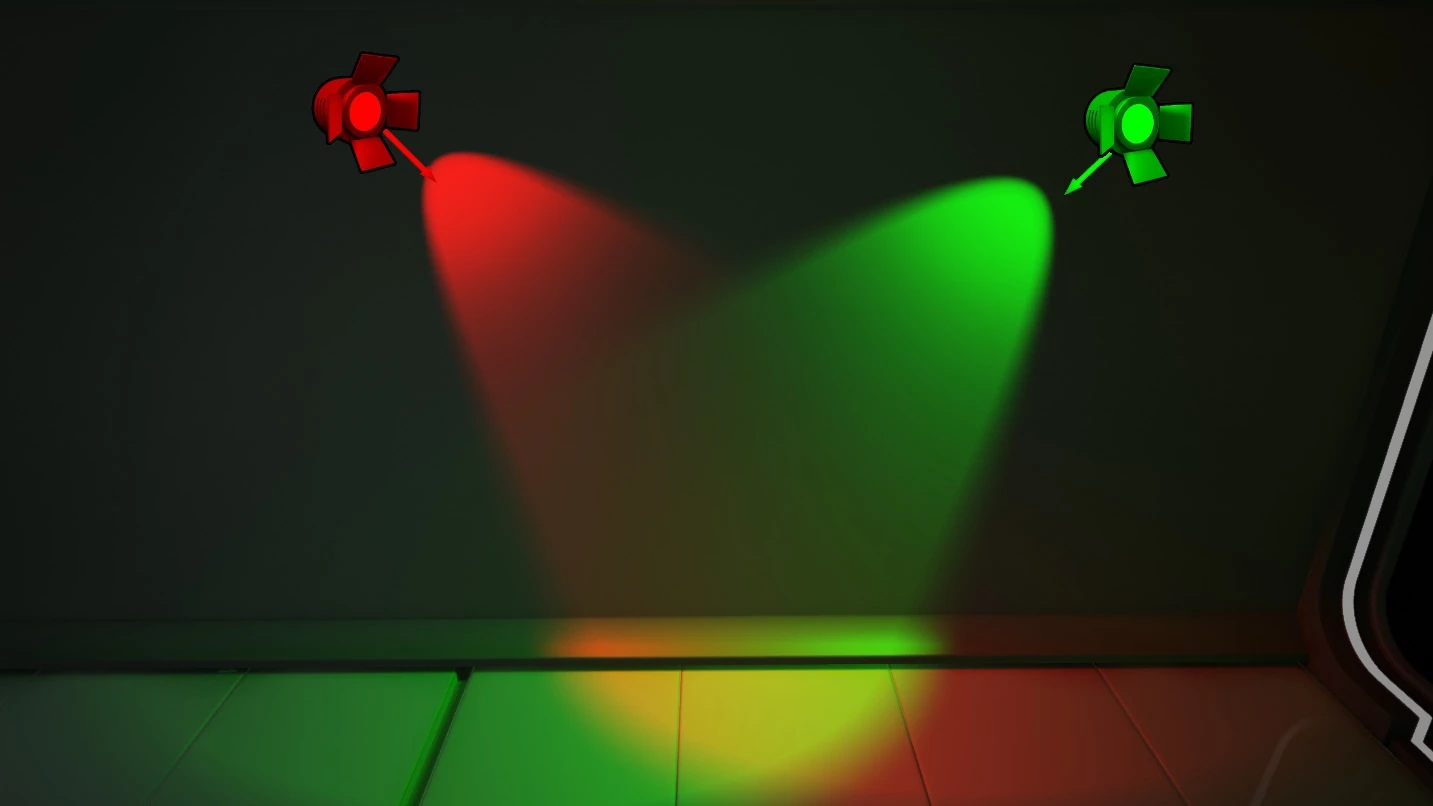
nanos world 提供了 3 种类型的光源:Spot(聚光灯)、Point(点光源)和 Rect(矩形光源)。所有光源都是动态的,因此性能开销非常大!在生成成百上千个光源之前请务必牢记这一点 😉。
🗿 静态函数
Inherited Entity Static Functions
Light inherits from Base Entity Class, sharing it's methods and functions:
Base Entityscripting-reference/classes/base-classes/entity
Base Entityscripting-reference/classes/base-classes/entity
| Returns | Name | Description | |
|---|---|---|---|
 | table of Base Entity | GetAll | 返回一个包含调用此方法的类中所有实体的表 |
| Base Entity | GetByIndex | 返回该类中指定索引处的特定实体 |
| integer | GetCount | 返回该类当前存在的实体数量 |
| table of table | GetInheritedClasses | 获取使用 继承系统 创建的、直接继承自该类的所有子类列表 |
| iterator | GetPairs | 返回一个包含该类所有实体的迭代器,供 pairs() 使用 |
| table or nil | GetParentClass | 如果该类是使用 继承系统 创建的,则获取其父类 |
| table | Inherit | 通过 继承系统 继承此类 |
| boolean | IsChildOf | 如果该类是使用 继承系统 创建的,检查此类是否为另一个类的子类 |
| function | Subscribe | 为此类的所有实体订阅一个 事件 |
| function | SubscribeRemote | 订阅从服务器调用的自定义事件 |
| Unsubscribe | 退订此包内该类中此 事件 的所有回调,或者仅取消传入的特定回调 |
This class doesn't have own static functions.
🦠 函数
Inherited Entity Functions
Light inherits from Base Entity Class, sharing it's methods and functions:
Base Entityscripting-reference/classes/base-classes/entity
Base Entityscripting-reference/classes/base-classes/entity
| Returns | Name | Description | |
|---|---|---|---|
 | BroadcastRemoteEvent | 直接在此实体上向所有玩家调用自定义远程事件 | |
| BroadcastRemoteInRadiusEvent | 直接针对此实体调用自定义远程事件,并将该事件传递给半径范围内的所有玩家 | |
| CallRemoteEvent | 直接在此实体上向特定玩家调用自定义远程事件 | |
 | CallRemoteEvent | 直接在此实体上调用自定义远程事件 | |
| CallRemotePlayersEvent | 直接在此实体上调用自定义远程事件,并将事件传递给玩家列表 | |
 | Destroy | 销毁此实体 | |
| FinishSpawn | 如果此实体是以延迟 spawn_mode 生成的,则完成生成过程并将该实体发送至客户端 | |
| table of string | GetAllValuesKeys | 获取所有存储值的键名列表 |
| table | GetClass | 获取此实体的类 |
| integer | GetID | 获取此实体的通用网络 ID(客户端和服务器一致) |
| any | GetValue | 获取存储在此实体上指定键处的 值 |
| boolean | HasAuthority | 获取本地上下文是否对此实体拥有主控(如果由客户端生成则为 true,由服务器生成则为 false) |
| boolean | IsA | 递归检查此实体是否继承自某个类 |
| boolean | IsBeingDestroyed | 如果此实体正在被销毁,则返回 true |
| boolean | IsSpawned | 获取此实体是否已完成生成 |
| boolean | IsValid | 如果此实体有效(即未被销毁且指向有效的实体),则返回 true |
| SetSpawnMode | 从继承类的构造函数中覆盖此实体完成生成的时间点 | |
| SetValue | 在此实体中设置一个 值 | |
| function | Subscribe | 在这个特定实体上订阅一个事件 |
| function | SubscribeRemote | 在这个特定实体上订阅一个从服务器调用的自定义远程事件 |
| Unsubscribe | 退订此包内该实体中此 事件 的所有回调,或者仅取消传入的特定回调 |
Inherited Actor Functions
Light inherits from Base Actor Class, sharing it's methods and functions:
Base Actorscripting-reference/classes/base-classes/actor
Base Actorscripting-reference/classes/base-classes/actor
| Returns | Name | Description | |
|---|---|---|---|
| AddActorTag | 向该 Actor 添加一个虚幻 Actor 标签 | |
 | AddAngularImpulse | 向该 Actor 添加角冲量。适用于单次瞬间爆发 | |
| AddImpulse | 向该 Actor 添加冲量。适用于单次瞬间爆发 | |
| boolean | AttachTo | 将该 Actor 附加到任何其他 Actor 上,可选择附加在特定骨骼处 |
| Detach | 将该 Actor 从其附加的 Actor 上分离 | |
| table of string | GetActorTags | 获取该 Actor 上的所有虚幻 Actor 标签 |
| Vector | GetAngularForce | 获取该 Actor 的角外力(由 SetAngularForce() 设置) |
| float | GetAngularVelocity | 返回此 Actor 的角速度 |
| table of Base Actor | GetAttachedEntities | 获取附加到该 Actor 的所有 Actor |
| Base Actor or nil | GetAttachedTo | 获取该 Actor 所附加到的父级 Actor |
| string | GetAttachedToSocket | 获取此 Actor 所附加到的骨骼或插槽名称 |
| table | GetBounds | 获取此 Actor 的包围盒,便于计算其在世界中的尺寸 |
| CollisionType | GetCollision | 获取该 Actor 的碰撞类型 |
| integer | GetDimension | 获取该 Actor 的维度 |
| float | GetDistanceFromCamera | 获取该 Actor 距离相机的距离 |
| Vector | GetForce | 获取该 Actor 的持续外力(由 SetForce() 设置) |
| float | GetLifeSpan | 获取此 Actor 被销毁前剩余的时间(秒) |
| Vector | GetLocation | 获取该 Actor 在游戏世界中的位置 |
| float | GetMass | 返回此 Actor 的质量 |
| Player or nil | GetNetworkAuthority | 获取该 Actor 的网络主控玩家 |
| Vector | GetRelativeLocation | 如果该 Actor 已附加,获取其相对位置 |
| Rotator | GetRelativeRotation | 如果该 Actor 已附加,获取其相对旋转 |
| Rotator | GetRotation | 获取该 Actor 在游戏世界中的角度值 |
| Vector | GetScale | 获取该 Actor 的缩放比例 |
| float | GetScreenPercentage | 获取该 Actor 在屏幕中所占尺寸的百分比 |
| table | GetSocketTransform | 在给定骨骼或插槽名称的情况下,获取世界空间中的插槽变换 |
| Vector | GetVelocity | 获取该 Actor 当前的速度 |
| boolean | HasNetworkAuthority | 如果本地玩家当前是该 Actor 的网络主控(Network Authority),则返回 true |
| boolean | IsGravityEnabled | 如果该 Actor 启用了重力,则返回 true |
| boolean | IsInWater | 如果该 Actor 处于水中,则返回 true |
| boolean | IsNetworkDistributed | 如果该 Actor 当前处于网络分配状态,则返回 true |
| boolean | IsVisible | 如果该 Actor 可见,则返回 true |
| RemoveActorTag | 从该 Actor 中移除一个虚幻 Actor 标签 | |
| RotateTo | 在一定时间内平滑旋转该 Actor 到指定角度 | |
| SetAngularForce | 向该 Actor 添加一个永久的角外力,设为 Vector(0, 0, 0) 可以取消 | |
| SetCastShadow | 设置该 Actor 是否投射阴影 | |
| SetCollision | 设置该 Actor 的碰撞类型 | |
| SetDimension | 设置此 Actor 的维度。Actor 仅能看见并与处于同一维度中的实体进行交互 | |
| SetDistanceOptimizationMultiplier | 设置此 Actor 的距离优化系数 | |
| SetForce | 向该 Actor 添加一个永久的外力,设为 Vector(0, 0, 0) 可以取消 | |
| SetGravityEnabled | 设置该 Actor 是否启用重力 | |
| SetHighlightEnabled | 设置该 Actor 是否启用高亮显示,以及使用哪个高亮索引值 | |
| SetLifeSpan | 设置该 Actor 被销毁前的生存时间(秒)。经过这段时间后,Actor 将被自动销毁。 | |
| SetLocation | 设置该 Actor 在游戏世界中的位置 | |
| SetNetworkAuthority | 设置某个玩家拥有此 Actor 的网络主控 | |
| SetNetworkAuthorityAutoDistributed | 设置该 Actor 是否在玩家之间自动分配网络主控 | |
| SetOutlineEnabled | 设置该 Actor 是否启用描边,以及使用哪个描边索引值 | |
| SetRelativeLocation | 在局部空间中设置该 Actor 的相对位置(仅在此 Actor 已附加时生效) | |
| SetRelativeRotation | 在局部空间中设置该 Actor 的相对旋转(仅在此 Actor 已附加时生效) | |
| SetRenderCullDistance | 设置该 Actor 的渲染剔除距离 | |
| SetRotation | 设置该 Actor 在游戏世界中的旋转 | |
| SetScale | 设置该 Actor 的缩放比例 | |
| SetVisibility | 设置该 Actor 是否可见 | |
| TranslateTo | 在一定时间内平滑地将该 Actor 移动到某个位置 | |
| boolean | WasRecentlyRendered | 获取该 Actor 最近是否在屏幕上被渲染过 |
| Returns | Name | Description | |
|---|---|---|---|
| float | GetAttenuationRadius | 获取此光源照射的距离 |
| boolean | GetCastShadows | 获取此光源是否投射阴影 |
| Color | GetColor | 获取此光源的颜色 |
| float | GetIntensity | 获取此光源的亮度 |
| SetAttenuationRadius | 设置此光源照射的距离 | |
| SetCastShadows | 设置此光源是否投射阴影 | |
| SetColor | 设置光照颜色 | |
| SetIntensity | 设置此光源的亮度 | |
| SetTextureLightProfile | 设置光照的纹理轮廓 |
 Optimal
GetAttenuationRadius
获取此光源照射的距离
local attenuation_radius = my_light:GetAttenuationRadius()
Returns
| Type | Description |
|---|---|
| float | 衰减半径 |
See also SetAttenuationRadius.
OptimalGetCastShadows
获取此光源是否投射阴影
local is_shadows_enabled = my_light:GetCastShadows()
Returns
| Type | Description |
|---|---|
| boolean | 是否投射阴影 |
See also SetCastShadows.
OptimalGetColor
获取此光源的颜色
local color = my_light:GetColor()
Returns
| Type | Description |
|---|---|
| Color | 光照颜色 |
See also SetColor.
OptimalGetIntensity
获取此光源的亮度
local intensity = my_light:GetIntensity()
Returns
| Type | Description |
|---|---|
| float | 亮度 |
See also SetIntensity.
OptimalSetAttenuationRadius
设置此光源照射的距离
my_light:SetAttenuationRadius(attenuation_radius)
Parameters
| Type | Parameter | Default | Description |
|---|---|---|---|
| float | attenuation_radius | Required parameter | 新的衰减半径 |
See also GetAttenuationRadius.
OptimalSetCastShadows
设置此光源是否投射阴影
my_light:SetCastShadows(is_shadows_enabled)
Parameters
| Type | Parameter | Default | Description |
|---|---|---|---|
| boolean | is_shadows_enabled | Required parameter | 是否投射阴影 |
See also GetCastShadows.
OptimalSetColor
设置光照颜色
my_light:SetColor(color)
Parameters
| Type | Parameter | Default | Description |
|---|---|---|---|
| Color | color | Required parameter | 光照颜色 |
See also GetColor.
OptimalSetIntensity
设置此光源的亮度
my_light:SetIntensity(intensity)
Parameters
| Type | Parameter | Default | Description |
|---|---|---|---|
| float | intensity | Required parameter | 新的亮度 |
See also GetIntensity.
OptimalSetTextureLightProfile
设置光照的纹理轮廓
my_light:SetTextureLightProfile(light_profile)
Parameters
| Type | Parameter | Default | Description |
|---|---|---|---|
| LightProfile | light_profile | Required parameter | 要使用的光照轮廓 |
See also 💡 Light Profiles.
🚀 事件
Inherited Entity Events
Light inherits from Base Entity Class, sharing it's events:
Base Entityscripting-reference/classes/base-classes/entity
Base Entityscripting-reference/classes/base-classes/entity
| Name | Description | |
|---|---|---|
| ClassRegister | 当使用 继承系统 注册一个新类时触发 |
| Destroy | 当实体被销毁时触发 |
| Spawn | 当实体被生成/创建时触发 |
| ValueChange | 当实体通过 :SetValue() 改变了值时触发 |
Inherited Actor Events
Light inherits from Base Actor Class, sharing it's events:
Base Actorscripting-reference/classes/base-classes/actor
Base Actorscripting-reference/classes/base-classes/actor
| Name | Description | |
|---|---|---|
| DimensionChange | 当 Actor 改变其维度时触发 |
| EnterWater | 当 Actor 进入水体时触发 |
| LeaveWater | 当 Actor 离开水体时触发 |
| NetworkAuthorityChange | 当 Actor 更改其网络主控玩家时触发 |
| NetworkAuthorityChange | 当本地玩家获得或失去对此 Actor 的网络主控时触发 |
This class doesn't have own events.
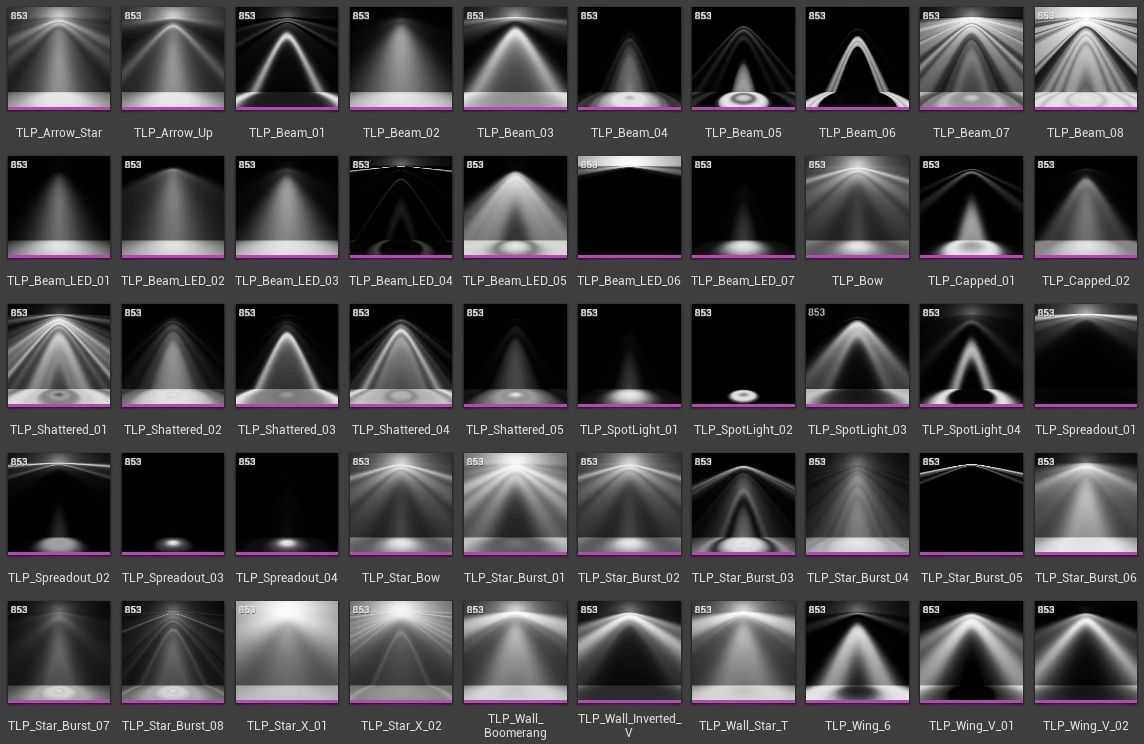
💡 光源描述文件
光源描述文件是使用真实世界测量数据来描述光源光照分布的纹理文件。
提示
Please check Unreal Engine Light Profile documentation for more information about Light Profiles!
nanos world 在基础游戏中内置了 50 个光源描述文件,可用于增强你的光源效果。你可以使用 :SetTextureLightProfile() 配合 LightProfile 枚举来进行设置。