上下文菜单
如何扩展和使用沙盒上下文菜单。
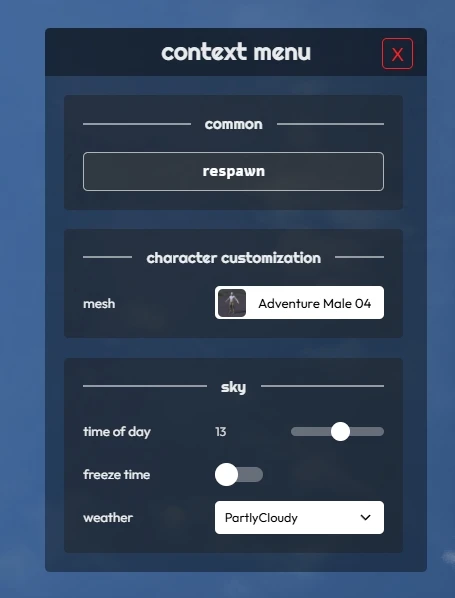
上下文菜单是沙盒游戏模式中的一个菜单,它提供了调整太阳光照或重新生成等运行时设置。该菜单可以通过默认按键 C 进行访问,按下即可切换开启或关闭。
直接通过 Lua 就可以在上下文菜单中添加或移除设置!
提示
你可以在沙盒的 GitHub 上查看上下文菜单的源代码。
添加新项
Client/Index.lua
-- Adds new items to the Context Menu
--  It can be called multiple times with the same ID to append more items to the same category
---@param id string             Unique ID used to identify this category
---@param title string          Category title
---@param items table           Table of items
---@param color? Color          Optional color of the category
function Sandbox.ContextMenu.AddItems(id, title, items, color)
示例:
Client/Index.lua
Sandbox.ContextMenu.AddItems("my-package-settings", "my settings", {
	{
		id = "my_checkbox",
		type = "checkbox",
		label = "enable fun",
		value = true,
		callback = function(value)
			Console.Log("Fun is now " .. tostring(value))
		end
	},
})
items 参数是一个表列表,每个 type 的格式如下:
checkbox
{
	id = "id-of-item",
	type = "checkbox",
	label = "my check box",
	callback = function(value)
		Console.Log("Checkbox value changed to: " .. tostring(value))
	end
},
range
{
	id = "id-of-item",
	type = "range",
	label = "slide me!",
	min = 0,
	max = 1440,
	value = 720,
	step = 1,
	callback = function(value)
		Console.Log("范围值已更改为:" .. value)
	end
},
button
{
	id = "id-of-item",
	type = "button",
	label = "press me",
	callback = function()
		Console.Log("按钮已按下!")
	end
},
select_image
{
	id = "id-of-item",
	type = "select_image",
	label = "select the image",
	options = {
		{ id = "id-opt-01", name = "Opt 01", image = "package://your-package/01.jpg" },
		{ id = "id-opt-02", name = "Opt 02", image = "package://your-package/02.jpg" },
	},
	value = function()
		return "id-opt-01"
	end,
	callback = function(value)
		Console.Log("Select Image changed to: " .. value)
	end
}
select
{
	id = "id-of-item",
	type = "select",
	label = "select the option",
	options = {
		{ id = "id-opt-01", name = "Opt 01" },
		{ id = "id-opt-02", name = "Opt 02" },
	},
	value = "id-opt-01",
	callback = function(value)
		Console.Log("Select changed to: " .. value)
	end
}
text
{
	id = "id-of-item",
	type = "text",
	label = "type something",
	placeholder = "enter text...",
	value = "",
	callback = function(value)
		Console.Log("Text changed to: " .. value)
	end
},
color
{
	id = "id-of-item",
	type = "color",
	label = "select the color",
	value = function()
		return my_current_color:ToHex(false)
	end,
	callback = function(value)
		Console.Log("颜色已更改为:" .. value)
	end
},
提示
value 和 options 属性可以是直接值,也可以是当项添加到上下文菜单时动态获取的函数!
提示
id 属性是可选的,当你想要以编程方式更新现有项的值时,它会非常有用。
移除项
Client/Index.lua
-- 从上下文菜单中移除项目
---@param id string             用于标识此类别的唯一 ID
function Sandbox.ContextMenu.RemoveItems(id)
更新项
Client/Index.lua
-- Updates an existing Context Menu item value
---@param item_id string        Unique ID used to identify this item
---@param value any             The new value
function Sandbox.ContextMenu.SetItemValue(item_id, value)
向实体/工具枪添加项
自定义实体和 Base Pickable(例如 Weapon)能够在被选择或拾取时自动显示自定义上下文菜单项。
选择实体时
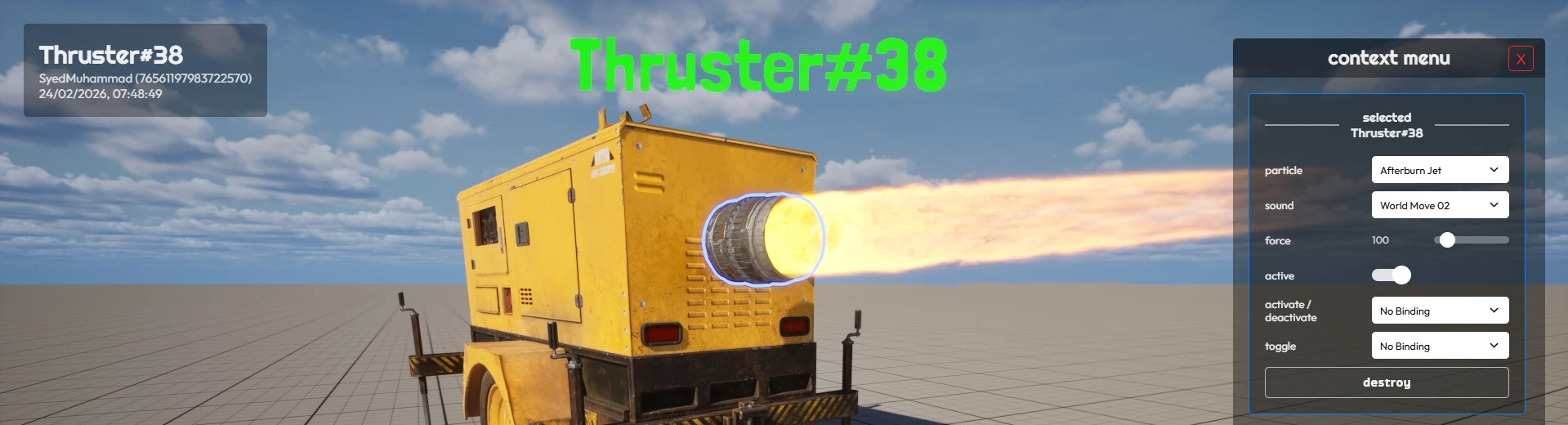
要在选择实体时添加项,需要在实体的类上定义 selected_context_menu_items 属性,其格式与 AddItems 函数的 items 参数相同。
你可以使用 Sandbox.ContextMenu.selected_entity 中当前选定的实体集,动态获取/设置上下文菜单项中与选定实体相关的值,例如:
Client/CustomEntity.lua
MyEntityClass.selected_context_menu_items = {
	{
		id = "my_entity_input",
		type = "text",
		label = "text",
		placeholder = "请输入文本",
		callback = function(value)
			Sandbox.ContextMenu.selected_entity:CallRemoteEvent("SetMyValue", Reliability.Reliable, value)
		end,
		value = function()
			return Sandbox.ContextMenu.selected_entity:GetValue("MyValue")
		end,
	}
}
拾取实体时
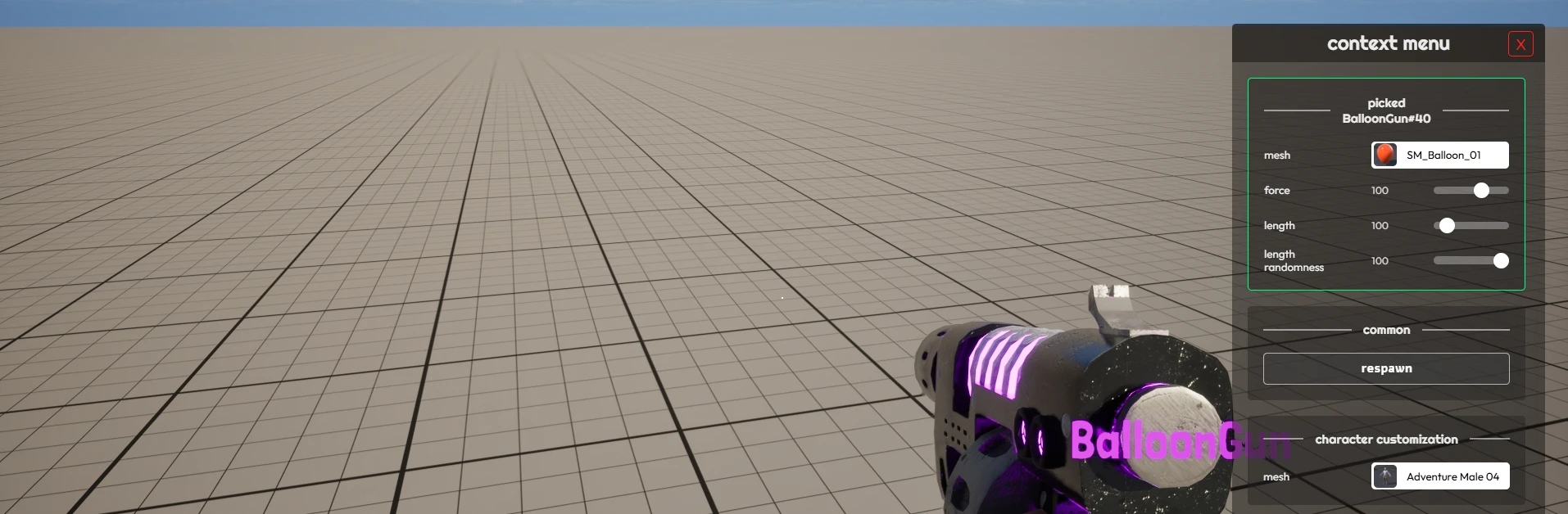
你还可以为 Base Pickable 类定义自定义项,这些项会在选择它们时自动显示。为此,你需要在可拾取物的类中定义 picked_context_menu_items 属性:
Client/CustomPickable.lua
MyGun.picked_context_menu_items = {
	{
		id = "my_gun_value",
		type = "range",
		label = "my value",
		min = 0,
		max = 100,
		step = 1,
		callback = function(value)
			MyGun.my_value = value
		end,
		value = function()
			return MyGun.my_value
		end
	}
}
打开/关闭
Client/Index.lua
-- 打开上下文菜单
function Sandbox.ContextMenu.Open()

-- 关闭上下文菜单
function Sandbox.ContextMenu.Close()
示例
你可以在 ContextMenu.lua 文件中找到示例以及它是如何深入工作的。
Also, you can see a working example of dynamically adding an entry to the Context Menu in the BalloonGun.