烟花
如何使用我们志愿库中的烟花粒子效果资产包创建烟花发射器武器!
提示
我们现在在资源库中提供了一个 Fireworks Tools 包可供下载,其功能与本代码片段完全相同!
首先,你需要从我们的资源库中下载资产包 Fireworks Particle Effects!
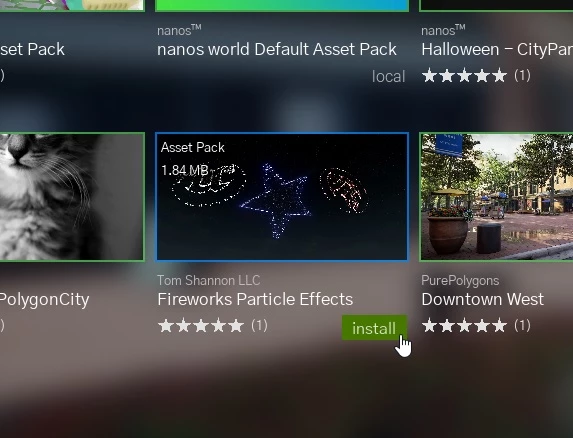
配置资产包
After that you will need to add this Asset Pack and the default-weapons Package (which we will use to spawn a Weapon) as requirements of your Package, in its Package.toml:
Packages/my-firework-package/Package.toml
[meta]
    title =                 "My Awesome Firework Package"
    author =                "Me"
    version =               "1.0.0"

[script]
    # ... keep the other settings generated by the CLI ...
    # packages requirements
    packages_requirements = [
        "default-weapons",
    ]
    # asset packs requirements
    assets_requirements = [
        "ts-fireworks",
    ]
Requirements are loaded before your Package, so everything they define (like the Glock class) is ready when your scripts run. If you don't have them yet, install them from the Vault through the CLI:
Terminal
./NanosWorldServer.exe --cli install package default-weapons
./NanosWorldServer.exe --cli install assets ts-fireworks
代码片段
Server/Index.lua
-- Let's spawn a Glock from default-weapons package and set it to give no damage, this also avoids it from spawning a trail particle
local weapon = Glock()
weapon:SetDamage(0)

-- Let's subscribe for 'Fire' event from this weapon, this will be triggered for every fire it shoots
weapon:Subscribe("Fire", function(weap, shooter)
    -- We get the position at the front of the weapon
    local control_rotation = shooter:GetControlRotation()
    local forward_vector = control_rotation:GetForwardVector()
    local spawn_location = shooter:GetLocation() + Vector(0, 0, 40) + forward_vector * Vector(400)

    -- We will spawn an empty/invisible Prop, to be our projectile - using our Invisible mesh 'SM_None'
    local prop = Prop(spawn_location, control_rotation, "nanos-world::SM_None")

    -- Spawns the trail/shell particle, this particle is not auto destroyed as it should follow the projectile,
    -- this way we must destroy it manually after all
    -- The Asset Pack which we are using to get the particles contains two Shells: 'PS_TS_FireworksShell' and 'PS_TS_FireworksShell_Palm'
    -- You can use the another one to get more cool effects!
    local particle = Particle(Vector(), Rotator(), "ts-fireworks::PS_TS_FireworksShell", false, true)

    -- Attaches the particle to the projectile prop
    particle:AttachTo(prop)

    -- Impulses the Projectile forward
    prop:AddImpulse(forward_vector * Vector(50000), true)

    -- Sets the shooter to be the Network Authority of this Projectile
    -- This way only the shooter will be reponsible to handle the physics of this object
    prop:SetNetworkAuthority(shooter:GetPlayer())

    -- Calls the client to spawn the 'Launch' sound
    Events.BroadcastRemote("SpawnFireworkSound", Reliability.Reliable, particle)

    -- After 500 miliseconds, explode the firework
    Timer.SetTimeout(function(pr)
        -- Calls the client to spawn the 'Explosion' sound at the projectile location
        Events.BroadcastRemote("ExplodeFireworkSound", Reliability.Reliable, pr:GetLocation())

        -- Spawns the Particle Explosion.
        -- This Asset Pack also contains the following Particles, feel free to try them!
        -- 'PS_TS_Fireworks_Burst_Chrys', 'PS_TS_Fireworks_Burst_Circle', 'PS_TS_Fireworks_Burst_Palm',
        -- 'PS_TS_Fireworks_Burst_Shaped' and 'PS_TS_Fireworks_Burst_ShellsWithinShells'
        local particle_burst = Particle(pr:GetLocation(), Rotator(), "ts-fireworks::PS_TS_Fireworks_Burst_Palm", true, true)

        -- Those particles make it available to tweak some of their properties, let's set the BlastColor to red
        particle_burst:SetParameterColor("BlastColor", Color(1, 0, 0))

        -- Those particles exposes the following parameters:
        --  Color: 'BlastColor', 'BurstColor', 'SparkleColor', 'FlareColor', 'TailColor'
        --  bool: 'BlastSmoke', 'TailSmoke'
        --  float: 'BurstMulti', 'SparkleMulti'
    end, 500, prop)

    -- After 1 second, destroy the particle and the projectile
    prop:SetLifeSpan(1)
    particle:SetLifeSpan(1)
end)
Client/Index.lua
-- 订阅以生成并附加烟花发射音效
Events.SubscribeRemote("SpawnFireworkSound", function(firework)
    local sound = Sound(Vector(), "ts-fireworks::A_Firework_Launch", false, true, SoundType.SFX, 1, 1, 400, 100000)
    sound:AttachTo(firework)
end)

-- 订阅以生成烟花爆炸音效
Events.SubscribeRemote("ExplodeFireworkSound", function(location)
    Sound(location, "ts-fireworks::A_Firework_Explosion_Fizz_Cue", false, true, SoundType.SFX, 3, 1, 400, 100000)
end)