基本 HUD(画布)
如何使用渲染器的画布功能添加一个基本 HUD,以显示角色的生命值和弹药量。
提示
你也可以使用 HTML + JavaScript + CSS 创建完整且复杂的 UI,快来看看吧:基本 HUD(HTML)。
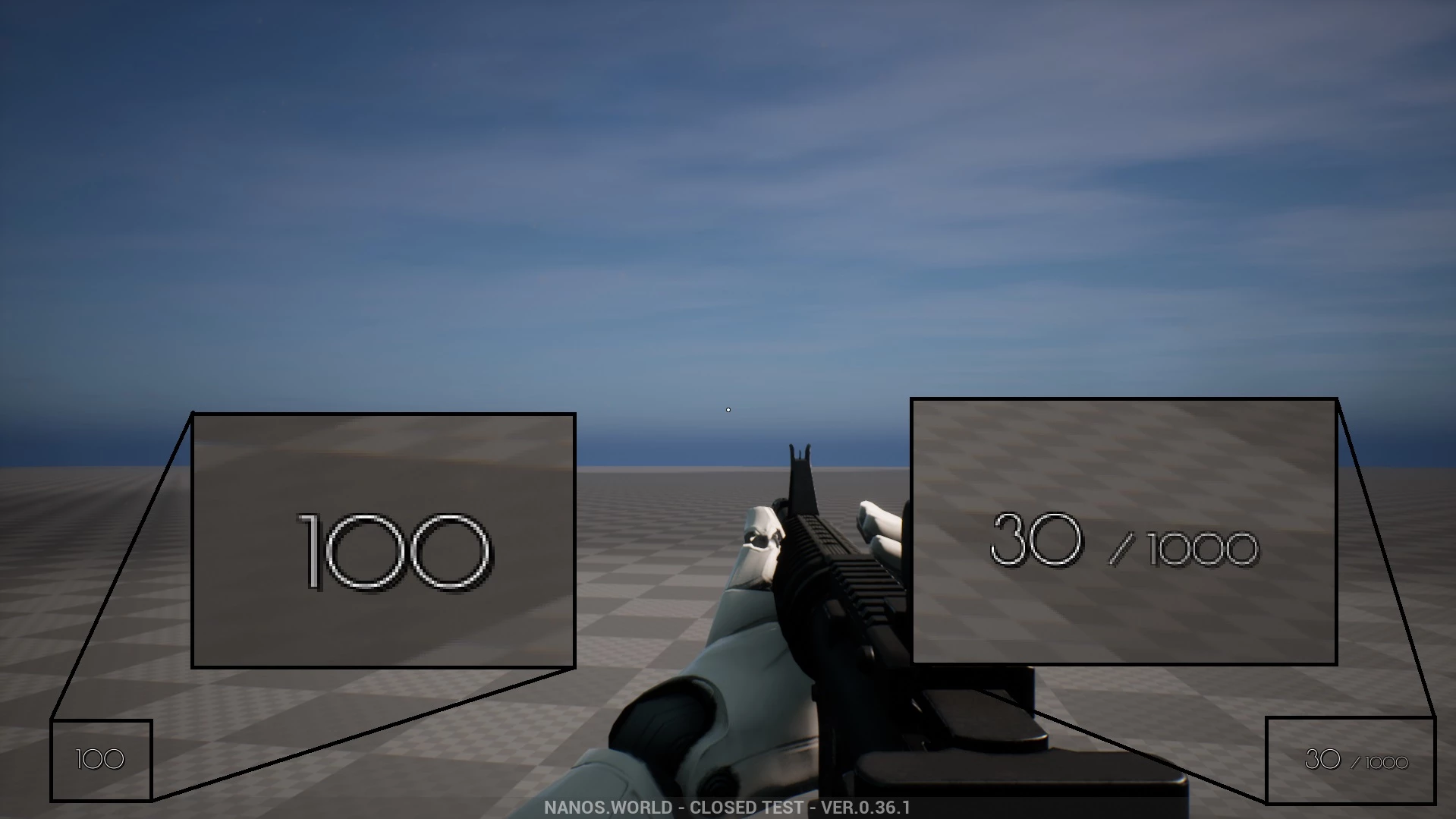
画布(Canvas)可以用来绘制图形。以下代码展示了如何使用画布添加基础 UI:
Client/Index.lua
-- Spawns the Canvas
HUDCanvas = Canvas(true, Color.TRANSPARENT, 0, true)

-- Subscribes for Update event, we can only draw inside this event
HUDCanvas:Subscribe("Update", function(self, width, height)
    -- Gets the Local Player
    local local_player = Client.GetLocalPlayer()
    if (not local_player) then return end

    -- Gets the Local Character (possessed by the Local Player)
    local local_character = local_player:GetControlledCharacter()
    if (not local_character) then return end

    -- Draws the Health
    self:DrawText(tostring(local_character:GetHealth()), Vector2D(100, height - 100), FontType.PoiretOne, 25, Color.WHITE)

    -- Gets the Local Weapon
    local character_weapon = local_character:GetPicked()
    if (character_weapon and character_weapon:IsA(Weapon)) then
        -- Draws the Ammo Clip
        self:DrawText(tostring(character_weapon:GetAmmoClip()), Vector2D(width - 200, height - 100), FontType.PoiretOne, 25, Color.WHITE)

        -- Draws the Ammo Bag
        self:DrawText("/ " .. tostring(character_weapon:GetAmmoBag()), Vector2D(width - 140, height - 87), FontType.PoiretOne, 15, Color.WHITE)
    end
end)
上面的示例在每个刻都会重新渲染并更新所有生命值/弹药信息,这可能会影响性能。幸运的是,我们可以通过在构造函数中修改自动重绘速率来限制它,从而快速改善性能:
-- Instead of 0 in the auto_repaint_rate parameter
HUDCanvas = Canvas(true, Color.TRANSPARENT, 0, true)

-- Use 0.033, so it only updates every 0.033 seconds (i.e. about 30 times per second)
HUDCanvas = Canvas(true, Color.TRANSPARENT, 0.033, true)
另一种进一步的优化是仅在需要时进行更新,对于这种情况,我们需要实现一些额外的代码。在这种情况下,我们将 auto_repaint_rate 设置为 -1 以禁用自动重绘:
-- We set -1 to never auto repaint
HUDCanvas = Canvas(true, Color.TRANSPARENT, -1, true)

-- Subscribes for Update event, we can only draw inside this event (as usual)
HUDCanvas:Subscribe("Update", function(self, width, height)
    -- Gets the Local Player
    local local_player = Client.GetLocalPlayer()
    if (not local_player) then return end

    -- Gets the Local Character (possessed by the Local Player)
    local local_character = local_player:GetControlledCharacter()
    if (not local_character) then return end

    -- Draws the Health
    self:DrawText(tostring(local_character:GetHealth()), Vector2D(100, height - 100), FontType.PoiretOne, 25, Color.WHITE)

    -- Gets the Local Weapon
    local character_weapon = local_character:GetPicked()
    if (character_weapon and character_weapon:IsA(Weapon)) then
        -- Draws the Ammo Clip
        self:DrawText(tostring(character_weapon:GetAmmoClip()), Vector2D(width - 200, height - 100), FontType.PoiretOne, 25, Color.WHITE)

        -- Draws the Ammo Bag
        self:DrawText("/ " .. tostring(character_weapon:GetAmmoBag()), Vector2D(width - 140, height - 87), FontType.PoiretOne, 15, Color.WHITE)
    end
end)


-- Now we subscribe for when we want it to be updated:

-- Function to set all needed events on local character (to update the UI when its health or weapon changes)
function UpdateLocalCharacter(character)
    -- Verifies if character is not nil (eg. when GetControlledCharacter() doesn't return a character)
    if (character == nil) then return end

    -- Updates the health UI whenever the health changes (damage, healing, respawn or scripting)
    character:Subscribe("HealthChange", function(charac, old_health, new_health)
        HUDCanvas:Repaint()
    end)

    -- Updates the ammo UI when picking up a weapon
    character:Subscribe("PickUp", function(charac, object)
        if (object:IsA(Weapon)) then
            HUDCanvas:Repaint()
        end
    end)

    -- Removes the ammo UI when dropping the weapon
    character:Subscribe("Drop", function(charac, object)
        HUDCanvas:Repaint()
    end)

    -- Updates the ammo UI when firing
    character:Subscribe("Fire", function(charac, weapon)
        HUDCanvas:Repaint()
    end)

    -- Updates the ammo UI when reloading
    character:Subscribe("Reload", function(charac, weapon, ammo_to_reload)
        HUDCanvas:Repaint()
    end)

    -- Updates the UI immediately
    HUDCanvas:Repaint()
end

-- Unsubscribes from the old character events when we stop controlling it, so they don't pile up
function ClearLocalCharacter(character)
    if (character == nil or not character:IsValid()) then return end

    character:Unsubscribe("HealthChange")
    character:Unsubscribe("PickUp")
    character:Unsubscribe("Drop")
    character:Unsubscribe("Fire")
    character:Unsubscribe("Reload")
end

-- When the LocalPlayer spawns, subscribes to know when it possesses a new Character. This event is only called once, see Package.Subscribe("Load") for when reloading the package
Client.Subscribe("SpawnLocalPlayer", function(local_player)
    local_player:Subscribe("Possess", function(player, character)
        UpdateLocalCharacter(character)
    end)

    local_player:Subscribe("UnPossess", function(player, character)
        ClearLocalCharacter(character)
        HUDCanvas:Repaint()
    end)
end)

-- When the package loads, verifies if the LocalPlayer already exists (eg. when reloading the package), then gets its controlled character
Package.Subscribe("Load", function()
    local local_player = Client.GetLocalPlayer()
    if (local_player ~= nil) then
        UpdateLocalCharacter(local_player:GetControlledCharacter())
    end
end)

-- Updates the UI positions when the Viewport (screen) is resized
Viewport.Subscribe("Resize", function(new_size)
    HUDCanvas:Repaint()
end)
备注
Unsubscribe without a callback removes all callbacks of that event which this Package subscribed on the entity. If your Package subscribes to those events elsewhere too, keep the callbacks returned by Subscribe and pass them to Unsubscribe instead.