💬 Chat
Configure, send and intercept chat messages.
🎒 Examples
(Chat.BroadcastMessage) Sends a message to everyone
Chat.BroadcastMessage("Welcome to the server!")
Colors in Chat
It is also possible to send colored messages in the Chat! For that, just circumvent a piece of text with a style tag: \<TAG>my awesome text</>.
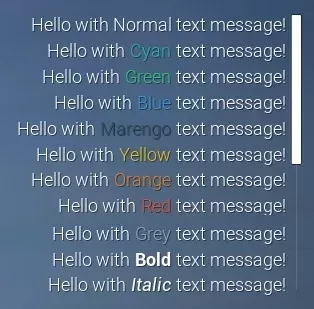
Server/Index.lua
Chat.BroadcastMessage("Hello with <cyan>Cyan</> text message!")
All supported text styles/tags:
\<cyan> \<green> \<blue> \<purple> \<marengo> \<yellow> \<orange> \<red> \<grey> \<bold> \<italic>
note
It is NOT possible to combine two or more styles together (e.g. \<bold> + \<red>).
🗿 Static Functions
| Returns | Name | Description | |
|---|---|---|---|
 | AddMessage | Adds a chat message which will display local only | |
 | BroadcastMessage | Sends a chat message to all Players | |
| Clear | Clears all messages | |
| SendMessage | Sends a chat message to a Player only | |
| SetConfiguration | Configures the Chat visuals and position | |
| SetVisibility | Sets if the Chat is visible or not | |
 | function | Subscribe | Subscribes to an Event |
| Unsubscribe | Unsubscribes from all subscribed Events in this Class and in this Package, optionally passing the function to unsubscribe only that callback |
 Moderate
AddMessage
Adds a chat message which will display local only
Chat.AddMessage(message)
Parameters
| Type | Parameter | Default | Description |
|---|---|---|---|
| string | message | Required parameter | The message, supports the same rich text tags as the chat |
ModerateBroadcastMessage
Sends a chat message to all Players
Chat.BroadcastMessage(message)
Parameters
| Type | Parameter | Default | Description |
|---|---|---|---|
| string | message | Required parameter | The message to send to all Players |
Chat.BroadcastMessage Examples
Sends a message to everyone
Chat.BroadcastMessage("Welcome to the server!")
Clear
Clears all messages
Chat.Clear()
 Optimal
SendMessage
Sends a chat message to a Player only
Chat.SendMessage(player, message)
Parameters
| Type | Parameter | Default | Description |
|---|---|---|---|
| Player | player | Required parameter | The player to receive the message |
| string | message | Required parameter | The message |
ModerateSetConfiguration
Configures the Chat visuals and position
Chat.SetConfiguration(screen_location?, size?, anchors_min?, anchors_max?, alignment?, justify?, show_scrollbar?)
Parameters
| Type | Parameter | Default | Description |
|---|---|---|---|
| Vector2D | screen_location? | Vector2D(-25, 0) | Screen location, or the left and top offsets when the anchors are stretched |
| Vector2D | size? | Vector2D(600, 250) | Size, or the right and bottom offsets when the anchors are stretched |
| Vector2D | anchors_min? | Vector2D(1, 0.5) | Min anchor, from (0, 0) top-left to (1, 1) bottom-right |
| Vector2D | anchors_max? | Vector2D(1, 0.5) | Max anchor, from (0, 0) top-left to (1, 1) bottom-right |
| Vector2D | alignment? | Vector2D(1, 0.5) | Pivot of the chat, (0.5, 0.5) is the center |
| boolean | justify? | true | Whether the text is justified |
| boolean | show_scrollbar? | true | Whether to show the scrollbar |
OptimalSetVisibility
Sets if the Chat is visible or not
Chat.SetVisibility(is_visible)
Parameters
| Type | Parameter | Default | Description |
|---|---|---|---|
| boolean | is_visible | Required parameter | Whether the Chat is visible or not |
OptimalSubscribe
Subscribes to an Event
local ret = Chat.Subscribe(event_name, callback)
Parameters
| Type | Parameter | Default | Description |
|---|---|---|---|
| string | event_name | Required parameter | Event to subscribe to |
| function | callback | Required parameter | Callback to run on the event occurring |
Returns
| Type | Description |
|---|---|
| function | The function callback |
OptimalUnsubscribe
Unsubscribes from all subscribed Events in this Class and in this Package, optionally passing the function to unsubscribe only that callback
Chat.Unsubscribe(event_name, callback?)
Parameters
| Type | Parameter | Default | Description |
|---|---|---|---|
| string | event_name | Required parameter | Event to unsubscribe to |
| function | callback? | nil | Optional callback to specifically unsubscribe to |
🚀 Events
| Name | Description | |
|---|---|---|
| ChatEntry | Called when a new Chat Message is received, this is also triggered when new messages are sent programatically |
| Close | When player closes the Chat |
| Open | When player opens the Chat |
| PlayerSubmit | Called when a player submits a message in the chat |
ChatEntry
Called when a new Chat Message is received, this is also triggered when new messages are sent programatically
This is useful for creating your own Chat interface while still use the built-in system
Chat.Subscribe("ChatEntry", function(message, player)
	-- ChatEntry was called
end)
Arguments
| Type | Argument | Description |
|---|---|---|
| string | message | The message |
| Player or nil | player | The player who sent the message or nil if this was called on client side or was sent through code |
Close
When player closes the Chat
Chat.Subscribe("Close", function()
	-- Close was called
end)
Open
When player opens the Chat
Chat.Subscribe("Open", function()
	-- Open was called
end)
PlayerSubmit
Called when a player submits a message in the chat
Return false to prevent the message from being sent
Chat.Subscribe("PlayerSubmit", function(message, player)
	-- PlayerSubmit was called
	return true
end)