HUD Basique (Canvas)
Comment ajouter un HUD de base en utilisant les fonctionnalités de Render's Canvas pour afficher la santé et les munitions du personnage.
Vous pouvez aussi créer des interfaces complètes et complexes en HTML + JavaScript + CSS, voyez : HUD de base (HTML).
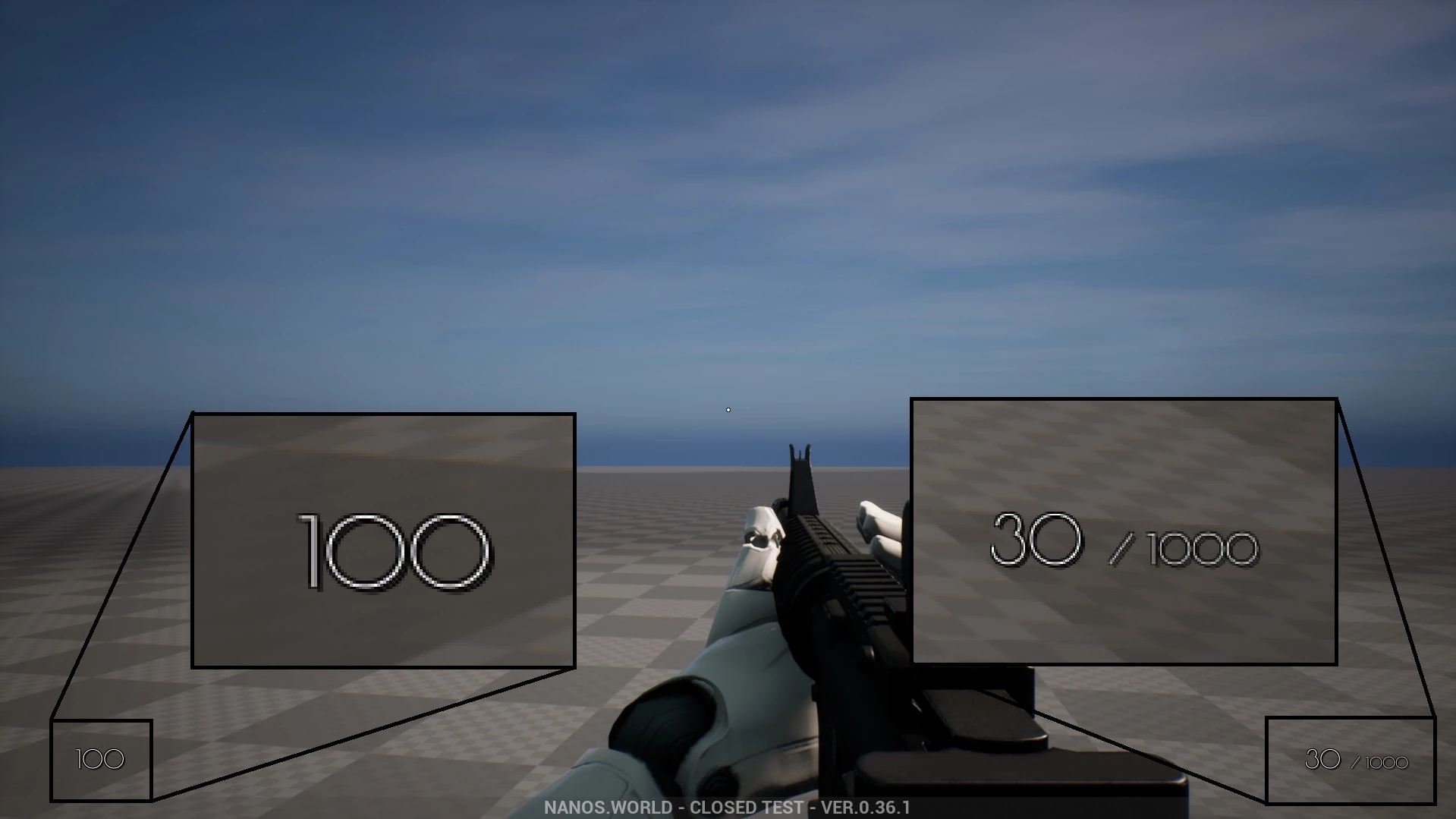
Un Canvas est une surface sur laquelle on peut dessiner. Le code suivant montre comment ajouter une interface de base avec un Canvas :
-- Spawns the Canvas
HUDCanvas = Canvas(true, Color.TRANSPARENT, 0, true)

-- Subscribes for Update event, we can only draw inside this event
HUDCanvas:Subscribe("Update", function(self, width, height)
    -- Gets the Local Player
    local local_player = Client.GetLocalPlayer()
    if (not local_player) then return end

    -- Gets the Local Character (possessed by the Local Player)
    local local_character = local_player:GetControlledCharacter()
    if (not local_character) then return end

    -- Draws the Health
    self:DrawText(tostring(local_character:GetHealth()), Vector2D(100, height - 100), FontType.PoiretOne, 25, Color.WHITE)

    -- Gets the Local Weapon
    local character_weapon = local_character:GetPicked()
    if (character_weapon and character_weapon:IsA(Weapon)) then
        -- Draws the Ammo Clip
        self:DrawText(tostring(character_weapon:GetAmmoClip()), Vector2D(width - 200, height - 100), FontType.PoiretOne, 25, Color.WHITE)

        -- Draws the Ammo Bag
        self:DrawText("/ " .. tostring(character_weapon:GetAmmoBag()), Vector2D(width - 140, height - 87), FontType.PoiretOne, 15, Color.WHITE)
    end
end)
L'exemple ci-dessus redessine et met à jour toutes les infos de vie/munitions à chaque tick, ce qui peut nuire aux performances. Heureusement, on peut vite l'améliorer en limitant la fréquence de redessin automatique, dans le constructeur :
-- Instead of 0 in the auto_repaint_rate parameter
HUDCanvas = Canvas(true, Color.TRANSPARENT, 0, true)

-- Use 0.033, so it only updates every 0.033 seconds (i.e. about 30 times per second)
HUDCanvas = Canvas(true, Color.TRANSPARENT, 0.033, true)
Autre optimisation : ne mettre à jour que quand c'est nécessaire ; il faudra pour cela un peu de code en plus. Ici, on règle auto_repaint_rate sur -1 pour désactiver le redessin automatique :
-- We set -1 to never auto repaint
HUDCanvas = Canvas(true, Color.TRANSPARENT, -1, true)

-- Subscribes for Update event, we can only draw inside this event (as usual)
HUDCanvas:Subscribe("Update", function(self, width, height)
    -- Gets the Local Player
    local local_player = Client.GetLocalPlayer()
    if (not local_player) then return end

    -- Gets the Local Character (possessed by the Local Player)
    local local_character = local_player:GetControlledCharacter()
    if (not local_character) then return end

    -- Draws the Health
    self:DrawText(tostring(local_character:GetHealth()), Vector2D(100, height - 100), FontType.PoiretOne, 25, Color.WHITE)

    -- Gets the Local Weapon
    local character_weapon = local_character:GetPicked()
    if (character_weapon and character_weapon:IsA(Weapon)) then
        -- Draws the Ammo Clip
        self:DrawText(tostring(character_weapon:GetAmmoClip()), Vector2D(width - 200, height - 100), FontType.PoiretOne, 25, Color.WHITE)

        -- Draws the Ammo Bag
        self:DrawText("/ " .. tostring(character_weapon:GetAmmoBag()), Vector2D(width - 140, height - 87), FontType.PoiretOne, 15, Color.WHITE)
    end
end)


-- Now we subscribe for when we want it to be updated:

-- Function to set all needed events on local character (to update the UI when its health or weapon changes)
function UpdateLocalCharacter(character)
    -- Verifies if character is not nil (eg. when GetControlledCharacter() doesn't return a character)
    if (character == nil) then return end

    -- Updates the health UI whenever the health changes (damage, healing, respawn or scripting)
    character:Subscribe("HealthChange", function(charac, old_health, new_health)
        HUDCanvas:Repaint()
    end)

    -- Updates the ammo UI when picking up a weapon
    character:Subscribe("PickUp", function(charac, object)
        if (object:IsA(Weapon)) then
            HUDCanvas:Repaint()
        end
    end)

    -- Removes the ammo UI when dropping the weapon
    character:Subscribe("Drop", function(charac, object)
        HUDCanvas:Repaint()
    end)

    -- Updates the ammo UI when firing
    character:Subscribe("Fire", function(charac, weapon)
        HUDCanvas:Repaint()
    end)

    -- Updates the ammo UI when reloading
    character:Subscribe("Reload", function(charac, weapon, ammo_to_reload)
        HUDCanvas:Repaint()
    end)

    -- Updates the UI immediately
    HUDCanvas:Repaint()
end

-- Unsubscribes from the old character events when we stop controlling it, so they don't pile up
function ClearLocalCharacter(character)
    if (character == nil or not character:IsValid()) then return end

    character:Unsubscribe("HealthChange")
    character:Unsubscribe("PickUp")
    character:Unsubscribe("Drop")
    character:Unsubscribe("Fire")
    character:Unsubscribe("Reload")
end

-- When the LocalPlayer spawns, subscribes to know when it possesses a new Character. This event is only called once, see Package.Subscribe("Load") for when reloading the package
Client.Subscribe("SpawnLocalPlayer", function(local_player)
    local_player:Subscribe("Possess", function(player, character)
        UpdateLocalCharacter(character)
    end)

    local_player:Subscribe("UnPossess", function(player, character)
        ClearLocalCharacter(character)
        HUDCanvas:Repaint()
    end)
end)

-- When the package loads, verifies if the LocalPlayer already exists (eg. when reloading the package), then gets its controlled character
Package.Subscribe("Load", function()
    local local_player = Client.GetLocalPlayer()
    if (local_player ~= nil) then
        UpdateLocalCharacter(local_player:GetControlledCharacter())
    end
end)

-- Updates the UI positions when the Viewport (screen) is resized
Viewport.Subscribe("Resize", function(new_size)
    HUDCanvas:Repaint()
end)
Unsubscribe sans callback retire tous les callbacks de cet événement que ce Package a abonnés sur l'entité. Si votre Package s'abonne aussi à ces événements ailleurs, gardez les callbacks renvoyés par Subscribe et passez-les plutôt à Unsubscribe.