🪟 Widget
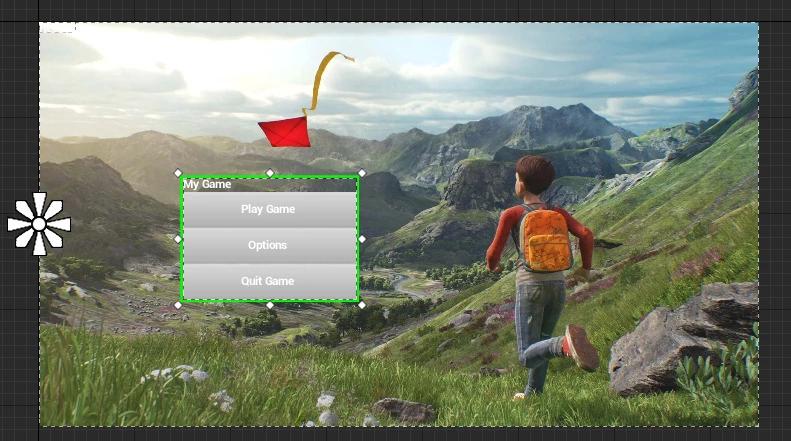
The Widget class supports spawning Unreal Widgets classes through scripting and manipulate them such as Blueprints!
 Client OnlyAPI Source
The Widget class allows a very versatile way to create and use Unreal widgets as UI within the game.
Most parameters are not exposed in the Widget class, and should be called using the method CallBlueprintEvent(), which will call the specific underlying Widget method.
🎒 Examples
Creating a Simple Native Text and adding it to screen
local my_text = Widget(NativeWidget.Text)
my_text:CallBlueprintEvent("SetText", "Hello World!")
my_text:AddToViewport()
SetText is a method from UTextBlock, the Widget associated to NativeWidget.Text.
Creating a Widgets with Childs
local my_vertical_box = Widget(NativeWidget.VerticalBox)
my_vertical_box:AddToViewport()

local my_text = Widget(NativeWidget.Text)
my_text:CallBlueprintEvent("SetText", "Hello World!")

local my_button = Widget(NativeWidget.Button)

my_vertical_box:AddChild(my_text)
my_vertical_box:AddChild(my_button)
Using a WebUI as Image Brush
local webui = WebUI("mywebui", "https://google.com", WidgetVisibility.Hidden)

local my_image = Widget(NativeWidget.Image)
my_image:CallBlueprintEvent("SetBrushFromMaterial", webui)
my_image:AddToViewport()
SetBrushFromMaterial is a method from UImage, and expects a MaterialInstance as parameter. Passing WebUI, SceneCapture or Canvas converts it to it's internal Material automatically when being passed as parameter!
Subscribing for a Dispatcher
local my_button = Widget(NativeWidget.Button)

-- Puts a text inside of it
local my_text = Widget(NativeWidget.Text)
my_text:CallBlueprintEvent("SetText", "Press Me!")
my_button:AddChild(my_text)

-- Binds the native OnClicked dispatcher
my_button:BindBlueprintEventDispatcher("OnClicked", function()
	Console.Log("clicked!")
end)

-- Adds the button to viewport (will fill the whole screen)
my_button:AddToViewport()
📚 Libraries & Frameworks
Here a list of Community Created Libraries & Frameworks making use of Widgets expanding it's possibilities:
🛠 Constructors
UserWidget Constructor
Spawns a Widget passing a UserWidget blueprint
local my_widget = Widget(blueprint_path)
Parameters
| Name | Type | Description |
|---|---|---|
blueprint_path | Blueprint Reference | A custom UserWidget Blueprint to spawn |
Native Widget Constructor
Spawns a Widget passing a NativeWidget enum
local my_widget = Widget(native_widget)
Parameters
| Name | Type | Description |
|---|---|---|
native_widget | NativeWidget | One of the native Widgets to spawn |
🦠 Functions
| Blueprints | ||
| BindBlueprintEventDispatcher: function | Assigns and Binds a Blueprint Event Dispatcher |
| CallBlueprintEvent: varargs of any | Calls a Blueprint Event or Function |
| GetBlueprintPropertyValue: any | Gets a Blueprint Property/Variable value |
| SetBlueprintPropertyValue | Sets a Blueprint Property/Variable value directly |
| UnbindBlueprintEventDispatcher | Unbinds a Blueprint Event Dispatcher |
| Layout | ||
| AddChild | Adds a new child widget to this Widget container, if this is a Panel |
| AddToViewport | Adds it to the game's viewport and fills the entire screen |
| BringToFront | Puts this Widget in the front of all WebUIs and Widgets |
| GetVisibility: WidgetVisibility | Returns the current WebUI visibility |
| SetFocus | Enables the focus on this Widget |
| SetVisibility | Sets the visibility in screen |
| SpawnWidget3D: Widget3D | Spawns a 3D Widget actor rendering this Widget in the world |
| Slots | ||
| SetContentForSlot | Sets the widget for a given slot by name, if this is a UserWidget |
| SetSlotAlignment | Sets the slot alignment for horizontal and vertical positioning |
| SetSlotCanvasLayout | Sets the Layout as Canvas on Screen |
| SetSlotPadding | Sets the slot padding for horizontal and vertical spacing |
| SetSlotSize | Sets the slot size and size rule |
Inherited functions
GetAllValuesKeys, GetValue, SetValueSubscribe, UnsubscribeDestroy, FinishSpawn, IsBeingDestroyed, IsSpawned, IsValid, SetSpawnModeBroadcastRemoteEvent, BroadcastRemoteInRadiusEvent, CallRemoteEvent, CallRemoteEvent, CallRemotePlayersEvent, HasAuthority, SubscribeRemoteGetIDBlueprintsfunctions
BindBlueprintEventDispatcher Slow
Assigns and Binds a Blueprint Event Dispatcher
local ret = my_widget:BindBlueprintEventDispatcher(dispatcher_name, callback)
Parameters
| Name | Type | Description |
|---|---|---|
dispatcher_name | string | Event Dispatcher name |
callback | function | Callback function to call with this format |
Returns
| Type | Description |
|---|---|
| function | the callback itself |
CallBlueprintEventSlow
Calls a Blueprint Event or Function
Returns all Function return values on Client Side
local ret_01, ret_02, ... = my_widget:CallBlueprintEvent(event_name, arguments...?)
GetBlueprintPropertyValueSlow
Gets a Blueprint Property/Variable value
local ret = my_widget:GetBlueprintPropertyValue(property_name)
Parameters
| Name | Type | Description |
|---|---|---|
property_name | string | Name of the Blueprint variable |
Returns
| Type | Description |
|---|---|
| any | the value |
See also SetBlueprintPropertyValue.
SetBlueprintPropertyValueSlow
Sets a Blueprint Property/Variable value directly
my_widget:SetBlueprintPropertyValue(property_name, value)
Parameters
| Name | Type | Description |
|---|---|---|
property_name | string | Name of the Blueprint variable |
value | any | The value to set |
See also GetBlueprintPropertyValue.
UnbindBlueprintEventDispatcher Optimal
Unbinds a Blueprint Event Dispatcher
my_widget:UnbindBlueprintEventDispatcher(dispatcher_name, callback?)
Layoutfunctions
AddChild Moderate
Adds a new child widget to this Widget container, if this is a Panel
my_widget:AddChild(other)
AddToViewportModerate
Adds it to the game's viewport and fills the entire screen
my_widget:AddToViewport()
BringToFrontOptimal
Puts this Widget in the front of all WebUIs and Widgets
Note: You can only call it if the Widget is parented to the Viewport!
my_widget:BringToFront()
GetVisibilityOptimal
Returns the current WebUI visibility
local visibility = my_widget:GetVisibility()
Returns
| Type | Description |
|---|---|
| WidgetVisibility | Current WebUI visibility |
See also SetVisibility.
SetFocusOptimal
Enables the focus on this Widget
Enables the focus on this Widget (i.e. can receive Keyboard input and will trigger input events)
Note: Only one Widget can have focus per time
my_widget:SetFocus()
SetVisibilityModerate
Sets the visibility in screen
my_widget:SetVisibility(visibility)
Parameters
| Name | Type | Description |
|---|---|---|
visibility | WidgetVisibility | The new visibility in screen |
See also GetVisibility.
SpawnWidget3DSlow
Spawns a 3D Widget actor rendering this Widget in the world
local widget_3D = my_widget:SpawnWidget3D(location?, rotation?, widget_space?, auto_size?, size?, auto_repaint_rate?, pivot?)
Parameters
| Name | Type | Description |
|---|---|---|
location? | Vector | World location Default Vector(0, 0, 0) |
rotation? | Rotator | World rotation Default Rotator(0, 0, 0) |
widget_space? | WidgetSpace | Whether it renders in the world or always facing the screen Default WidgetSpace.World |
auto_size? | boolean | Whether to size it automatically based on its content Default false |
size? | Vector2D | Only works if auto_size = false Default Vector2D(500, 500) |
auto_repaint_rate? | float | Leaves -1 to repaint every frame Default -1 |
pivot? | Vector2D | Pivot of the widget, (0.5, 0.5) is the center Default Vector2D(0.5, 0.5) |
Returns
| Type | Description |
|---|---|
| Widget3D | The spawned Widget3D |
Slotsfunctions
SetContentForSlotModerate
Sets the widget for a given slot by name, if this is a UserWidget
my_widget:SetContentForSlot(slot_name, widget?)
SetSlotAlignmentModerate
Sets the slot alignment for horizontal and vertical positioning
Note: This method only works if this Widget is child of one of: HorizontalBoxSlot, VerticalBoxSlot, OverlaySlot, SizeBoxSlot, ScrollBoxSlot, BackgroundBlurSlot, BorderSlot, ButtonSlot, ScaleBoxSlot, UniformGridSlot, GridSlot
my_widget:SetSlotAlignment(horizontal_alignment?, vertical_alignment?)
Parameters
| Name | Type | Description |
|---|---|---|
horizontal_alignment? | WidgetHorizontalAlignment | Horizontal alignment for the slot Default WidgetHorizontalAlignment.Fill |
vertical_alignment? | WidgetVerticalAlignment | Vertical alignment for the slot Default WidgetVerticalAlignment.Fill |
SetSlotCanvasLayoutOptimal
Sets the Layout as Canvas on Screen
Note: This method only works if this Widget is child of a Canvas Panel.
Anchors: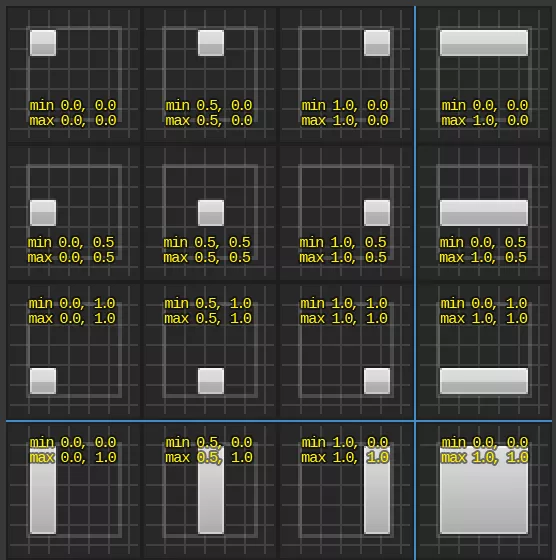
my_widget:SetSlotCanvasLayout(location?, size?, anchors_min?, anchors_max?, alignment?)
Parameters
| Name | Type | Description |
|---|---|---|
location? | Vector2D | Screen location, or the left and top offsets when the anchors are stretched Default Vector(0, 0) |
size? | Vector2D | Size, or the right and bottom offsets when the anchors are stretched Default Vector(0, 0) |
anchors_min? | Vector2D | Min anchor, from (0, 0) top-left to (1, 1) bottom-right Default Vector(0, 0) |
anchors_max? | Vector2D | Max anchor, from (0, 0) top-left to (1, 1) bottom-right Default Vector(1, 1) |
alignment? | Vector2D | Pivot of the Widget, (0.5, 0.5) is the center Default Vector(0.5, 0.5) |
SetSlotPaddingModerate
Sets the slot padding for horizontal and vertical spacing
Note: This method only works if this Widget is child of one of: HorizontalBoxSlot, VerticalBoxSlot, OverlaySlot, SizeBoxSlot, ScrollBoxSlot, BackgroundBlurSlot, BorderSlot, ButtonSlot, GridSlot
my_widget:SetSlotPadding(padding_horizontal?, padding_vertical?)
SetSlotSizeModerate
Sets the slot size and size rule
Note: This method only works if this Widget is child of one of: HorizontalBoxSlot, VerticalBoxSlot, ScrollBoxSlot
my_widget:SetSlotSize(size?, slate_size_rule?)
Parameters
| Name | Type | Description |
|---|---|---|
size? | float | Size value for the slot Default 0.0 |
slate_size_rule? | WidgetSizeRule | Size rule for the slot Default WidgetSizeRule.Automatic |
🚀 Events
This class doesn't have own events.
Inherited events
ClassRegister, Destroy, Spawn, ValueChange✅ NativeWidgets to Unreal Widgets Relation
List of the relation Unreal native Widgets ↔ NativeWidget Enums:
| Enum | Unreal Class | Is Panel |
|---|---|---|
NativeWidget.Border | Border | ✅ |
NativeWidget.Button | Button | ✅ |
NativeWidget.CheckBox | CheckBox | ✅ |
NativeWidget.Image | Image | ❌ |
NativeWidget.ProgressBar | ProgressBar | ❌ |
NativeWidget.RichTextBlock | RichTextBlock | ❌ |
NativeWidget.Slider | Slider | ❌ |
NativeWidget.Text | TextBlock | ❌ |
NativeWidget.ComboBox | ComboBox | ❌ |
NativeWidget.EditableText | EditableText | ❌ |
NativeWidget.EditableTextMultiLine | MultiLineEditableText | ❌ |
NativeWidget.SpinBox | SpinBox | ❌ |
NativeWidget.TextBox | EditableTextBox | ❌ |
NativeWidget.TextBoxMultiLine | MultiLineEditableTextBox | ❌ |
NativeWidget.CanvasPanel | CanvasPanel | ✅ |
NativeWidget.GridPanel | GridPanel | ✅ |
NativeWidget.HorizontalBox | HorizontalBox | ✅ |
NativeWidget.Overlay | Overlay | ✅ |
NativeWidget.ScaleBox | ScaleBox | ✅ |
NativeWidget.ScrollBox | ScrollBox | ✅ |
NativeWidget.SizeBox | SizeBox | ✅ |
NativeWidget.UniformGridPanel | UniformGridPanel | ✅ |
NativeWidget.VerticalBox | VerticalBox | ✅ |
NativeWidget.WrapBox | WrapBox | ✅ |
NativeWidget.BackgroundBlur | BackgroundBlur | ✅ |
✅ List of Supported Parameter Types
See all Supported Parameter Types in the Blueprint Page.