🔊 Sound
Class for playing in-game 2D and 3D sounds
You can also load raw .ogg files from disk! Please check SpecialPath.
🎒 Examples
local my_sound = Sound(
    Vector(-510, 145, 63), -- Location (if a 3D sound)
    "nanos-world::A_VR_Confirm", -- Asset Path
    false, -- Is 2D Sound
    true, -- Auto Destroy (if to destroy after finished playing)
    SoundType.SFX,
    1, -- Volume
    1 -- Pitch
)
-- Spawning a ogg sound located in a Package
local ogg_sound = Sound(Vector(), "package://my-package/Client/awesome_beep.ogg", true)
🛠 Constructors
Default Constructor
No description provided
local my_sound = Sound(location, asset, is_2d_sound?, auto_destroy?, sound_type?, volume?, pitch?, inner_radius?, falloff_distance?, attenuation_function?, keep_playing_when_silent?, loop_mode?, auto_play?)
Parameters
| Name | Type | Description |
|---|---|---|
location | Vector | Only used if 3D sound |
asset | Sound Reference | The Sound Asset to load |
is_2d_sound? | boolean | Whether to spawn it as 2D or 3D Default false |
auto_destroy? | boolean | Whether to destroy after finished playing Default true |
sound_type? | SoundType | Used to apply user's volume settings Default SoundType.SFX |
volume? | float | Volume multiplier Default 1 |
pitch? | float | Pitch multiplier Default 1 |
inner_radius? | float | Only used if 3D sound Default 400 |
falloff_distance? | float | Only used if 3D sound Default 3600 |
attenuation_function? | AttenuationFunction | Only used if 3D sound Default AttenuationFunction.Linear |
keep_playing_when_silent? | boolean | Only used if 3D sound - Use with caution, it may cause performance issues! Default false |
loop_mode? | SoundLoopMode | Whether should force sound to loop Default SoundLoopMode.Default |
auto_play? | boolean | Whether it should immediately play when loaded Default true |
auto_destroy means the Entity will be immediately destroyed after spawned, losing references to the Sound spawned in-game. So if the Sound itself loops indefinitely, it will keep playing until the Player reconnects.
🗿 Static Functions
This class doesn't have own static functions.
Inherited static functions
Subscribe, UnsubscribeSubscribeRemoteGetAll, GetByIndex, GetCount, GetPairs🦠 Functions
| Attenuation | ||
 | GetFalloffDistance: float | Gets the distance at which the sound becomes inaudible |
| GetInnerRadius: float | Gets the radius within which the volume is 100% |
| Is2D: boolean | Gets if the sound is 2D |
| SetAttenuationShape | If a 3D Sound, sets the shape of the volume within which the volume is 100% |
| SetFalloffDistance | If a 3D Sound, sets the distance which the sound is inaudible |
| SetInnerRadius | If a 3D Sound, sets the radius within which the volume is 100% |
| SetOcclusion | If a 3D Sound, configures its automatic occlusion |
| Mixing | ||
| GetLowPassFilter: float | Gets the low pass filter frequency |
| GetPitch: float | Gets the pitch multiplier |
| GetSoundType: SoundType | Gets the Sound Type, used to apply the user's volume settings |
| GetVolume: float | Gets the volume multiplier |
| SetLowPassFilter | Sets low-pass filter frequency. Sets 0 to disable it |
| SetPitch | Sets the Sound's pitch |
| SetVolume | Sets the Sound's volume |
| Playback | ||
| FadeIn | Plays the sound with a fade effect |
| FadeOut | Stops the sound with a fade effect |
| GetDuration: float | Gets the duration of the Sound |
| GetPath: string | Gets the asset path of this Sound |
| IsPlaying: boolean | Gets if the sound is playing |
| Play | Starts the sound |
| SetPaused | Pauses or resumes the sound |
| Stop | Stops the sound |
| StopDelayed | Stops the sound after the provided delay |
Inherited functions
GetDistanceFromCamera, GetScreenPercentage, IsVisible, SetCastShadow, SetHighlightEnabled, SetOutlineEnabled, SetRenderCullDistance, SetVisibility, WasRecentlyRenderedAttachTo, Detach, GetAttachedEntities, GetAttachedTo, GetAttachedToSocket, GetSocketTransformGetLifeSpan, SetLifeSpanGetDimension, GetNetworkAuthority, HasNetworkAuthority, IsNetworkDistributed, SetDimension, SetDistanceOptimizationMultiplier, SetNetworkAuthority, SetNetworkAuthorityAutoDistributedGetAllValuesKeys, GetValue, SetValueSubscribe, UnsubscribeDestroy, FinishSpawn, IsBeingDestroyed, IsSpawned, IsValid, SetSpawnModeBroadcastRemoteEvent, BroadcastRemoteInRadiusEvent, CallRemoteEvent, CallRemoteEvent, CallRemotePlayersEvent, HasAuthority, SubscribeRemoteGetIDAttenuationfunctions
GetFalloffDistance Optimal
Gets the distance at which the sound becomes inaudible
local falloff_distance = my_sound:GetFalloffDistance()
Returns
| Type | Description |
|---|---|
| float | The falloff distance |
See also SetFalloffDistance.
GetInnerRadiusOptimal
Gets the radius within which the volume is 100%
local inner_radius = my_sound:GetInnerRadius()
Returns
| Type | Description |
|---|---|
| float | The inner radius |
See also SetInnerRadius.
Is2DOptimal
Gets if the sound is 2D
local is_2d_sound = my_sound:Is2D()
Returns
| Type | Description |
|---|---|
| boolean | Whether the sound is 2D |
SetAttenuationShapeOptimal
If a 3D Sound, sets the shape of the volume within which the volume is 100%
Outside the shape, the volume fades over the falloff distance. The meaning of the extents depends on the shape: Sphere uses X as the radius, Capsule uses X as the half height and Y as the radius, Box uses X, Y and Z as its extents, and Cone uses X as the radius, Y as the angle and Z as the falloff angle (both in degrees). The Capsule, Box and Cone follow the Sound's rotation. For a Sphere, this is the same as SetInnerRadius
my_sound:SetAttenuationShape(shape, extents, cone_offset?)
Parameters
| Name | Type | Description |
|---|---|---|
shape | AttenuationShape | The new attenuation shape |
extents | Vector | The dimensions of the shape, read differently by each shape |
cone_offset? | float | Cone only: the distance back from the Sound's location at which the cone begins Default 0 |
See also SetInnerRadius, SetFalloffDistance.
SetFalloffDistanceOptimal
If a 3D Sound, sets the distance which the sound is inaudible
my_sound:SetFalloffDistance(falloff_distance)
Parameters
| Name | Type | Description |
|---|---|---|
falloff_distance | float | Distance from the inner radius at which the sound becomes inaudible |
See also GetFalloffDistance.
SetInnerRadiusOptimal
If a 3D Sound, sets the radius within which the volume is 100%
my_sound:SetInnerRadius(inner_radius)
Parameters
| Name | Type | Description |
|---|---|---|
inner_radius | float | Radius within which the volume is 100% |
See also GetInnerRadius.
SetOcclusionOptimal
If a 3D Sound, configures its automatic occlusion
When something blocks the line between the listener and the Sound, like a wall or a floor, the Sound gets a low-pass filter and a volume multiplier. It is disabled by default
my_sound:SetOcclusion(enabled, low_pass_frequency?, volume_multiplier?)
Parameters
| Name | Type | Description |
|---|---|---|
enabled | boolean | If the Sound is automatically occluded |
low_pass_frequency? | float | The low-pass filter threshold frequency applied when occluded, in Hz Default 3500 |
volume_multiplier? | float | The volume multiplier applied when occluded Default 0.85 |
See also SetLowPassFilter, SetVolume.
Mixingfunctions
GetLowPassFilterOptimal
Gets the low pass filter frequency
local frequency = my_sound:GetLowPassFilter()
Returns
| Type | Description |
|---|---|
| float | The low pass filter frequency |
See also SetLowPassFilter.
GetPitchOptimal
Gets the pitch multiplier
local pitch = my_sound:GetPitch()
Returns
| Type | Description |
|---|---|
| float | The pitch multiplier |
See also SetPitch.
GetSoundTypeOptimal
Gets the Sound Type, used to apply the user's volume settings
local sound_type = my_sound:GetSoundType()
Returns
| Type | Description |
|---|---|
| SoundType | The Sound Type |
GetVolumeOptimal
Gets the volume multiplier
local volume = my_sound:GetVolume()
Returns
| Type | Description |
|---|---|
| float | The volume multiplier |
See also SetVolume.
SetLowPassFilterOptimal
Sets low-pass filter frequency. Sets 0 to disable it
my_sound:SetLowPassFilter(frequency)
Parameters
| Name | Type | Description |
|---|---|---|
frequency | float | The new low-pass filter frequency. Sets 0 to disable it |
See also GetLowPassFilter.
SetPitchOptimal
Sets the Sound's pitch
my_sound:SetPitch(new_pitch)
Parameters
| Name | Type | Description |
|---|---|---|
new_pitch | float | The new Sound's pitch |
See also GetPitch.
SetVolumeOptimal
Sets the Sound's volume
my_sound:SetVolume(new_volume)
Parameters
| Name | Type | Description |
|---|---|---|
new_volume | float | Volume multiplier, 1 is the original volume |
See also GetVolume.
Playbackfunctions
FadeInOptimal
Plays the sound with a fade effect
my_sound:FadeIn(fade_in_duration, fade_volume_level?, start_time?)
FadeOutOptimal
Stops the sound with a fade effect
my_sound:FadeOut(fade_out_duration, fade_volume_level?, destroy_after_fadeout?)
GetDurationOptimal
Gets the duration of the Sound
local duration = my_sound:GetDuration()
Returns
| Type | Description |
|---|---|
| float | Duration of the Sound |
GetPathOptimal
Gets the asset path of this Sound
local path = my_sound:GetPath()
Returns
| Type | Description |
|---|---|
| string | The asset path |
IsPlayingOptimal
Gets if the sound is playing
local is_playing = my_sound:IsPlaying()
Returns
| Type | Description |
|---|---|
| boolean | Whether the sound is playing |
PlayOptimal
Starts the sound
my_sound:Play(start_time?)
Parameters
| Name | Type | Description |
|---|---|---|
start_time? | float | Seconds into the sound to start playing from Default 0.0 |
SetPausedOptimal
Pauses or resumes the sound
my_sound:SetPaused(pause?)
Parameters
| Name | Type | Description |
|---|---|---|
pause? | boolean | Whether to pause (true) or resume (false) Default true |
StopDelayedOptimal
Stops the sound after the provided delay
my_sound:StopDelayed(delay)
Parameters
| Name | Type | Description |
|---|---|---|
delay | float | Seconds to wait before stopping |
🚀 Events
This class doesn't have own events.
Inherited events
ClassRegister, Destroy, Spawn, ValueChange🔊 Sound Attenuation
This property defines the function that determines the rate of attenuation over distance. There are a number of different functions to choose from:
🔈 Linear
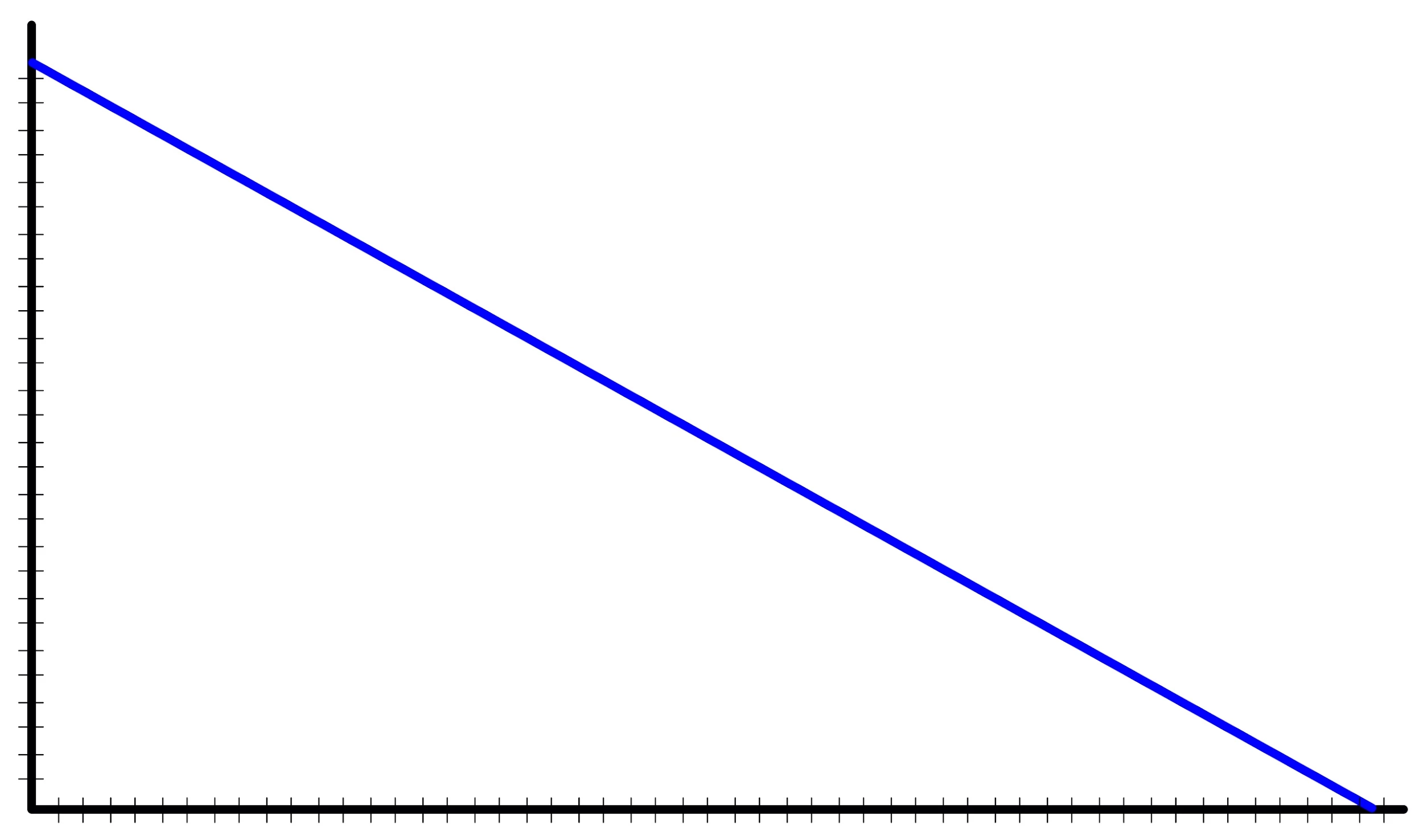
This is the default function. When using this function the volume will attenuate linearly and so the changes in volume are constant as the listener moves towards and away from the source. This function is good for crossfading between large background-type sounds that don't need tightly focussed 3D spatial falloff settings.
🔈 Logarithmic
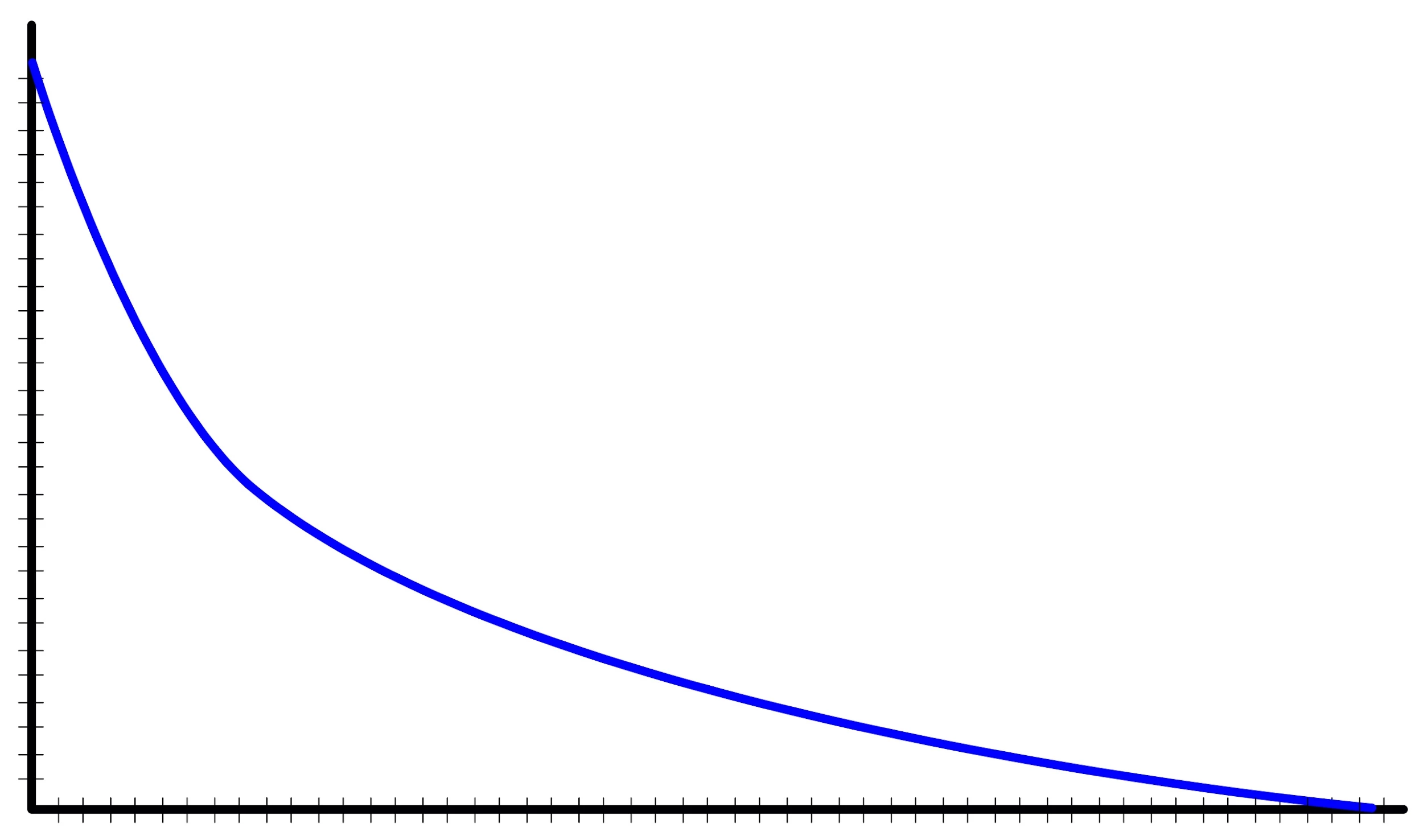
When using this function the volume attenuates such that the changes in volume are greater at close distances, and lesser at far distances. This function is good for spot sounds that need good 3D positioning, while still being audible at reasonable distances.
🔈 Inverse
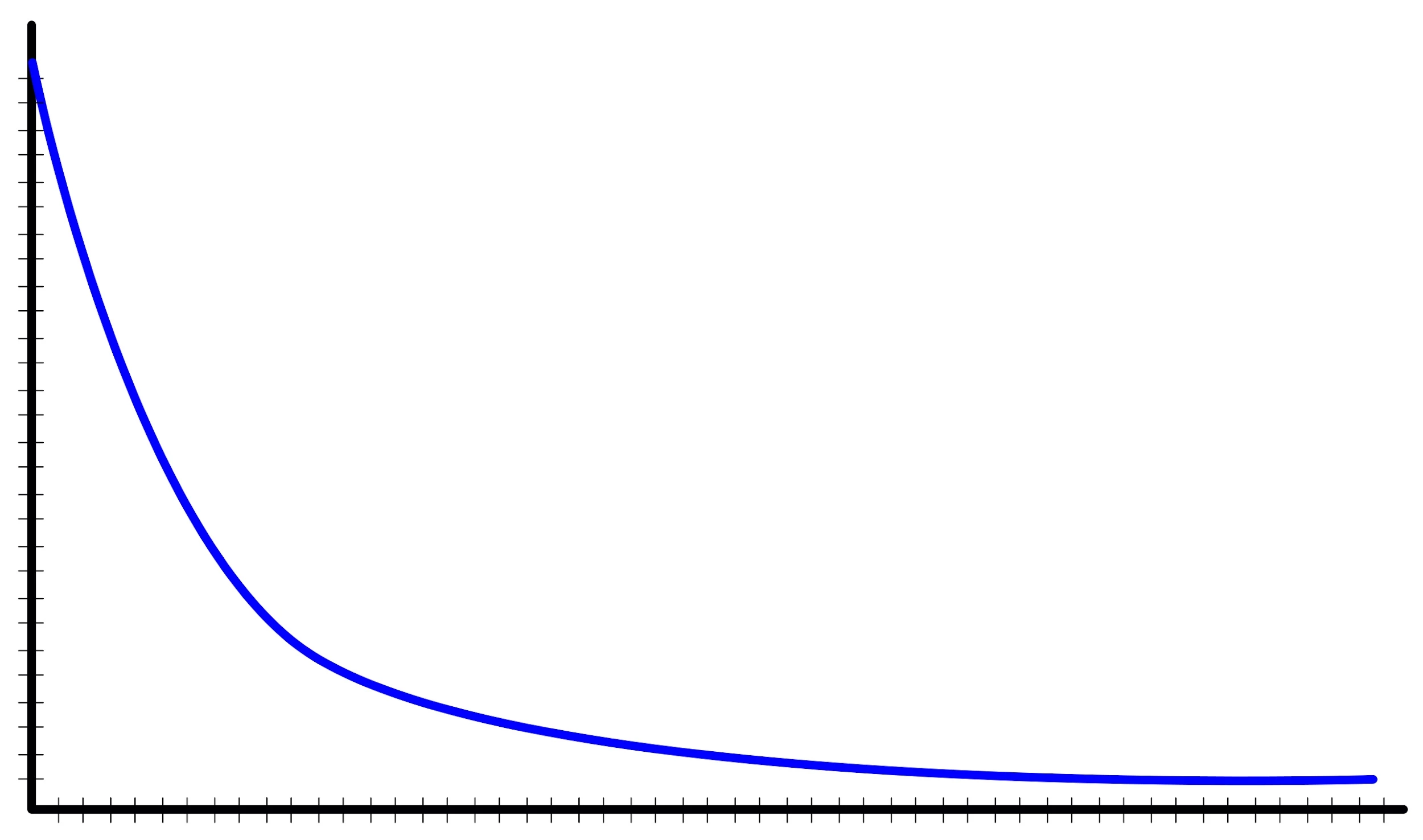
When using this function, the changes in volume are similar to that of the logarithmic curve, but are more exaggerated. This function is good for sounds that only need to be just audible at far distances, but that gets significantly louder as the listener gets quite close to the source.
🔈 Log Reverse
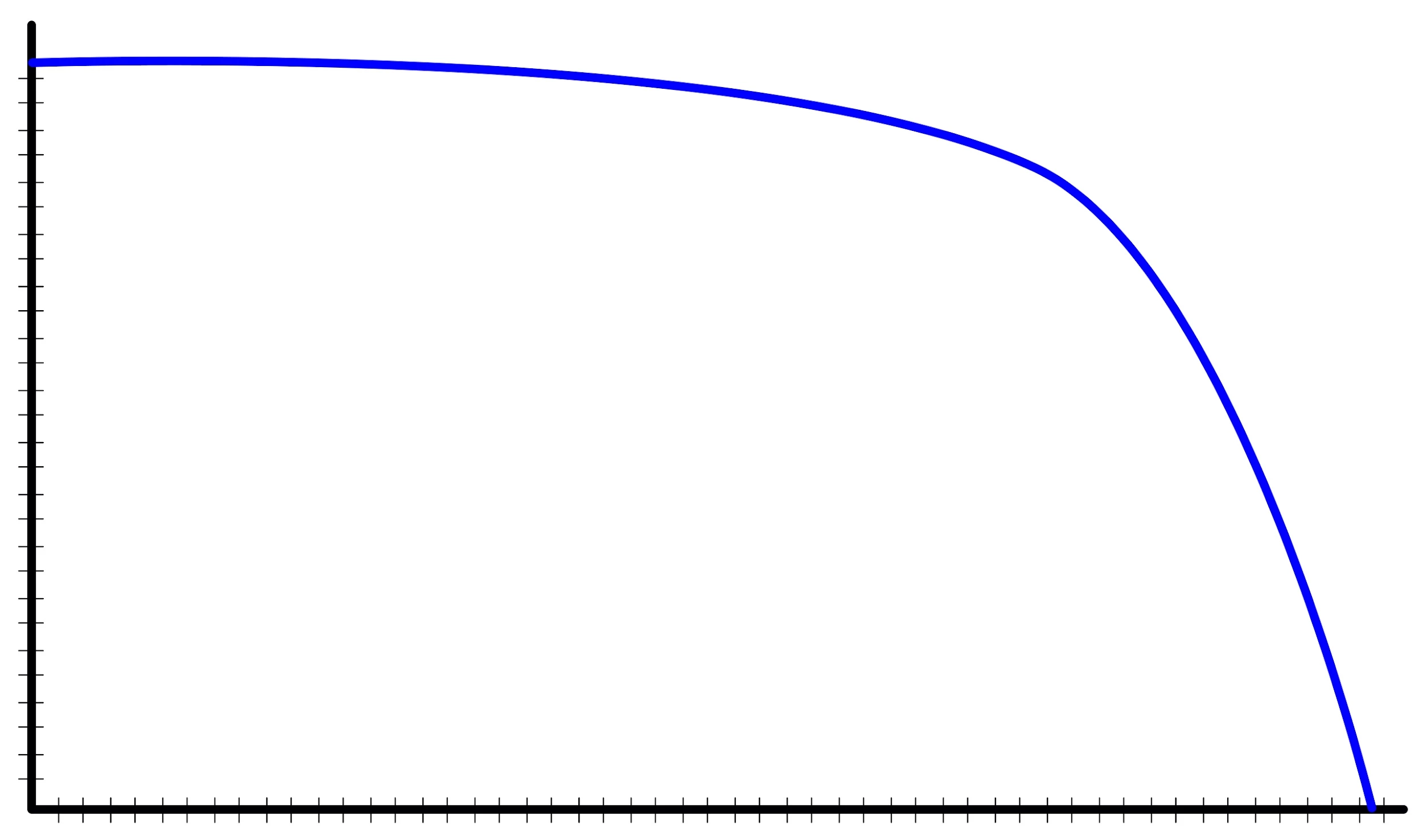
When using this function, the changes in volume are lesser at close distances, with more dramatic differences at far distances. This function is good for sounds that need to be loud across larger distances.
🔈 Natural Sound
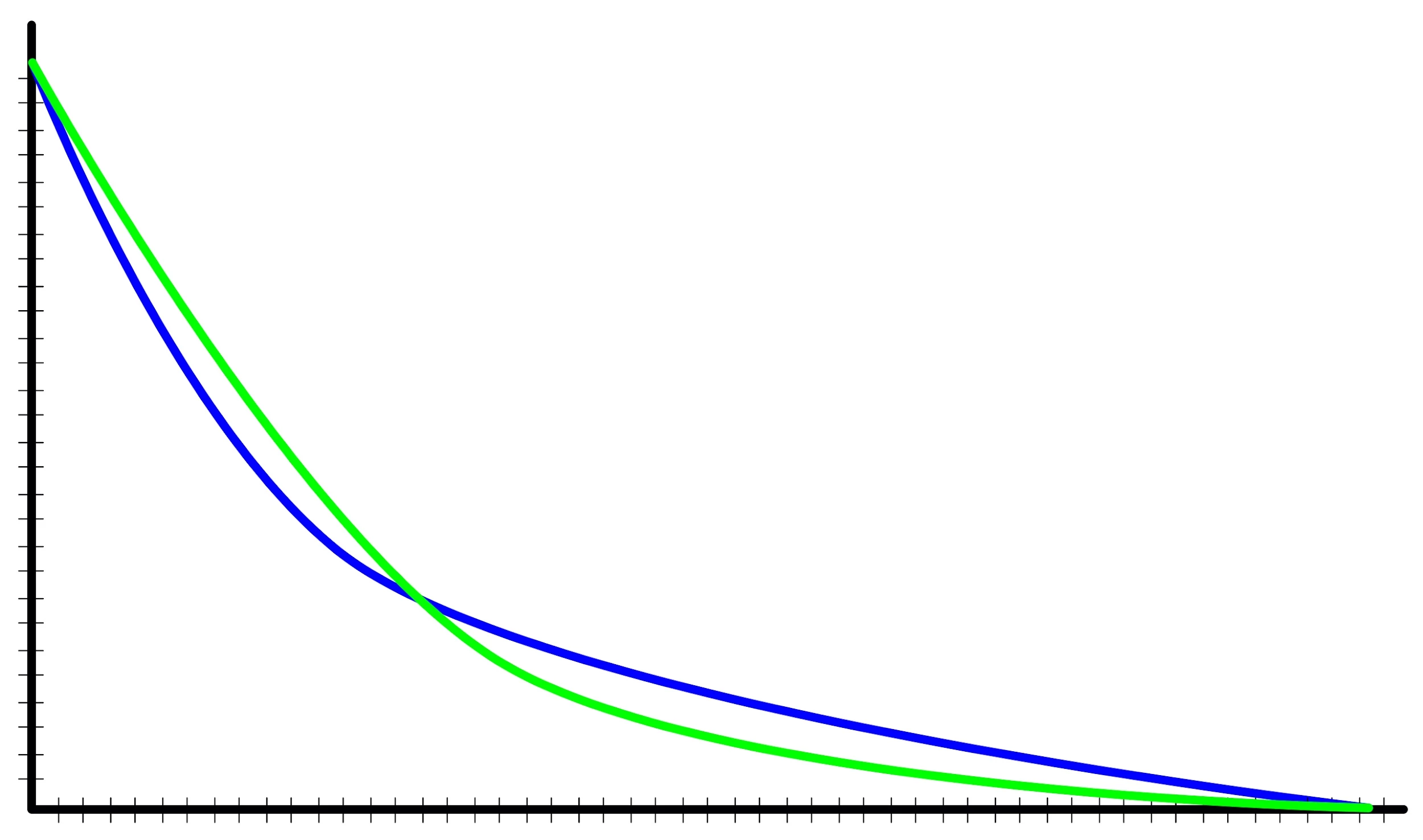
This function attempts to model a more 'naturalistic' falloff behavior to produce behaviors that closer match reality. This function is a kind of 'middle ground' between the Logarithmic and Inverse functions.