⛓️ Cable
A Cable represents a Physics Constraint which joins two Actors with a rope-like visual representation between them
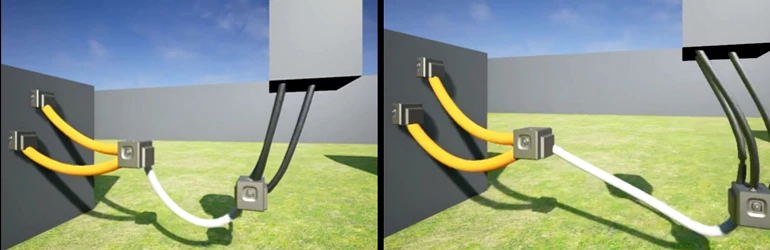
nanos world Cables are composed primarily of two Unreal Engine components: a Cable and a PhysicsConstraint. The first is used for visual purposes only and the second one gives the effective physical effects that are applied to each end of the Cable.
Cable visuals can be tweaked with :SetForces(), :SetCableSettings() and :SetRenderingSettings() methods. Those methods don’t have effect on the physics being applied and only have effects on the visual representation.
Cable physics can be tweaked with :SetAngularLimits() and :SetLinearLimits().
After attaching the two sides of your cable, the physics can be tweaked to affect how the constraint will affect the objects.
Cables are automatically destroyed when one of the sides are detached
🎒 Examples
local my_cable = Cable(Vector())
local cube_01 = Prop(Vector(100, 100, 100), Rotator(), "nanos-world::SM_Cube")
local cube_02 = Prop(Vector(200, 0, 100), Rotator(), "nanos-world::SM_Cube")

my_cable:AttachStartTo(cube_01)
my_cable:AttachEndTo(cube_02)
🛠 Constructors
Default Constructor
No description provided
local my_cable = Cable(location, enable_visuals?, spawn_mode?)
Parameters
| Name | Type | Description |
|---|---|---|
location | Vector | World location to spawn at |
enable_visuals? | boolean | Toggles the cable visuals Default true |
spawn_mode? | SpawnMode | Pass SpawnMode.AfterConstructor or SpawnMode.Manual to avoid immediately sending the entity to clients and improve performance when you want to configure it by setting several configs. Must call FinishSpawn() after all Default SpawnMode.Immediate |
🗿 Static Functions
This class doesn't have own static functions.
Inherited static functions
Subscribe, UnsubscribeSubscribeRemoteGetAll, GetByIndex, GetCount, GetPairs🦠 Functions
| Appearance | ||
 | IsVisible: boolean | Returns true if this cable is visible |
| SetCableSettings | Set the overall settings for this cable (visuals only) |
| SetRenderingSettings | Set the rendering settings of this cable (visuals only) |
| SetVisibility | Sets whether the cable is visible or not (visuals only, the constraint keeps working) |
| Attachments | ||
 | AttachEndTo: boolean | Attaches the end of this cable to another Actor at a specific bone or relative location |
| AttachStartTo: boolean | Attaches the beginning of this cable to another Actor at a specific bone or relative location |
| DetachEnd | Detaches the End of this Cable |
| DetachStart | Detaches the Start of this Cable |
| GetAttachedEndTo: Base Actor or nil | Gets the Actor attached to End |
| GetAttachedStartTo: Base Actor or nil | Gets the Actor attached to Start |
| Motors | ||
| SetAngularMotorSLERPOrientationSettings | Sets whether the SLERP angular orientation drive is enabled and the target orientation |
| SetAngularMotorSLERPVelocitySettings | Sets whether the SLERP angular velocity drive is enabled and the target angular velocity |
| SetAngularMotorTwistAndSwingOrientationSettings | Sets which twist and swing angular orientation drives are enabled and the target orientation |
| SetAngularMotorTwistAndSwingVelocitySettings | Sets which twist and swing angular velocity drives are enabled and the target angular velocity |
| SetLinearMotorPositionSettings | Sets which linear position drives are enabled and the target position |
| SetLinearMotorVelocitySettings | Sets which linear velocity drives are enabled and the target velocity |
| Physics | ||
| SetAngularLimits | Sets the Physics Angular Limits of this cable |
| SetForces | Set the forces the cable has applied (visuals only) |
| SetLinearLimits | Sets the Physics Linear Limits of this cable |
| SetPhysicsConstraintSettings | Set the Physics Constraint related settings for this cable |
Inherited functions
GetMaterialColorParameter, GetMaterialScalarParameter, GetMaterialTextureParameter, GetMaterialVectorParameter, ResetMaterial, SetMaterial, SetMaterialColorParameter, SetMaterialFromCanvas, SetMaterialFromSceneCapture, SetMaterialFromWebUI, SetMaterialScalarParameter, SetMaterialTextureParameter, SetMaterialVectorParameter, SetPhysicalMaterialGetDistanceFromCamera, GetScreenPercentage, IsVisible, SetCastShadow, SetHighlightEnabled, SetOutlineEnabled, SetRenderCullDistance, SetVisibility, WasRecentlyRenderedAttachTo, Detach, GetAttachedEntities, GetAttachedTo, GetAttachedToSocket, GetSocketTransformGetLifeSpan, SetLifeSpanGetDimension, GetNetworkAuthority, HasNetworkAuthority, IsNetworkDistributed, SetDimension, SetDistanceOptimizationMultiplier, SetNetworkAuthority, SetNetworkAuthorityAutoDistributedGetAllValuesKeys, GetValue, SetValueSubscribe, UnsubscribeDestroy, FinishSpawn, IsBeingDestroyed, IsSpawned, IsValid, SetSpawnModeBroadcastRemoteEvent, BroadcastRemoteInRadiusEvent, CallRemoteEvent, CallRemoteEvent, CallRemotePlayersEvent, HasAuthority, SubscribeRemoteGetIDAppearancefunctions
IsVisible Optimal
Returns true if this cable is visible
local is_visible = my_cable:IsVisible()
Returns
| Type | Description |
|---|---|
| boolean | Whether this cable is visible |
SetCableSettingsOptimal
Set the overall settings for this cable (visuals only)
my_cable:SetCableSettings(length, num_segments?, solver_iterations?, enable_stiffness?)
Parameters
| Name | Type | Description |
|---|---|---|
length | float | Rest length of the cable. Default is 100. Min is 0 |
num_segments? | integer | How many segments the cable has. Default is 10. Min is 1 Default 10 |
solver_iterations? | integer | The number of solver iterations controls how 'stiff' the cable is. Default is 1. Max is 16 Default 1 |
enable_stiffness? | boolean | Add stiffness constraints to cable. Default is true Default true |
SetRenderingSettingsOptimal
Set the rendering settings of this cable (visuals only)
my_cable:SetRenderingSettings(width, num_sides, tile_material)
SetVisibilityOptimal
Sets whether the cable is visible or not (visuals only, the constraint keeps working)
my_cable:SetVisibility(is_visible)
Parameters
| Name | Type | Description |
|---|---|---|
is_visible | boolean | Whether the cable is visible or not |
Attachmentsfunctions
AttachEndTo Slow
Attaches the end of this cable to another Actor at a specific bone or relative location
For optimization, it is recommended to be the last method to call when setting up the cable.
Note¹: You can attach the end only, and the start will fixed at the Cable's location.
Note²: If no linear limit is set, the entity will be snapped to the other actor. Alternatively you can keep a physics constraint offset by passing it as parameter
local attached_successfully = my_cable:AttachEndTo(other, relative_location?, bone_name?, constraint_offset?)
Parameters
| Name | Type | Description |
|---|---|---|
other | Base Actor | The Actor to attach to |
relative_location? | Vector | Offset relative to the Actor or bone Default Vector(0, 0, 0) |
bone_name? | string | Which bone to attach to. If empty it will be attached to the Actor, otherwise to the Mesh at the bone/socket Default |
constraint_offset? | Vector | The physics constraint offset applied to the attached end, in the local space of the other Actor Default Vector(0, 0, 0) |
Returns
| Type | Description |
|---|---|
| boolean | if it was attached successfully |
AttachStartTo Moderate
Attaches the beginning of this cable to another Actor at a specific bone or relative location
For optimization, it is recommended attaching start first if you wish to attach both start and end, to avoid double calculations
local attached_successfully = my_cable:AttachStartTo(other, relative_location?, bone_name?)
Parameters
| Name | Type | Description |
|---|---|---|
other | Base Actor | The Actor to attach to |
relative_location? | Vector | Offset relative to the Actor or bone Default Vector(0, 0, 0) |
bone_name? | string | Which bone to attach to. If empty it will be attached to the Actor, otherwise to the Mesh at the bone/socket Default |
Returns
| Type | Description |
|---|---|
| boolean | if it was attached successfully |
GetAttachedEndToOptimal
Gets the Actor attached to End
local attached_actor = my_cable:GetAttachedEndTo()
Returns
| Type | Description |
|---|---|
| Base Actor or nil | Actor attached to End |
GetAttachedStartToOptimal
Gets the Actor attached to Start
local attached_actor = my_cable:GetAttachedStartTo()
Returns
| Type | Description |
|---|---|
| Base Actor or nil | Actor attached to Start |
Motorsfunctions
SetAngularMotorSLERPOrientationSettingsOptimal
Sets whether the SLERP angular orientation drive is enabled and the target orientation
my_cable:SetAngularMotorSLERPOrientationSettings(enable_drive_slerp?, strength?, target?)
SetAngularMotorSLERPVelocitySettingsOptimal
Sets whether the SLERP angular velocity drive is enabled and the target angular velocity
my_cable:SetAngularMotorSLERPVelocitySettings(enable_drive_slerp?, strength?, target?)
SetAngularMotorTwistAndSwingOrientationSettingsOptimal
Sets which twist and swing angular orientation drives are enabled and the target orientation
my_cable:SetAngularMotorTwistAndSwingOrientationSettings(enable_drive_twist?, enable_drive_swing?, strength?, target?)
Parameters
| Name | Type | Description |
|---|---|---|
enable_drive_twist? | boolean | Enable the twist angular orientation drive Default false |
enable_drive_swing? | boolean | Enable the swing angular orientation drive Default false |
strength? | float | Positional strength for the drive (stiffness) Default 0 |
target? | Rotator | Angular drive orientation target Default Rotator(0, 0, 0) |
SetAngularMotorTwistAndSwingVelocitySettingsOptimal
Sets which twist and swing angular velocity drives are enabled and the target angular velocity
my_cable:SetAngularMotorTwistAndSwingVelocitySettings(enable_drive_twist?, enable_drive_swing?, strength?, target?)
Parameters
| Name | Type | Description |
|---|---|---|
enable_drive_twist? | boolean | Enable the twist angular velocity drive Default false |
enable_drive_swing? | boolean | Enable the swing angular velocity drive Default false |
strength? | float | Velocity strength of the drive (damping) Default 0 |
target? | Vector | Target angular velocity Default Vector(0, 0, 0) |
SetLinearMotorPositionSettingsOptimal
Sets which linear position drives are enabled and the target position
my_cable:SetLinearMotorPositionSettings(enable_drive_x?, enable_drive_y?, enable_drive_z?, strength?, target?)
Parameters
| Name | Type | Description |
|---|---|---|
enable_drive_x? | boolean | Enable the linear position drive on X Default false |
enable_drive_y? | boolean | Enable the linear position drive on Y Default false |
enable_drive_z? | boolean | Enable the linear position drive on Z Default false |
strength? | float | Positional strength for the drive (stiffness) Default 0 |
target? | Vector | Target position Default Vector(0, 0, 0) |
SetLinearMotorVelocitySettingsOptimal
Sets which linear velocity drives are enabled and the target velocity
my_cable:SetLinearMotorVelocitySettings(enable_drive_x?, enable_drive_y?, enable_drive_z?, strength?, target?)
Parameters
| Name | Type | Description |
|---|---|---|
enable_drive_x? | boolean | Enable the linear velocity drive on X Default false |
enable_drive_y? | boolean | Enable the linear velocity drive on Y Default false |
enable_drive_z? | boolean | Enable the linear velocity drive on Z Default false |
strength? | float | Velocity strength of the drive (damping) Default 0 |
target? | Vector | Target velocity Default Vector(0, 0, 0) |
Physicsfunctions
SetAngularLimitsOptimal
Sets the Physics Angular Limits of this cable
my_cable:SetAngularLimits(swing_1_motion, swing_2_motion, twist_motion, swing_1_limit?, swing_2_limit?, twist_limit?)
Parameters
| Name | Type | Description |
|---|---|---|
swing_1_motion | ConstraintMotion | Indicates whether the Swing1 limit is used |
swing_2_motion | ConstraintMotion | Indicates whether the Swing2 limit is used |
twist_motion | ConstraintMotion | Indicates whether the Twist limit is used |
swing_1_limit? | float | Angle of movement along the XY plane. This defines the first symmetric angle of the cone Default 0 |
swing_2_limit? | float | Angle of movement along the XZ plane. This defines the second symmetric angle of the cone Default 0 |
twist_limit? | float | Symmetric angle of roll along the X-axis Default 0 |
SetForcesModerate
Set the forces the cable has applied (visuals only)
my_cable:SetForces(force, gravity_scale?)
SetLinearLimitsOptimal
Sets the Physics Linear Limits of this cable
If use_soft_constraint is enabled, then stiffness and damping will be used, otherwise restitution will be used.
Note: this method must be called before attaching any cable end
my_cable:SetLinearLimits(x_motion, y_motion, z_motion, limit?, restitution?, use_soft_constraint?, stiffness?, damping?)
Parameters
| Name | Type | Description |
|---|---|---|
x_motion | ConstraintMotion | Indicates the linear constraint applied along the X-axis. Free implies no constraint at all. Locked implies no movement along X is allowed. Limited implies the distance in the joint along all active axes must be less than the Distance provided |
y_motion | ConstraintMotion | Indicates the linear constraint applied along the Y-axis. Free implies no constraint at all. Locked implies no movement along Y is allowed. Limited implies the distance in the joint along all active axes must be less than the Distance provided |
z_motion | ConstraintMotion | Indicates the linear constraint applied along theZX-axis. Free implies no constraint at all. Locked implies no movement along Z is allowed. Limited implies the distance in the joint along all active axes must be less than the Distance provided |
limit? | float | The distance allowed between the two joint reference frames. Distance applies on all axes enabled (one axis means line, two axes implies circle, three axes implies sphere) Default 0 |
restitution? | float | Controls the amount of bounce when the constraint is violated. A restitution value of 1 will bounce back with the same velocity the limit was hit. A value of 0 will stop dead Default 0 |
use_soft_constraint? | boolean | Whether we want to use a soft constraint (spring) Default false |
stiffness? | float | Stiffness of the soft constraint. Only used when Soft Constraint is on Default 0 |
damping? | float | Damping of the soft constraint. Only used when Soft Constraint is on Default 0 |
SetPhysicsConstraintSettingsOptimal
Set the Physics Constraint related settings for this cable
my_cable:SetPhysicsConstraintSettings(disable_collision)
Parameters
| Name | Type | Description |
|---|---|---|
disable_collision | boolean | If true, the collision between the two rigid bodies of the constraint will be disabled |
🚀 Events
This class doesn't have own events.
Inherited events
ClassRegister, Destroy, Spawn, ValueChange