🪟 Widget
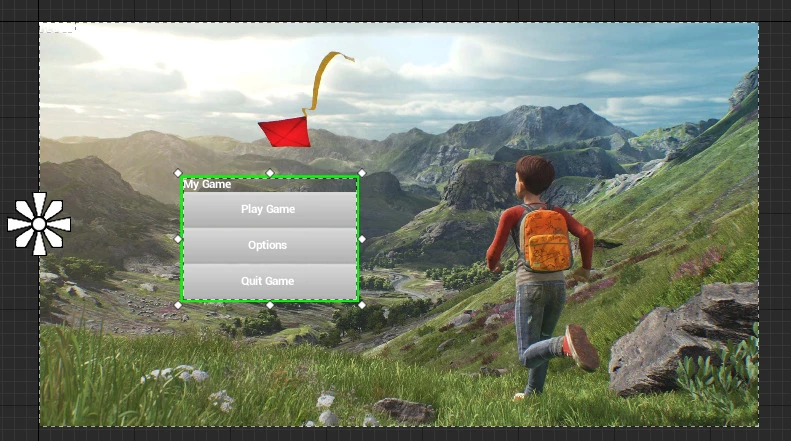
The Widget class supports spawning Unreal Widgets classes through scripting and manipulate them such as Blueprints!
 Client OnlyAPI Source
The Widget class allows a very versatile way to create and use Unreal widgets as UI within the game.
Most parameters are not exposed in the Widget class, and should be called using the method CallBlueprintEvent(), which will call the specific underlying Widget method.
🎒 Examples
Creating a Simple Native Text and adding it to screen
local my_text = Widget(NativeWidget.Text)
my_text:CallBlueprintEvent("SetText", "Hello World!")
my_text:AddToViewport()
SetText is a method from UTextBlock, the Widget associated to NativeWidget.Text.
Creating a Widgets with Childs
local my_vertical_box = Widget(NativeWidget.VerticalBox)
my_vertical_box:AddToViewport()

local my_text = Widget(NativeWidget.Text)
my_text:CallBlueprintEvent("SetText", "Hello World!")

local my_button = Widget(NativeWidget.Button)

my_vertical_box:AddChild(my_text)
my_vertical_box:AddChild(my_button)
Using a WebUI as Image Brush
local webui = WebUI("mywebui", "https://google.com", WidgetVisibility.Hidden)

local my_image = Widget(NativeWidget.Image)
my_image:CallBlueprintEvent("SetBrushFromMaterial", webui)
my_image:AddToViewport()
SetBrushFromMaterial is a method from UImage, and expects a MaterialInstance as parameter. Passing WebUI, SceneCapture or Canvas converts it to it's internal Material automatically when being passed as parameter!
Subscribing for a Dispatcher
local my_button = Widget(NativeWidget.Button)

-- Puts a text inside of it
local my_text = Widget(NativeWidget.Text)
my_text:CallBlueprintEvent("SetText", "Press Me!")
my_button:AddChild(my_text)

-- Binds the native OnClicked dispatcher
my_button:BindBlueprintEventDispatcher("OnClicked", function()
	Console.Log("clicked!")
end)

-- Adds the button to viewport (will fill the whole screen)
my_button:AddToViewport()
📚 Libraries & Frameworks
Here a list of Community Created Libraries & Frameworks making use of Widgets expanding it's possibilities:
🛠 Constructors
UserWidget Constructor
Spawns a Widget passing a UserWidget blueprint
local my_widget = Widget(blueprint_path)
Parameters
| Type | Name | Default | Description |
|---|---|---|---|
| Blueprint Reference | blueprint_path | Required parameter | A custom UserWidget Blueprint to spawn |
Native Widget Constructor
Spawns a Widget passing a NativeWidget enum
local my_widget = Widget(native_widget)
Parameters
| Type | Name | Default | Description |
|---|---|---|---|
| NativeWidget | native_widget | Required parameter | One of the native Widgets to spawn |
🦠 Functions
Inherited Entity Functions
Base Entityscripting-reference/classes/base-classes/entity
| Returns | Name | Description | |
|---|---|---|---|
 | BroadcastRemoteEvent | Calls a custom remote event directly on this entity to all Players | |
| BroadcastRemoteInRadiusEvent | Calls a custom remote event directly on this entity to all Players in a radius | |
| CallRemoteEvent | Calls a custom remote event directly on this entity to a specific Player | |
| CallRemoteEvent | Calls a custom remote event directly on this entity | |
| CallRemotePlayersEvent | Calls a custom remote event directly on this entity to a list of Players | |
 | Destroy | Destroys this Entity | |
 | FinishSpawn | Finish the spawning process and send the entity to clients if it was spawned with a deferred spawn_mode | |
| table of string | GetAllValuesKeys | Gets a list of all values keys |
| table | GetClass | Gets the class of this entity |
| integer | GetID | Gets the universal network ID of this Entity (same on both client and server) |
| any | GetValue | Gets a Value stored on this Entity at the given key |
| boolean | HasAuthority | Gets if the local context has authority over this Entity (true if spawned by the client, false if spawned by the server) |
| boolean | IsA | Recursively checks if this entity is inherited from a Class |
| boolean | IsBeingDestroyed | Returns true if this Entity is being destroyed |
| boolean | IsSpawned | Gets if this Entity finished spawning |
| boolean | IsValid | Returns true if this Entity is valid (i.e. wasn't destroyed and points to a valid Entity) |
| SetSpawnMode | Overrides when this Entity finishes spawning, from the Constructor of an Inherited Class | |
| SetValue | Sets a Value in this Entity | |
| function | Subscribe | Subscribes to an Event on this specific entity |
| function | SubscribeRemote | Subscribes to a custom event called from server on this specific entity |
| Unsubscribe | Unsubscribes all callbacks from this Event in this Entity within this Package, or only the callback passed |
| Returns | Name | Description | |
|---|---|---|---|
| AddChild | Adds a new child widget to this Widget container, if this is a Panel | |
| AddToViewport | Adds it to the game's viewport and fills the entire screen | |
| function | BindBlueprintEventDispatcher | Assigns and Binds a Blueprint Event Dispatcher |
| BringToFront | Puts this Widget in the front of all WebUIs and Widgets | |
| varargs of any | CallBlueprintEvent | Calls a Blueprint Event or Function |
| any | GetBlueprintPropertyValue | Gets a Blueprint Property/Variable value |
| WidgetVisibility | GetVisibility | Returns the current WebUI visibility |
| SetBlueprintPropertyValue | Sets a Blueprint Property/Variable value directly | |
| SetContentForSlot | Sets the widget for a given slot by name, if this is a UserWidget | |
| SetFocus | Enables the focus on this Widget (i.e. can receive Keyboard input and will trigger input events) | |
| SetSlotAlignment | Sets the slot alignment for horizontal and vertical positioning | |
| SetSlotCanvasLayout | Sets the Layout as Canvas on Screen | |
| SetSlotPadding | Sets the slot padding for horizontal and vertical spacing | |
| SetSlotSize | Sets the slot size and size rule | |
| SetVisibility | Sets the visibility in screen | |
| Widget3D | SpawnWidget3D | Spawns a 3D Widget actor rendering this Widget in the world |
| UnbindBlueprintEventDispatcher | Unbinds a Blueprint Event Dispatcher |
 Moderate
AddChild
Adds a new child widget to this Widget container, if this is a Panel
my_widget:AddChild(other)
Parameters
| Type | Parameter | Default | Description |
|---|---|---|---|
| WebUI or Widget | other | Required parameter | The WebUI or Widget to add |
ModerateAddToViewport
Adds it to the game's viewport and fills the entire screen
my_widget:AddToViewport()
 Slow
SlowBindBlueprintEventDispatcher
Assigns and Binds a Blueprint Event Dispatcher
local ret = my_widget:BindBlueprintEventDispatcher(dispatcher_name, callback)
Parameters
| Type | Parameter | Default | Description |
|---|---|---|---|
| string | dispatcher_name | Required parameter | Event Dispatcher name |
| function | callback | Required parameter | Callback function to call with this format |
Returns
| Type | Description |
|---|---|
| function | the callback itself |
 Optimal
BringToFront
Puts this Widget in the front of all WebUIs and Widgets. Note: You can only call it if the Widget is parented to the Viewport!
my_widget:BringToFront()
CallBlueprintEvent
Calls a Blueprint Event or Function
Returns all Function return values on Client Side
local ret_01, ret_02, ... = my_widget:CallBlueprintEvent(event_name, arguments...?)
Parameters
| Type | Parameter | Default | Description |
|---|---|---|---|
| string | event_name | Required parameter | Event or Function name |
| any | arguments...? | nil | Sequence of arguments to pass to the event |
SlowGetBlueprintPropertyValue
Gets a Blueprint Property/Variable value
local ret = my_widget:GetBlueprintPropertyValue(property_name)
Parameters
| Type | Parameter | Default | Description |
|---|---|---|---|
| string | property_name | Required parameter | Name of the Blueprint variable |
Returns
| Type | Description |
|---|---|
| any | the value |
See also SetBlueprintPropertyValue.
OptimalGetVisibility
Returns the current WebUI visibility
local visibility = my_widget:GetVisibility()
Returns
| Type | Description |
|---|---|
| WidgetVisibility | Current WebUI visibility |
See also SetVisibility.
SlowSetBlueprintPropertyValue
Sets a Blueprint Property/Variable value directly
my_widget:SetBlueprintPropertyValue(property_name, value)
Parameters
| Type | Parameter | Default | Description |
|---|---|---|---|
| string | property_name | Required parameter | Name of the Blueprint variable |
| any | value | Required parameter | The value to set |
See also GetBlueprintPropertyValue.
ModerateSetContentForSlot
Sets the widget for a given slot by name, if this is a UserWidget
my_widget:SetContentForSlot(slot_name, widget?)
Parameters
| Type | Parameter | Default | Description |
|---|---|---|---|
| string | slot_name | Required parameter | Name of the Named Slot |
| Widget | widget? | nil | Pass nil to remove it |
OptimalSetFocus
Enables the focus on this Widget (i.e. can receive Keyboard input and will trigger input events
Note: Only one Widget can have focus per time.
my_widget:SetFocus()
SetSlotAlignment
Sets the slot alignment for horizontal and vertical positioning.
Note: This method only works if this Widget is child of one of: HorizontalBoxSlot, VerticalBoxSlot, OverlaySlot, SizeBoxSlot, ScrollBoxSlot, BackgroundBlurSlot, BorderSlot, ButtonSlot, ScaleBoxSlot, UniformGridSlot, GridSlot.
my_widget:SetSlotAlignment(horizontal_alignment?, vertical_alignment?)
Parameters
| Type | Parameter | Default | Description |
|---|---|---|---|
| WidgetHorizontalAlignment | horizontal_alignment? | WidgetHorizontalAlignment.Fill | Horizontal alignment for the slot |
| WidgetVerticalAlignment | vertical_alignment? | WidgetVerticalAlignment.Fill | Vertical alignment for the slot |
OptimalSetSlotCanvasLayout
Sets the Layout as Canvas on Screen.
Note: This method only works if this Widget is child of a Canvas Panel.
Anchors:
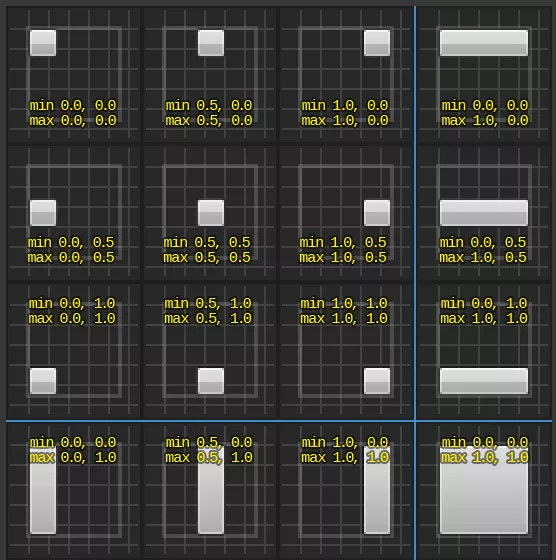
my_widget:SetSlotCanvasLayout(location?, size?, anchors_min?, anchors_max?, alignment?)
Parameters
| Type | Parameter | Default | Description |
|---|---|---|---|
| Vector2D | location? | Vector(0, 0) | Screen location, or the left and top offsets when the anchors are stretched |
| Vector2D | size? | Vector(0, 0) | Size, or the right and bottom offsets when the anchors are stretched |
| Vector2D | anchors_min? | Vector(0, 0) | Min anchor, from (0, 0) top-left to (1, 1) bottom-right |
| Vector2D | anchors_max? | Vector(1, 1) | Max anchor, from (0, 0) top-left to (1, 1) bottom-right |
| Vector2D | alignment? | Vector(0.5, 0.5) | Pivot of the Widget, (0.5, 0.5) is the center |
ModerateSetSlotPadding
Sets the slot padding for horizontal and vertical spacing.
Note: This method only works if this Widget is child of one of: HorizontalBoxSlot, VerticalBoxSlot, OverlaySlot, SizeBoxSlot, ScrollBoxSlot, BackgroundBlurSlot, BorderSlot, ButtonSlot, GridSlot.
my_widget:SetSlotPadding(padding_horizontal?, padding_vertical?)
Parameters
| Type | Parameter | Default | Description |
|---|---|---|---|
| Vector2D | padding_horizontal? | Vector2D(0, 0) | Horizontal padding for the slot |
| Vector2D | padding_vertical? | Vector2D(0, 0) | Vertical padding for the slot |
ModerateSetSlotSize
Sets the slot size and size rule.
Note: This method only works if this Widget is child of one of: HorizontalBoxSlot, VerticalBoxSlot, ScrollBoxSlot.
my_widget:SetSlotSize(size?, slate_size_rule?)
Parameters
| Type | Parameter | Default | Description |
|---|---|---|---|
| float | size? | 0.0 | Size value for the slot |
| WidgetSizeRule | slate_size_rule? | WidgetSizeRule.Automatic | Size rule for the slot |
ModerateSetVisibility
Sets the visibility in screen
my_widget:SetVisibility(visibility)
Parameters
| Type | Parameter | Default | Description |
|---|---|---|---|
| WidgetVisibility | visibility | Required parameter | The new visibility in screen |
See also GetVisibility.
SlowSpawnWidget3D
Spawns a 3D Widget actor rendering this Widget in the world
local widget_3D = my_widget:SpawnWidget3D(location?, rotation?, widget_space?, auto_size?, size?, auto_repaint_rate?, pivot?)
Parameters
| Type | Parameter | Default | Description |
|---|---|---|---|
| Vector | location? | Vector(0, 0, 0) | World location |
| Rotator | rotation? | Rotator(0, 0, 0) | World rotation |
| WidgetSpace | widget_space? | WidgetSpace.World | Whether it renders in the world or always facing the screen |
| boolean | auto_size? | false | Whether to size it automatically based on its content |
| Vector2D | size? | Vector2D(500, 500) | Only works if auto_size = false |
| float | auto_repaint_rate? | -1 | Leaves -1 to repaint every frame |
| Vector2D | pivot? | Vector2D(0.5, 0.5) | Pivot of the widget, (0.5, 0.5) is the center |
Returns
| Type | Description |
|---|---|
| Widget3D | The spawned Widget3D |
OptimalUnbindBlueprintEventDispatcher
Unbinds a Blueprint Event Dispatcher
my_widget:UnbindBlueprintEventDispatcher(dispatcher_name, callback?)
Parameters
| Type | Parameter | Default | Description |
|---|---|---|---|
| string | dispatcher_name | Required parameter | Event Dispatcher name |
| function | callback? | nil | Optional callback to unbind |
🚀 Events
Inherited Entity Events
Base Entityscripting-reference/classes/base-classes/entity
| Name | Description | |
|---|---|---|
| ClassRegister | Triggered when a new Class is registered with the Inheriting System |
| Destroy | Triggered when an Entity is destroyed |
| Spawn | Triggered when an Entity is spawned/created |
| ValueChange | Triggered when an Entity has a value changed with :SetValue() |
This class doesn't have own events.
✅ NativeWidgets to Unreal Widgets Relation
List of the relation Unreal native Widgets ↔ NativeWidget Enums:
| Enum | Unreal Class | Is Panel |
|---|---|---|
NativeWidget.Border | Border | ✅ |
NativeWidget.Button | Button | ✅ |
NativeWidget.CheckBox | CheckBox | ✅ |
NativeWidget.Image | Image | ❌ |
NativeWidget.ProgressBar | ProgressBar | ❌ |
NativeWidget.RichTextBlock | RichTextBlock | ❌ |
NativeWidget.Slider | Slider | ❌ |
NativeWidget.Text | TextBlock | ❌ |
NativeWidget.ComboBox | ComboBox | ❌ |
NativeWidget.EditableText | EditableText | ❌ |
NativeWidget.EditableTextMultiLine | MultiLineEditableText | ❌ |
NativeWidget.SpinBox | SpinBox | ❌ |
NativeWidget.TextBox | EditableTextBox | ❌ |
NativeWidget.TextBoxMultiLine | MultiLineEditableTextBox | ❌ |
NativeWidget.CanvasPanel | CanvasPanel | ✅ |
NativeWidget.GridPanel | GridPanel | ✅ |
NativeWidget.HorizontalBox | HorizontalBox | ✅ |
NativeWidget.Overlay | Overlay | ✅ |
NativeWidget.ScaleBox | ScaleBox | ✅ |
NativeWidget.ScrollBox | ScrollBox | ✅ |
NativeWidget.SizeBox | SizeBox | ✅ |
NativeWidget.UniformGridPanel | UniformGridPanel | ✅ |
NativeWidget.VerticalBox | VerticalBox | ✅ |
NativeWidget.WrapBox | WrapBox | ✅ |
NativeWidget.BackgroundBlur | BackgroundBlur | ✅ |
✅ List of Supported Parameter Types
See all Supported Parameter Types in the Blueprint Page.