💬 Chat
Configure, send and intercept chat messages.
🎒 Examples
(Chat.BroadcastMessage) Sends a message to everyone
Chat.BroadcastMessage("Welcome to the server!")
(Chat.Submit) Forwards a message from a custom chat interface
Events.SubscribeRemote("MyChatSubmit", function(player, message)
	if (not Chat.Submit(player, message)) then
		Chat.SendMessage(player, "Your message was not sent")
	end
end)
Colors in Chat
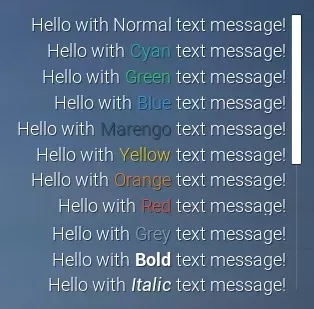
It is also possible to send colored messages in the Chat! For that, just circumvent a piece of text with a style tag: \<TAG>my awesome text</>.
Server/Index.lua
Chat.BroadcastMessage("Hello with <cyan>Cyan</> text message!")
All supported text styles/tags:
\<cyan> \<green> \<blue> \<purple> \<marengo> \<yellow> \<orange> \<red> \<grey> \<bold> \<italic>
note
It is NOT possible to combine two or more styles together (e.g. \<bold> + \<red>).
🗿 Static Functions
| Returns | Name | Description | |
|---|---|---|---|
 | AddMessage | Adds a chat message which will display local only | |
 | BroadcastMessage | Sends a chat message to all Players | |
| Clear | Clears all messages | |
| SendMessage | Sends a chat message to a Player only | |
| SetConfiguration | Configures the Chat visuals and position | |
| SetVisibility | Sets if the Chat is visible or not | |
| boolean | Submit | Submits a chat message as if the Player had typed it in the chat |
 | function | Subscribe | Subscribes to an Event |
| Unsubscribe | Unsubscribes from all subscribed Events in this Class and in this Package, optionally passing the function to unsubscribe only that callback |
 Moderate
AddMessage
Adds a chat message which will display local only
Chat.AddMessage(message)
Parameters
| Type | Parameter | Default | Description |
|---|---|---|---|
| string | message | Required parameter | The message, supports the same rich text tags as the chat |
ModerateBroadcastMessage
Sends a chat message to all Players
Chat.BroadcastMessage(message)
Parameters
| Type | Parameter | Default | Description |
|---|---|---|---|
| string | message | Required parameter | The message to send to all Players |
Chat.BroadcastMessage Examples
Sends a message to everyone
Chat.BroadcastMessage("Welcome to the server!")
Clear
Clears all messages
Chat.Clear()
 Optimal
SendMessage
Sends a chat message to a Player only
Chat.SendMessage(player, message)
Parameters
| Type | Parameter | Default | Description |
|---|---|---|---|
| Player | player | Required parameter | The player to receive the message |
| string | message | Required parameter | The message |
ModerateSetConfiguration
Configures the Chat visuals and position
Chat.SetConfiguration(screen_location?, size?, anchors_min?, anchors_max?, alignment?, justify?, show_scrollbar?)
Parameters
| Type | Parameter | Default | Description |
|---|---|---|---|
| Vector2D | screen_location? | Vector2D(-25, 0) | Screen location, or the left and top offsets when the anchors are stretched |
| Vector2D | size? | Vector2D(600, 250) | Size, or the right and bottom offsets when the anchors are stretched |
| Vector2D | anchors_min? | Vector2D(1, 0.5) | Min anchor, from (0, 0) top-left to (1, 1) bottom-right |
| Vector2D | anchors_max? | Vector2D(1, 0.5) | Max anchor, from (0, 0) top-left to (1, 1) bottom-right |
| Vector2D | alignment? | Vector2D(1, 0.5) | Pivot of the chat, (0.5, 0.5) is the center |
| boolean | justify? | true | Whether the text is justified |
| boolean | show_scrollbar? | true | Whether to show the scrollbar |
OptimalSetVisibility
Sets if the Chat is visible or not
Chat.SetVisibility(is_visible)
Parameters
| Type | Parameter | Default | Description |
|---|---|---|---|
| boolean | is_visible | Required parameter | Whether the Chat is visible or not |
ModerateSubmit
Submits a chat message as if the Player had typed it in the chat, also triggering the PlayerSubmit event
local ret = Chat.Submit(player, message)
Parameters
| Type | Parameter | Default | Description |
|---|---|---|---|
| Player | player | Required parameter | The player who is sending the message |
| string | message | Required parameter | The message |
Returns
| Type | Description |
|---|---|
| boolean | false if a PlayerSubmit handler cancelled the message, true if it was broadcast |
Chat.Submit Examples
Forwards a message from a custom chat interface
Events.SubscribeRemote("MyChatSubmit", function(player, message)
	if (not Chat.Submit(player, message)) then
		Chat.SendMessage(player, "Your message was not sent")
	end
end)
Subscribe
Subscribes to an Event
local ret = Chat.Subscribe(event_name, callback)
Parameters
| Type | Parameter | Default | Description |
|---|---|---|---|
| string | event_name | Required parameter | Event to subscribe to |
| function | callback | Required parameter | Callback to run on the event occurring |
Returns
| Type | Description |
|---|---|
| function | The function callback |
OptimalUnsubscribe
Unsubscribes from all subscribed Events in this Class and in this Package, optionally passing the function to unsubscribe only that callback
Chat.Unsubscribe(event_name, callback?)
Parameters
| Type | Parameter | Default | Description |
|---|---|---|---|
| string | event_name | Required parameter | Event to unsubscribe to |
| function | callback? | nil | Optional callback to specifically unsubscribe to |
🚀 Events
| Name | Description | |
|---|---|---|
| ChatEntry | Called when a new Chat Message is received, this is also triggered when new messages are sent programatically |
| Close | When player closes the Chat |
| Open | When player opens the Chat |
| PlayerSubmit | Called when a player submits a message in the chat |
ChatEntry
Called when a new Chat Message is received, this is also triggered when new messages are sent programatically
This is useful for creating your own Chat interface while still use the built-in system
Chat.Subscribe("ChatEntry", function(message, player)
	-- ChatEntry was called
end)
Arguments
| Type | Argument | Description |
|---|---|---|
| string | message | The message |
| Player or nil | player | The player who sent the message or nil if this was called on client side or was sent through code |
Close
When player closes the Chat
Chat.Subscribe("Close", function()
	-- Close was called
end)
Open
When player opens the Chat
Chat.Subscribe("Open", function()
	-- Open was called
end)
PlayerSubmit
Called when a player submits a message in the chat
Return false to prevent the message from being sent
Chat.Subscribe("PlayerSubmit", function(message, player)
	-- PlayerSubmit was called
	return true
end)