Basic HUD (Canvas)
How to add a basic HUD using Render's Canvas features, to display the character's Health and Ammo.
You can also create complete and complex UIs using HTML + JavaScript + CSS, check it out: Basic HUD (HTML).
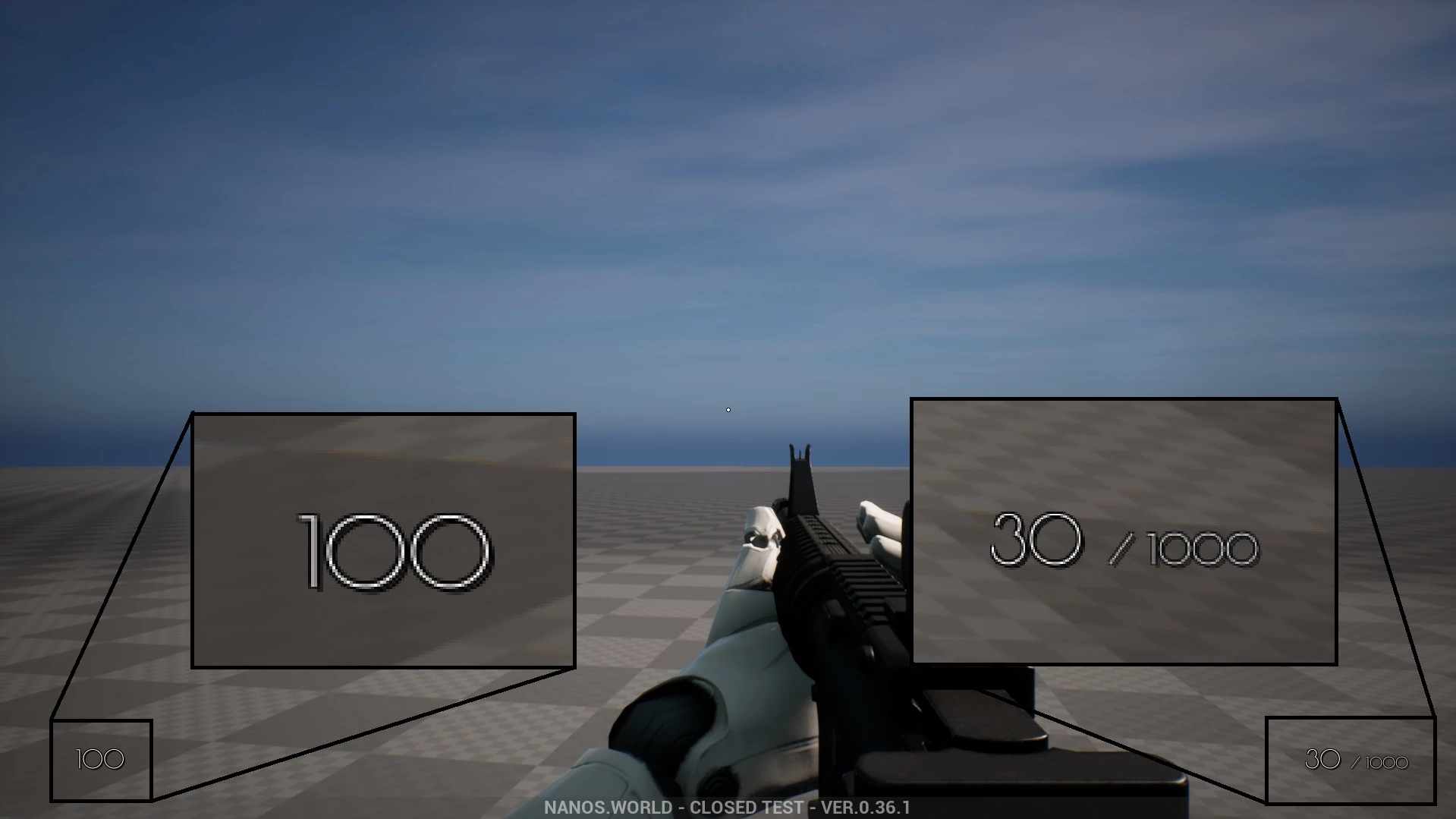
A Canvas is a painting fabric which can be drawn to. The following code shows how to add a basic UI using Canvas:
-- Spawns the Canvas
HUDCanvas = Canvas(true, Color.TRANSPARENT, 0, true)

-- Subscribes for Update event, we can only draw inside this event
HUDCanvas:Subscribe("Update", function(self, width, height)
    -- Gets the Local Player
    local local_player = Client.GetLocalPlayer()
    if (not local_player) then return end

    -- Gets the Local Character (possessed by the Local Player)
    local local_character = local_player:GetControlledCharacter()
    if (not local_character) then return end

    -- Draws the Health
    self:DrawText(tostring(local_character:GetHealth()), Vector2D(100, height - 100), FontType.PoiretOne, 25, Color.WHITE)

    -- Gets the Local Weapon
    local character_weapon = local_character:GetPicked()
    if (character_weapon and character_weapon:IsA(Weapon)) then
        -- Draws the Ammo Clip
        self:DrawText(tostring(character_weapon:GetAmmoClip()), Vector2D(width - 200, height - 100), FontType.PoiretOne, 25, Color.WHITE)

        -- Draws the Ammo Bag
        self:DrawText("/ " .. tostring(character_weapon:GetAmmoBag()), Vector2D(width - 140, height - 87), FontType.PoiretOne, 15, Color.WHITE)
    end
end)
The example above re-renders and updates all health/ammo information ever tick, which could be bad for performance. Gladly we can fast improve it by limiting the auto repaint rate by changing it in the constructor:
-- Instead of 0 in the auto_repaint_rate parameter
HUDCanvas = Canvas(true, Color.TRANSPARENT, 0, true)

-- Use 0.033, so it only updates every 0.033 seconds (i.e. about 30 times per second)
HUDCanvas = Canvas(true, Color.TRANSPARENT, 0.033, true)
Another further optimization is to only update when needed, for this case we will need to implement some additional code. In this case, we set auto_repaint_rate to -1 to disable it from being auto repainted:
-- We set -1 to never auto repaint
HUDCanvas = Canvas(true, Color.TRANSPARENT, -1, true)

-- Subscribes for Update event, we can only draw inside this event (as usual)
HUDCanvas:Subscribe("Update", function(self, width, height)
    -- Gets the Local Player
    local local_player = Client.GetLocalPlayer()
    if (not local_player) then return end

    -- Gets the Local Character (possessed by the Local Player)
    local local_character = local_player:GetControlledCharacter()
    if (not local_character) then return end

    -- Draws the Health
    self:DrawText(tostring(local_character:GetHealth()), Vector2D(100, height - 100), FontType.PoiretOne, 25, Color.WHITE)

    -- Gets the Local Weapon
    local character_weapon = local_character:GetPicked()
    if (character_weapon and character_weapon:IsA(Weapon)) then
        -- Draws the Ammo Clip
        self:DrawText(tostring(character_weapon:GetAmmoClip()), Vector2D(width - 200, height - 100), FontType.PoiretOne, 25, Color.WHITE)

        -- Draws the Ammo Bag
        self:DrawText("/ " .. tostring(character_weapon:GetAmmoBag()), Vector2D(width - 140, height - 87), FontType.PoiretOne, 15, Color.WHITE)
    end
end)


-- Now we subscribe for when we want it to be updated:

-- Function to set all needed events on local character (to update the UI when its health or weapon changes)
function UpdateLocalCharacter(character)
    -- Verifies if character is not nil (eg. when GetControlledCharacter() doesn't return a character)
    if (character == nil) then return end

    -- Updates the health UI whenever the health changes (damage, healing, respawn or scripting)
    character:Subscribe("HealthChange", function(charac, old_health, new_health)
        HUDCanvas:Repaint()
    end)

    -- Updates the ammo UI when picking up a weapon
    character:Subscribe("PickUp", function(charac, object)
        if (object:IsA(Weapon)) then
            HUDCanvas:Repaint()
        end
    end)

    -- Removes the ammo UI when dropping the weapon
    character:Subscribe("Drop", function(charac, object)
        HUDCanvas:Repaint()
    end)

    -- Updates the ammo UI when firing
    character:Subscribe("Fire", function(charac, weapon)
        HUDCanvas:Repaint()
    end)

    -- Updates the ammo UI when reloading
    character:Subscribe("Reload", function(charac, weapon, ammo_to_reload)
        HUDCanvas:Repaint()
    end)

    -- Updates the UI immediately
    HUDCanvas:Repaint()
end

-- Unsubscribes from the old character events when we stop controlling it, so they don't pile up
function ClearLocalCharacter(character)
    if (character == nil or not character:IsValid()) then return end

    character:Unsubscribe("HealthChange")
    character:Unsubscribe("PickUp")
    character:Unsubscribe("Drop")
    character:Unsubscribe("Fire")
    character:Unsubscribe("Reload")
end

-- When the LocalPlayer spawns, subscribes to know when it possesses a new Character. This event is only called once, see Package.Subscribe("Load") for when reloading the package
Client.Subscribe("SpawnLocalPlayer", function(local_player)
    local_player:Subscribe("Possess", function(player, character)
        UpdateLocalCharacter(character)
    end)

    local_player:Subscribe("UnPossess", function(player, character)
        ClearLocalCharacter(character)
        HUDCanvas:Repaint()
    end)
end)

-- When the package loads, verifies if the LocalPlayer already exists (eg. when reloading the package), then gets its controlled character
Package.Subscribe("Load", function()
    local local_player = Client.GetLocalPlayer()
    if (local_player ~= nil) then
        UpdateLocalCharacter(local_player:GetControlledCharacter())
    end
end)

-- Updates the UI positions when the Viewport (screen) is resized
Viewport.Subscribe("Resize", function(new_size)
    HUDCanvas:Repaint()
end)
Unsubscribe without a callback removes all callbacks of that event which this Package subscribed on the entity. If your Package subscribes to those events elsewhere too, keep the callbacks returned by Subscribe and pass them to Unsubscribe instead.