Default Materials
Default Materials and it's Parameters.
Template Materials
nanos world provides several built-in template materials which can be easily used and customized with Base Paintable methods.
You can create and access your own Materials Parameters if you have a Mesh which uses a Custom Material!
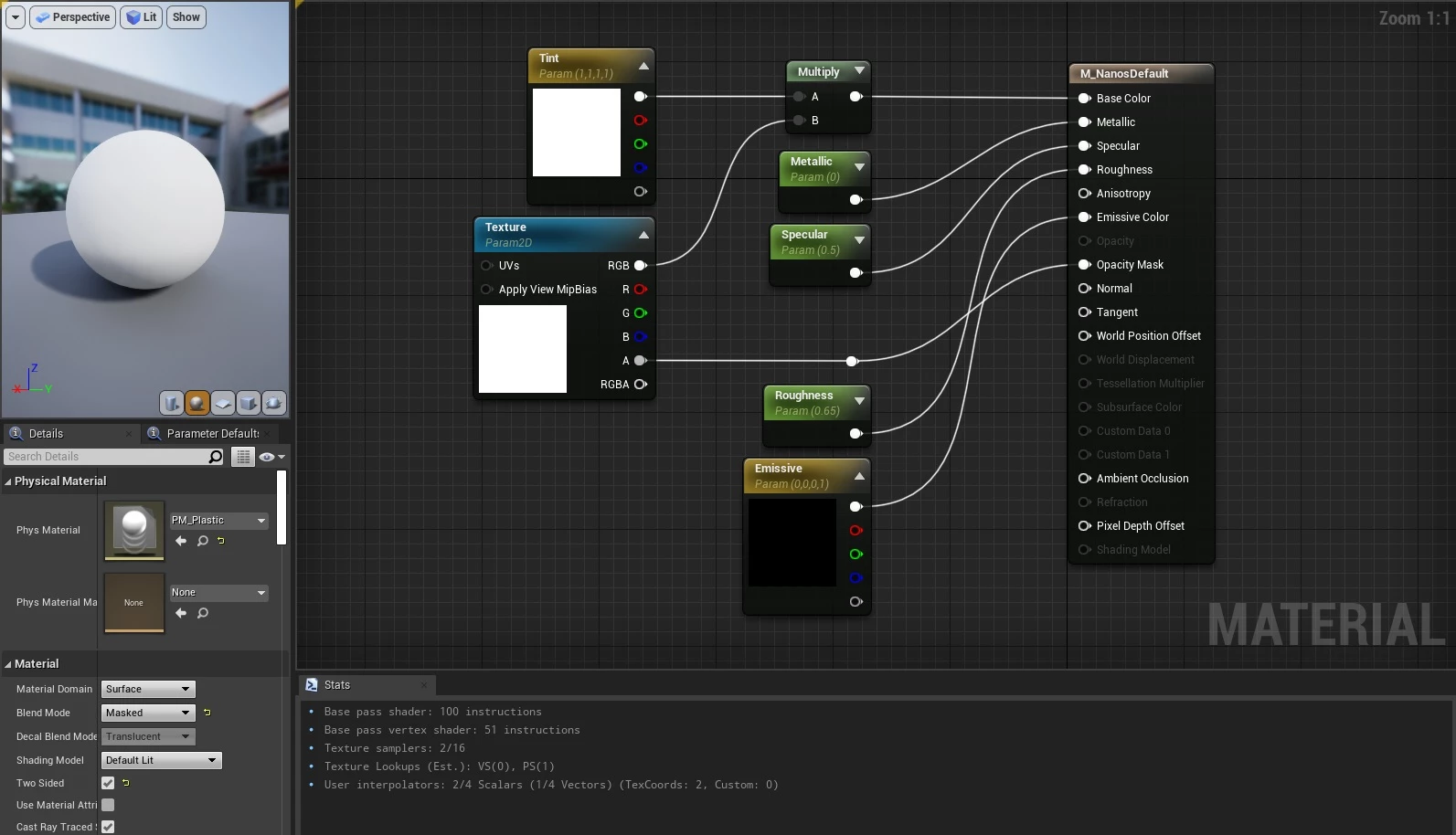
For more information regarding Material Types and Blend Modes, please refer to Unreal Docs.
Parameters Supported by Default Materials
| Type | Parameter | Default Value | Beschreibung |
|---|---|---|---|
| Color | Tint | Color.WHITE | Affects Base Color input. Tint multiplies with Texture parameter to generate the final color |
| Texture | Texture | White Texture | Image which multiplies with Tint to generate the final color |
| Texture | Normal | UP Normal Map Vector(0.5, 0.5, 1) | Image which affects how Light reflects on the object |
| Color | Emissive | Color.BLACK | Affects Emissive input, high values will cause bloom effect |
| Scalar | Metallic | 0 | Affects Metallic input - goes from 0 to 1 |
| Scalar | Specular | 0.5 | Affects Specular input - goes from 0 to 1 |
| Scalar | Roughness | 0.65 | Affects Roughness input - goes from 0 to 1 |
| Scalar | Opacity | 0 | Affects Opacity and Opacity Mask inputs - goes from 0 to 1 Opacity multiplies with Texture Alpha Channel to generate the final opacity |
For more information regarding how each Parameter affects the final visual, please take a look at Unreal Physically Based Materials and Material Inputs docs page.
M_Default_Masked_Lit
Masked and Lit Material.
M_Default_Masked_Lit_WorldAligned
Masked and Lit Material, with WorldAlignedTexture node, scaled with TextureSize scalar parameter.
M_Default_Opaque_Lit_Triplanar
Opaque and Lit Material which projects Texture and Normal from the three axes of the object itself, so it fits any mesh regardless of its UVs. Unlike M_Default_Masked_Lit_WorldAligned, the texture sticks to the object when it moves or rotates, and keeps the same size when the object is scaled. Besides the default parameters (no Opacity), it provides:
| Type | Parameter | Default Value | Beschreibung |
|---|---|---|---|
| Scalar | TextureSize | 100 | Size of one texture tile, in centimeters |
| Scalar | TextureAspect | 1 | Height of a tile divided by its width, for non square textures |
| Scalar | BlendSharpness | 8 | How sharp the transition between two projections is |
| Scalar | NormalStrength | 1 | Multiplies the Normal intensity |
All the Surface Materials are made from it.
M_Default_Masked_Unlit
Masked and Unlit Material.
M_Default_Translucent_Lit
Translucent and Lit Material.
M_Default_Translucent_Lit_Depth
Translucent, Lit with Disable Depth Test enabled. Is the same as Translucent but will be always visible in the screen, even behind walls or other objects.
M_Default_Translucent_Lit_Decal
Translucent, Lit with Deferred Decal Material Domain, to be used in Decal.
M_Default_Translucent_Unlit
Translucent and Unlit Material.
M_Default_Translucent_Unlit_Depth
Translucent, Unlit with Disable Depth Test enabled. Is the same as Translucent but will be always visible in the screen, even behind walls or other objects.
Surface Materials
Ready to use surfaces (wood, brick, concrete, metals...) made from M_Default_Opaque_Lit_Triplanar, so they look right on any mesh. Each one also carries a fitting Physical Material, so footsteps and impacts sound like the surface. You can still tweak them with the parameters above, e.g. SetMaterialColorParameter("Tint", Color.RED) to tint a wood.
my_prop:SetMaterial("nanos-world::MI_Surface_WoodPlanks")
| Material |
|---|
MI_Surface_WoodPlanks |
MI_Surface_WoodFloor |
MI_Surface_WoodDark |
MI_Surface_WoodSiding |
MI_Surface_Brick |
MI_Surface_Concrete |
MI_Surface_ConcreteTiles |
MI_Surface_Stone |
MI_Surface_Marble |
MI_Surface_Gravel |
MI_Surface_Dirt |
MI_Surface_RoofTiles |
MI_Surface_MetalPainted |
MI_Surface_MetalDark |
MI_Surface_MetalCorrugated |
MI_Surface_Wallpaper |
MI_Surface_Plastic |
MI_Surface_Rubber |
MI_Surface_Chrome |
MI_Surface_Gold |
MI_Surface_Copper |
MI_Surface_Neon |
Special Utils Materials
M_Noise
Opaque, Lit with a Noise node to produce a noise effect. Also provides Speed (Vector) and Scale (Scalar) parameters.
M_Wireframe
Translucent, Lit with Wireframe enabled, meaning it renders objects as Wireframe.
Note: All those Materials in this page are already included in the base game in the Default nanos world Asset Pack, you can reference them like that: nanos-world::M_Default_Masked_Lit.
Materials Summary
| Domain | Blend Mode | Shading Model | |
|---|---|---|---|
| M_Default_Masked_Lit | Surface | Masked | Default Lit |
| M_Default_Masked_Lit_WorldAligned | Surface | Masked | Default Lit |
| M_Default_Opaque_Lit_Triplanar | Surface | Opaque | Default Lit |
| M_Default_Masked_Unlit | Surface | Masked | Unlit |
| M_Default_Translucent_Lit | Surface | Translucent | Default Lit |
| M_Default_Translucent_Lit_Depth | Surface | Translucent | Default Lit |
| M_Default_Translucent_Lit_Decal | Deferred Decal | Translucent | Default Lit |
| M_Default_Translucent_Unlit | Surface | Translucent | Unlit |
| M_Default_Translucent_Unlit_Depth | Surface | Translucent | Unlit |
| M_Noise | Surface | Opaque | Default Lit |
| M_Wireframe | Surface | Translucent | Default Lit |
Opaque are the most efficient ones but doesn't support Opacity or Opacity Mask.
Masked are the most common ones and supports Opacity Mask only. It means the Opacity parameter accepts only 0 or 1.
Translucent are the heavier ones to render, and cause a lot of overdraw (and performance issues) if used incorrectly. It supports Opacity but does not support Normal, Metallic, Specular and Roughness inputs by default for optimization reasons.
Supported Common Parameters in each Material
| Material Name | Tint | Texture | Normal | Emissive | Metallic | Specular | Roughness | Opacity | VTiling | UTiling | TextureSize |
|---|---|---|---|---|---|---|---|---|---|---|---|
| M_Default_Masked_Lit | wahr | wahr | wahr | wahr | wahr | wahr | wahr | true* | wahr | wahr | false |
| M_Default_Masked_Lit_WorldAligned | wahr | wahr | wahr | wahr | wahr | wahr | wahr | true* | wahr | wahr | wahr |
| M_Default_Opaque_Lit_Triplanar | wahr | wahr | wahr | wahr | wahr | wahr | wahr | false | false | false | wahr |
| M_Default_Masked_Unlit | false | wahr | false | wahr | false | false | false | true* | wahr | wahr | false |
| M_Default_Translucent_Lit | wahr | wahr | false | wahr | false | false | false | wahr | false | false | false |
| M_Default_Translucent_Lit_Depth | wahr | wahr | false | wahr | false | false | false | wahr | false | false | false |
| M_Default_Translucent_Lit_Decal | wahr | wahr | wahr | wahr | wahr | wahr | wahr | wahr | false | false | false |
| M_Default_Translucent_Unlit | false | wahr | false | false | false | false | false | wahr | false | false | false |
| M_Default_Translucent_Unlit_Depth | false | wahr | false | false | false | false | false | wahr | false | false | false |
| M_Noise | false | false | false | wahr | wahr | wahr | wahr | false | false | false | false |
| M_Wireframe | wahr | false | false | wahr | false | false | false | wahr | false | false | false |
*Masked Material's Opacity supports only Opacity Mask:
0or1
Physical Materials
Physical Materials are materials which define Physical properties of an object. With Paintable.SetPhysicalMaterial() you can change the default physical material of an Entity.
Besides the Physical Properties of an object (friction, restitution, density, etc), Physical Materials are used in nanos world for applying special effects and sounds when events happen. For example on Footsteps Effects, Bullets Impacts or Objects Hits.
nanos world provides a list of the built-in Physical Materials which you can use to override in-game the Physical properties of an Entity.
You also can create your own Physical Materials and use them in-game! Just remember to configure in them the proper SurfaceType for a better integration!
| Friction | Restitution | Density | Surface Type | |
|---|---|---|---|---|
| PM_Concrete | 0.9 | 0.3 | 2.0 | SurfaceType.Concrete |
| PM_Flesh | 0.7 | 0.3 | 1.0 | SurfaceType.Flesh |
| PM_Glass | 0.2 | 0.2 | 2.0 | SurfaceType.Glass |
| PM_Grass | 0.7 | 0.3 | 1.0 | SurfaceType.Grass |
| PM_Gravel | 0.7 | 0.3 | 1.0 | SurfaceType.Gravel |
| PM_Ground | 0.7 | 0.3 | 1.0 | SurfaceType.Ground |
| PM_Metal | 0.6 | 0.1 | 1.0 | SurfaceType.MetalHeavy |
| PM_MetalLight | 0.6 | 0.2 | 1.0 | SurfaceType.MetalLight |
| PM_Mud | 0.7 | 0.3 | 1.0 | SurfaceType.Mud |
| PM_Plastic | 0.7 | 0.7 | 1.0 | SurfaceType.Plastic |
| PM_Rock | 0.9 | 0.3 | 1.0 | SurfaceType.Rock |
| PM_Rubber | 0.7 | 1.0 | 1.0 | SurfaceType.Rubber |
| PM_RubberBouncy | 0.05 | 0.9 | 1.0 | SurfaceType.Rubber |
| PM_Sand | 0.6 | 0.3 | 1.0 | SurfaceType.Sand |
| PM_Water | 0.7 | 0.3 | 1.0 | SurfaceType.Water |
| PM_Wood | 0.7 | 0.3 | 0.5 | SurfaceType.WoodLight |
| PM_WoodHeavy | 0.7 | 0.3 | 0.5 | SurfaceType.WoodHeavy |