Jun: Attachments Rework, Scripting Safety & QoL!

New Profile Screen info & Biography, reworked Skeletal Mesh Attachments, new Weapon BulletHit event, Package sandboxing, Capsule rework and much more!
Welcome to our roundup of the latest updates from the last month!
Profile Screen Enhancements
We added a new Biography field to the profile, allowing you to write a short description about yourself. This is a great way to let others know more about you, your interests, or your creations in the community.
Also, we added much more information to the profile screen, including a user's Last Seen, Join Date, Country and their Teams icons in the sidebar!
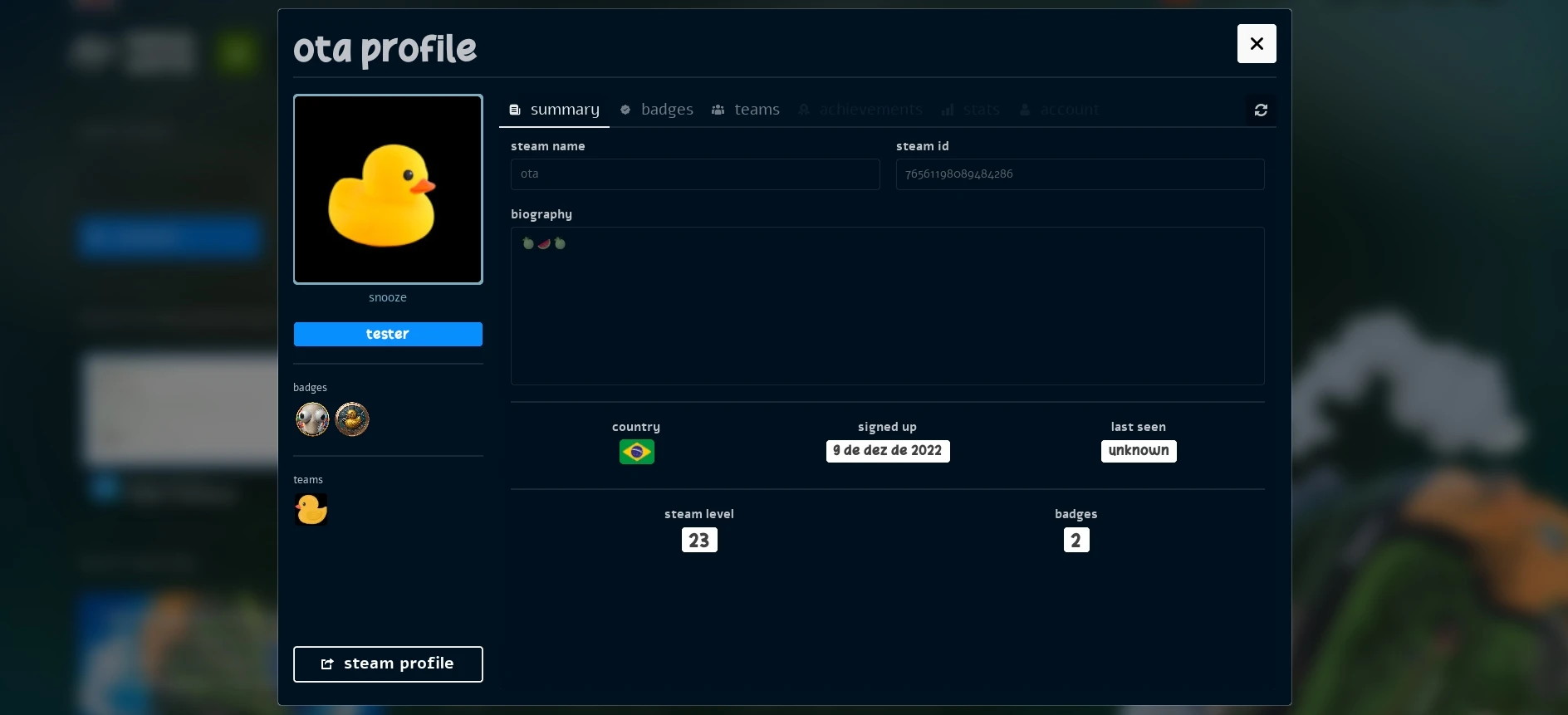
We are still working on expanding the profile screen with more information and privacy settings to customize what others see.
You can edit your own Biography directly from the manage tab, so go ahead and tell the community a bit about yourself!
Vault Improvements
New Report Buttons
We added new Report buttons for both Vault resources and Reviews, allowing you to report any inappropriate content or behavior directly to the moderation team.

We will gradually be adding more report buttons to other areas of the game, so you can help us keep the community safe!
Review Improvements
We also now display the user avatars in the Vault reviews tab.

If you play any game-mode or use a resource from Vault, don't forget to leave a review and let the community know what you think!

Danger Zone
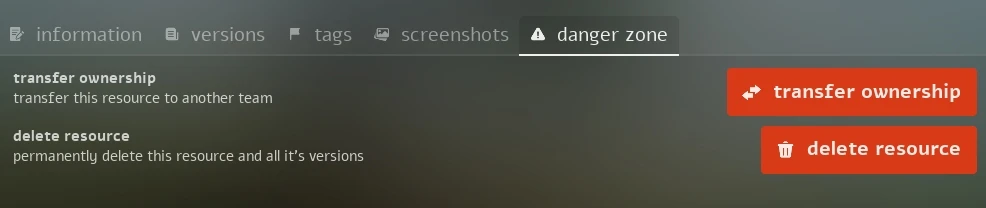
We have moved some buttons to a new Danger Zone section in the Vault Resource Manage tab, to make it more clear that these actions are irreversible and should be used with caution:
DLSS Frame Generation Options
We added back options to select the DLSS Frame Generation mode (auto, dynamic, 2x, 3x, 4x, etc, if supported), using the new DLSS 4.5 options.

Scripting Improvements
We've got a lot of new scripting features and improvements this month!
Reworked Skeletal Mesh Attachments
We reworked all AddSkeletalMeshAttached() methods, adding 4 new parameters that let you attach meshes to specific sockets, with a custom relative transform, and even with custom animations, allowing much more flexibility and even making it possible to use custom runtime retargeters!
Since the new format is a breaking change, we added a new Compatibility Version 1.144. See the Compatibility Version 1.144 page for more information about this change.
Files Sandboxing
We changed how the File class can access files, adding a whitelist of allowed extensions. Trying to access any file with an extension outside the allowed list will throw an error.
This was added to prevent malicious scripts from accessing and modifying sensitive files on the server, and to make it easier to sandbox scripts in general.
You can see all the allowed extensions in the File page:
File Classscripting-reference/classes/fileSafely Loading Lua Script
Since some packages may have been relying on loading .lua files at runtime with the File class, we added a new method Package.LoadFile() that loads .lua files in a sandboxed way, compiling and returning a function you can execute with your own custom env table:
local loader_func = Package.LoadFile("Server/MyScript.lua")

-- Define what the script can access by providing a custom env table
local my_env = {
	Console = Console,
	math = math,
}

-- Execute the script with the custom env
loader_func(my_env)
This way you can load and execute scripts in a sandboxed environment, preventing them from accessing any function or data from the server you don't want them to have access.
Client File Live Reloading
We added a new method Package.ReloadClientFile() that reloads, caches and sends the updated file to players, triggering a FileReload event on them.
You can use this method to build your own live-reloading system for client files, or to update a file on the fly without having to restart the whole package. For that, just subscribe to the event to reload the file with Package.Require(file_path, true) for example.
New Player.GetBySteamID
Added a new method Player.GetBySteamID() for getting a Player instance by their SteamID, this is much faster than iterating through all players and comparing their SteamID.
Customizable Distance Optimization per Entity
Recently we introduced the distance_optimization server-side setting, which works by reducing the update frequency of entities that are far away from the player, to improve performance and reduce network usage.
To give a better flexibility to this system, we added new methods Player:SetDistanceOptimizationMultiplier() and Actor:SetDistanceOptimizationMultiplier() that lets you customize the distance optimization multiplier for each entity, allowing you to have more control over how entities are optimized based on their importance or size.
You can make a specific Player to receive updates more frequently, or make a specific Actor to be updated less frequently than others, for example.
New Streaming Pause Events
We are adding new StreamLevelBeginPause and StreamLevelEndPause events, which are triggered when the streaming system pauses and resumes the level streaming process.
We also removed the native Unreal's ... throbber loading UI that was displayed and hiding all UI/WebUI when the streaming system started loading a stream level.
With that, you can implement your own loading screen logic when a Stream Level Pause happens.
New Mesh Settings
We added a new method Pawn:SetMeshSettings() for configuring the Character's main Skeletal Mesh attachment settings and visibility.
You can now change it's relative location/rotation or even hide it to be able to attach a different Skeletal Mesh with your custom runtime retargeter Animation Blueprint with the new :AddSkeletalMeshAttached()!
Also by default, if you don't override the values with this new method, the main Skeletal Mesh offset is now automatically calculated based on the mesh size.
Improved Capsule Settings
Now all Characters automatically calculate the Capsule size based on the Skeletal Mesh bounds size. But you can override it with the Pawn:SetCapsuleSize() method.
This method now also accept a crouched_half_height parameter, letting you customize the capsule size while crouching.
The adjust_capsule_size parameter on CharacterSimple:SetMesh() is now deprecated, you should use the method Pawn:SetCapsuleSize() instead.
Damage Multiplier Return
You can now return a number from the TakeDamage event, which works as a multiplier applied to the final damage, allowing you to implement your logic over the existing damage being applied.
For example, you can reduce the damage by half if the character is wearing some equipment of has some special status:
Character.Subscribe("TakeDamage", function(character, damage, bone, type, from_direction, instigator, causer)
	-- Half of damage if wearing armor
	if (character:GetValue("HasArmor")) then
		return 0.5
	end
end)
The multiplier is cumulative with all other events returns, so if you have multiple scripts subscribing to the TakeDamage event, the final damage will be multiplied by all the returned multipliers.
New Weapon BulletHit Event
We finally added the most (supposedly) upvoted feature request client side event BulletHit, which is triggered when you shoot with a Weapon and a bullet hits something.
Keyboard Layout Getter
We added a new method Input.GetKeyboardLayout() for getting the current player's keyboard layout, which is great for building default Inputs specifically for QWERTY, AZERTY, or other keyboard layouts.
For example, you can register Q for a QWERTY layout or A for an AZERTY layout:
if (Input.GetKeyboardLayout() == KeyboardLayout.AZERTY) then
	Input.Register("MyAction", "A")
else
	Input.Register("MyAction", "Q")
end
Timer Remaining Time Setter
Added a new method Timer.SetRemainingTime() that lets you set the remaining time of an existing Timer timeout, allowing you to extend or reduce the time left for a timer.
Other Improvements
Performance & Networking
We improved the efficiency of our snapshots sync implementation, and made several improvements to our internal memory allocations.
Also we reworked the implementation of :SetDimension(), making it much more efficient for both performance and networking usage. Let us know if you notice any issues with this change, as it was a big rework internally.
Prone Disabled
We took the decision to disable the Character Prone feature. It was an unfinished, rough-looking mechanic that was requiring a lot of maintenance and making the codebase way more complex.
Updated Deps
- Enabled the WaterAdvanced Plugin.
- Updated CEF to v149.
- Updated HTTP library.
Docs
Updated Essential Concepts
We've updated our Essential Concepts page to include a lot of new information on how nanos world works, and how to get started with scripting, even if you come from other games, to get used to our concepts and terminology. We also added a lot of new snippets and examples to get used to our API!
Check it out:
Essential Conceptsgetting-started/essential-conceptsGeneral Improvements
We did several improvements and some refactors in the Docs source code:
- Converted all files to
.mdxformat, to be standardized and be able to use advanced JSX features. - Added explicit anchors 'english' names to all headings, fixing localized/translated pages not being able to link to them properly.
- Simplified all
<MethodReference>and<EventReference>components, making them easier to use. - We now show if a method/event was recently modified from a Compatibility Version on it's description.
Conclusion
June was a month full of scripting improvements and quality of life changes, we are gradually improving certain areas to prepare the terrain for next updates we have already planned!
One of our main goals is to bring the community closer together, and we are working on several features to make it easier to find and connect with other players, and to make the game more accessible to everyone.
I hope you enjoy all the new features and improvements! I'm always looking for feedback, so if you have any suggestions or ideas, please let us know in our Discord or Feedback Hub.
A special thanks also goes to everyone contributing translations through Crowdin, helping make the game and the docs more accessible to players around the world, and to those supporting development through Ko-fi!
Your support is what allows me to continue working on nanos world full-time and keep pushing the project forward. 💙
See you in the next update! 🚀